MyWi 4.0 : Create a Wireless Hotspot on Your iPad [How To]

MyWi .jpg

The MyWi app by Intelliborn has been one of the biggest reasons to jailbreak an iOS based device. With the latest 4.0 release, creating a wireless hotspot has never been easier. For a one-time fee of $19.99 you can turn your stingy 3G iPad into a wireless hotspot capable of sharing your 3G connection with as many devices as you wish. I’ll show you how after the break.

This how-to assumes three things:

1-You have a 3G iPad that has an active cellular data plan (You can use MyWi on an WIFI-only iPad but the only benefit would be if you get free WIFI only on your iPad and wanted to share that connection.)

2- You have a jailbroken iPad. You can read on how to jailbreak your iPad using my tutorial.

3- You have installed the Rock app from Cydia. If you haven’t, just search Rock in Cydia and download it.

First things first. MyWi is a $19.99 app ($9.99 for previous MyWi 3.x users) but there is a FREE 10-day trial. This is perfect for those of you who are hesitant in buying an app that you may not like or need. The trial version provides you with the full version of the app with all features available.

Here’s the process:

A- Download the MyWi 4.0 app from Rock. This app is not available through Cydia. Follow the prompts given by the Rock app for proper installation.

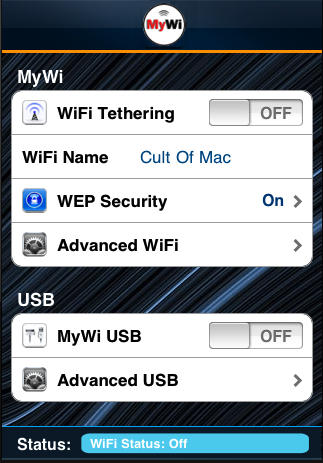
B- Once you are all installed, open the MyWi 4.0 app. You will get a prompt telling you this is a trial version. The image shown below assumes you already paid for the app.

DON'T MISS

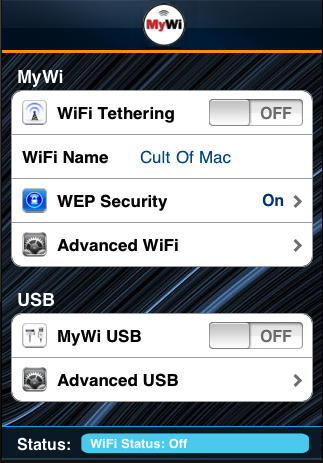
As shown below, you have the option to set WEP security. I HIGHLY ENCOURAGE YOU TO MAKE YOUR HOTSPOT A SECURED HOTSPOT USING WEP. You don’t want any freeloaders sucking your 3G bandwidth away. There are also options to tether your iPad using USB and even BlueTooth. For the sake of this tutorial, we’ll assume you just want to create a hotspot.
MyWi 4.0 : Create a Wireless Hotspot on Your iPad [How To]

C- Set your WEP password (or not) and hit the toggle next to WiFi Tethering. The status bar on the bottom of the app will give you indications on when your hotspot is activated. That’s it.
MyWi 4.0 : Create a Wireless Hotspot on Your iPad [How To]

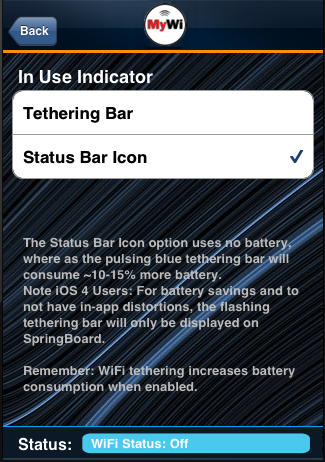
As shown above, you can tell MyWi whether or not you want a tethering bar (pulsing blue bar that resides under the status bar on your springboard indicating tethering is on) or a simple icon in the status bar for MyWi. The status bar icon is a new feature to 4.0 and one that takes no power away.

It really is that simple to make your already powerful 3G iPad into a mobile wireless hotspot. Who needs Froyo!!!
MyWi 4.0 : Create a Wireless Hotspot on Your iPad [How To]

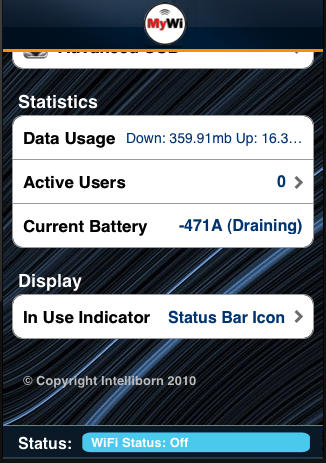
For those of you concerned with how much power this takes from your iPad, I can neither confirm nor deny that when you use this app for 9+ hours a day, your battery (starting at 100%) will likely only die down to about 70% or so. Seriously. MyWi will also let you monitor how many users are using your connection and how your battery is holding up  (shown above).

About the author

jagphotog

Jose Gutierrez is a San Diego-based Sailor who loves technology, specifically anything Apple. When he's not jailbreaking a device, you can find him blogging at Mac Mobility. Follow Jose on Twitter.

(sorry, you need Javascript to see this e-mail address)| Read more posts by .

Posted in How-To, iOS, iPad, iPad apps, Jailbreak, News | Tagged: , , , |

  • iPodTouchPro

    20 dollars for tethering???? Absolutely NOT!!!!!!

  • http://www.sabatini.tv James Ramsay

    Man, you got it the wrong way round. You don’t use mywi to turn your pad into a hotspot. You use it to turn your iPhone into a hotspot that feeds your (cheaper) wifi-only iPad. Just how many 3G sims and monthly data plans does a person need? Go figure — you’re always carrying your phone with you, and you aren’t about to jack in you phone sim or data plan. So, like me, you buy and install mywi on your jailbroken phone. You use the better wifi speed on yourwifi pad for general activity, and those times you are screwed for a hotspot you then use the mywi phone hotspot. So your pad can always be connected when you need it. And no need to jailbreak the pad for this…

  • Omer B

    James R has it spot on. Makes more sense to do it to your phone.

  • Romeo

    Sure, it’s better suited for the iPhone and that makes even the somewhat expensive $20 price seems reasonable because it’s less than the $130 extra you pay for the 3G version of the iPad… also you already pay for your phone data plan it is just fair to be able to share it with your iPad or laptop when you need it

  • http://www.jagphotog.com Jose Gutierrez

    Believe it or not, not every 3G iPad owner has an iPhone.

  • Vink

    If you already have an iPhone and have to pay that monthly fee, sure, you go that way. But for those of us who just have the iPad and pay only 29 per month, this is awesome and much cheaper. Kids can have Internet access in the car!

  • Michael Kleinpaste

    $20 to for a portable wifi hotspot app, or $120.00/year and a 2GB maximum (additional GB incur fees) to tether natively through the iOS OR $360.00/year for direct iPad 3G access plus the $130.00 higher 3G iPad price.

    I’ll happily pay the $20.00 thank to not take it in the @$$ by AT&T.

  • Spacekatgal

    Am I just missing it? I don’t see the Rock app in the Cydia store anymore. Help is appreciated.

  • JoeBob

    @Jose G — true, but I’d bet that a whole lot of iPhone owners have an iPad.

  • almost-buying-ipad

    Quick questions people. Please advise as I have an iphone 3GS (definitely buying iphone 4) and thinking of getting an ipad.

    1) which is a better option – jailbreak iphone or ipad?
    2) is ipad worth buying now? or should wait for next ipad which I have a feeling they gonna launch next year…
    3) I have a macbook but when I sync my iphone, my calendar in iphone is not updated in my mac book. It used to sync but not anymore. How to make the sync? iphone > mac book (not mac book to iphone)
    4) How to do a full back up on my iphone bcos I ever experience a total WIPE OUT on my contact list!!!

    Please advise. Thank you!

  • Mikey

    $20 fee per person ? Why does intelliborn need that much money from the jailbreak community ? Are they going corporate?

  • Scotty

    Who cares about an ipad? If you want internet use a computer… the iphone is an ipad lol … it just makes phone calls and fits in your pocket

  • Sam

    Question?? So if you use the wi-fi for a computer does it still use your data plan from your phone? Unfortunately I already switched to the 2g with tether and I’m just trying to figure out if its the same thing. I don’t know why they have to make things more complicated than they are……..oh yea, more money for the big boys I guess!

    Thanks

  • http://www.facebook.com/stuart.h.anderson Stuart Heath Anderson

    And if you have an itouch?  your screwed  :(

  • Anonymous

    The greatest one post about MyWi man… i think it is the best in world
     http://www.iphoneleaks.net/2011/09/download-mywi-5-0-5-01-9-v5-01-9/

  • Blackie Nightmare

    Why cant it Connect To My Android devices?

