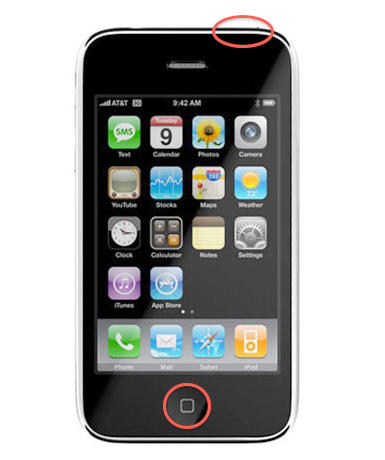
Speed Up iPhone 3G + iOS4 with a Hard Reset?

Speed Up iPhone 3G + iOS4 with a Hard Reset?

I’m an iPhone 3G owner, and am pleased that my “nearly obsolete” two year old iDevice qualifies for the iOS4 upgrade.  I understand (and am satisfied with) the trade-offs Apple made to minimize the performance hit on this model, but as others have reported I’ve noticed a distinct slowdown in my iPhone since upgrading.  Apps take longer to load, Mail messages open slower, the whole system just feels more sluggish.

A comment posted to MacInTouch suggests that a double Hard Reset of the phone may help minimize this problem, and indeed this has noticeably seemed to help with mine.

To perform a Hard Reset, press and hold the Home and Sleep/Wake buttons on your iPhone simultaneously for 5 to 10 seconds.  After a few seconds the Slide to Power Off notice will appear, ignore this and keep holding down both buttons.  In another few seconds the device should abruptly turn off, followed by the Apple logo and a reboot. Now release the buttons.

If your iPhone remains powered off, wait about 15 seconds then boot the phone by pressing the Sleep/Wake button.

The tip mentions that it may be necessary to perform the Hard Reset twice to get the desired effect.  I tried this on my iPhone 3G. I performed one reset and it rebooted immediately.  Before repeating I checked to see if I could notice any difference: maybe, not much, kinda hard to say.

I then did a second Hard Reset and this time my phone stayed off.  Rebooted again, and was happy to find that yes, my iPhone does seem to be peppier – or rather, back to it’s normal pokey nature instead of incredibly sluggish.  Apps load faster, Mail messages open quicker – yay!

A bit of Googling yields little information as to what exactly gets reset during this operation.  What I found just notes that the iPhone is a computer like any other, and a hard reset typically clears all RAM buffers, caches, etc.  That can indeed help with performance.

Worth a shot.  If this helps – or doesn’t – with your iPhone, let us know in the comments.

Thanks to MacInTouch reader Ron L. for this potentially very useful tip.

DON'T MISS

UPDATE JUL 2010 - Based on user feedback the Double Hard Reset (“DHR”) does appear to help a large number of 3G owners.  For more tips see our followup post iPhone 3G Performance Suffering with iOS4.

UPDATE SEP 2010 - iOS 4.1 has resolved the worst problems with iPhone 3G performance under iOS4 and is recommended for all iPhones running iOS 4.0.x.

About the author

oakbogAdam Rosen is an IT consultant specializing in Apple Macintosh systems new and old. He lives in Boston with two cats and too many possessions. In addition to membership in the Cult of Mac, Adam has written for Low End Mac and is curator of the Vintage Mac Museum. He also enjoys a good glass of Pinot Noir.

(sorry, you need Javascript to see this e-mail address)| Read more posts by .

Posted in iOS, iPhone 3G, News, Top stories |

  • Jim

    I have the iPOD touch 32 GB 3rd generation unit. It just got updated with the 4.0 OS and all of the sudden the integration with car menu system has slowed down by about 200%. I have 204 Albums on the unit and it was taking approximately 15 -30 seconds to load. Now it takes 2 minutes. I will try the hard reset and wallpaper disable and report back if it works. This is a very helpful post!

  • Tim Morley

    Just to add to the “me too” theme, I’ve been cursing my iPhone’s sluggishness for the last few weeks since I upgraded — I would never have bought a phone that was so slow to respond to input.

    However, the double reset method above has given a decent improvement. Still not sure it’s *quite* as fast as it was before, but it’s certainly a vast improvement.

    PS Not actually sure whether it needed two resets or whether the problem was solved after the first, but the second didn’t do any harm, and I’m happy with the result.

  • dave

    Hi,

    It works unless you haven’t jailbroken your iphone 3g using redsn0w with an enabled option “enable multitasking”. iPhone 3G isn’t recommended to run iOS4.0 with multi-tasking option. although after 2 hard-resets, you’ll still feel the pain.

    Dave

  • Nicole

    I have heard many a good response after performing the Double Hard Reset however, I am currently using an iPhone 3G on T-Mobile (it is unlocked,) and I was just curious if performing these “magical” resets is going to re-lock up my iPhone to AT&T.
    Thanks in advance for the advice!

  • Br

    Worked for me. Not Like a 3gs or 4, but it solved some of my speed issues. Thanks.

  • emy

    I have the 3gs and updated to os 4 with loads of problems. Sending sms are so slow and I am not receiving calls when my phone is even switcheded on. All my contacts are gone.
    I’ve restored the phone to factory settings and restored it as a new device but i want to know when doing this does should it go back to it’s original os setting of 3xxx. I still have os 4.0.1. after the restore. Is this right? I don’t want it.
    Apple fix the os4xx. 3gs was so much better on previous os 3 software.
    Thanks
    Emy.

  • Dathoover

    I’m going to double reset my iPhone 3G every hour until I can save up enough money to buy the iPhone 4 with the bad reception.

  • Paulo

    Worked for me to! Apps don’t crash anymore, open much faster, the ipod still opens slowly, though.

    Thanks for the tip

  • http://pcprofessor.com Steve

    Worked for me too! It DOES take a 2nd reboot. I also have verbose boot up (via jailbreak) and I can confirm that the 2nd time -not the 1st- it did do a diagnostic on my “hard drive”, and sure enough, it found (and fixed) a ton of problems. My phone, without a doubt, is much faster than before.

    ADDITIONAL TIP:

    Turn OFF spotlight on things you don’t need searched! (To do this, open Settings then General/Home Button/Spotlight Search – and uncheck what you don’t want–Keep in mind that Mail and Messages have their own search built in (you need to pull the screen down to see it), so you do not need them included in spotlight.

  • warren

    yes it works !
    thank you

  • pollar

    it work but after 2 hard reset activiti i notice that there is small improvement in speed nothing special.My 3G run smooth it’s ok but there in no speed like in OS_3.1.2 my previous OS. Now my battery drain like a niagara falls!!!
    OK i have to downgrade back to 3.1.2 is there a easiest way….redsnow or something else similar?????
    1.Once a time i was jailbreak with redsnow installing multitasking and wall pp can i do this again but without all these functions???
    IF i clean all ios4.0.2 with pressing the button clear all data and settings can i install the fresh copy of 3.1.2 via iTunes without pain and then jailbreak it again with redsnow or blackrain?????
    Thank you to all of you and please for your answer i need IT!!!!!!

  • http://www.hotmail.com joseph hn

    the true is the 3g iphone does not support multitasking option so, we need to disable it, there’s an app on cydia that disable multitaskind and wallpaper also the batery percentage make the iphone 3g usin ios4 work slow too.

    i already do on my 3g iphone and it work perfect.

    joseph hn

  • Jessica

    My iPod touch has been having lots of video issues. It was freezing up constantly. I did the double hard reset and it’s working great now! Thanks!

  • Calle

    Wow – i tried this and I am surprised but glad to say that it actually works!
    Weird.

  • kt

    It seems to help, thanks for advise!

  • Neuse

    It actually works. Opening a new SMS has gone from >10 secs to <2 secs.
    Still filthy on Apple for pushing this out to 3G users and ignoring the issue.
    Been a big fan in the past, but I'm not sure if my next phone will have an Apple logo on it now….

  • http://www.ladygagaws.com kelmen

    after upgrading to ios4 on my iphone 3g, my battery drains very fast, i thick its caused by background wallpaper or something else, i found that the status bar have no icon showing such as ringtone silent, missed call and new sms…, many cydia apps not compatible, crashed when launching, so i downgraded to firmware 3.1.2, now everything running good and smooth like before.

  • shah

    hi poller….
    you can downgrade 4.0.2 to 3.1.2 it complicated littlebit but possible..
    you must have shsh files stored in cydia… download 3.1.2 firmware save it to desktop .. connect ur iphoen via USB and open up itunes. then at the same time
    press Shift key on you Keyboard your computer keyboard and mouse left click on restore it will ask you to browse IPSW then you should select 3.1..2 that you downloaded and restore it thats it.. enjoy anyproblem letme know

  • http://vishu.net Vishu

    this isn’t a permanent fix, ram will get clogged again in a while and the 3G will return to it’s sluggish self, imo the only permanent fix is going back to 3.1.3 or well..buying the iphone 4 or even 3GS.

  • http://FUapple.com Ryan montelione

    I’ve gone from loving my phone to cursing it. They should at least have the decency to acknowledge the problem and offer a simple downgrade of firmware. Until I read it here I hadn’t realized it was possible, I’ve been wishing I could go back since I put the new ios4 on. Thanks for that at least……..

  • jay

    HEY i think i got it, i did everything people say here including triple reset with no luck, however i notice if you use gmail now you not only checking mail but also notes and calendar, i turned them off and left the mail option only and now my iphone it’s back to normal.
    not sure that would be the case for you, but it worked for me.
    Cheers
    Jay

  • http://www.atoztoa.com ATOzTOA

    It definitely made a difference.

    Thanks bro

  • Carl Devis

    Hello thank you so much…this trick actually worked for me i have 3g 16 gb upgraded to OS4.0 and it was slow like aghhh i was gona throw it out…but i did DHR(double hard reset) and it worked for me….thanks again u solve a big issue

  • lisa bryant

    thanks for the tip. i was so frustrated at the speed that i was actually trying to find out how to install the older ios on it when i found your blog. it took 2 resets for me but it is remarkably faster.

  • Jbishop261984

    a hard reset definately helps… apps open faster, and safari loads really fast…double hard reset works even better!!!

  • sleepyhead

    Ive been frustrated with the sluggishness of my iPhone 3gs (16Gb) for the last few months. I thought the sluggishness was due to the slowly increasing number of great apps I was loading/using. Perhaps it is indeed related more to iOS4. Im up to 4.3.3 and still frustrated (I had not noticed it getting better or worse with each upgrade since 4.1), hence my hunting and finding this suggestion.
    However the Hard Reset does seem to have improved things and I’m about to do #2, which Jbishop261984 confirmed was worth it. Will I lose any settings/data? Ah well, the joys of computing, 
    Thanks.

  • http://twitter.com/mike2pin Mike Toupin

    AWESOME!!! now i can stand my 3g until i get the 5!! THANKS!!

  • http://twitter.com/mike2pin Mike Toupin

    AWESOME!!! now i can stand my 3g until i get the 5!! THANKS!!

  • http://twitter.com/mike2pin Mike Toupin

    AWESOME!!! now i can stand my 3g until i get the 5!! THANKS!!

  • http://twitter.com/mike2pin Mike Toupin

    AWESOME!!! now i can stand my 3g until i get the 5!! THANKS!!

  • theONE

    your all stupid, hard reset does nothing, especially if you’ve jailbroken it, lack of ram means lack of ram no matter if you clear it via memory freeing apps or resetting or hard resetting it

    plus hard resetting takes ages for it to boot up and be useable, now picture hard resetting it ALOT just to make it faster. Totally not conventional or viable.

  • Biffmtannen

    Actually, you are the one that can’t spell “you’re” correctly…. So, who is stupid one?

  • Dpf

    Bought 2, iPhone 3GS about 9 months ago. About 3 months ago, one started dropping calls. I spoke to ATT & Apple. ATT did some things to “reset the phone to the tower”, so they say. Apple did nothing. The problem began getting worse. If I’m talking on the phone and get a text, the call will drop. Always shows 3 to 4 bars in signal. Called ATT 9 times since the problem started, called Apple 3 times, and ATT also did a 3 way conference call with Apple & me, twice.

    Apple swears it is a software problem with ATT sim card, so ATT replaced the sim card. Did not help. ATT swears it is a hardware problem. Long story short, I have been paying over 100.00 for the past 3 months, but can’t make calls longer than 20 seconds. Home button also started acting up. Sometimes you have to push it very hard several times to get any reaction. And you have to push it on the right hand side of the button or it will not work.

    Apple finally gave in, because the hardware warranty is still good, and said to take it to the local Apple store for replacement, because of the home button, not because it was dropping calls. Well, Apple store in Lafayette Louisiana does not handle iPhones….hmmm there’s a kick in the teeth. Apple tells me to go to THAT store, but that store is useless when it comes to phones.

    So, I bring the phone back home, and called ATT again. This time to cancel the account. I have been a ping pong ball between Apple & ATT long enough.

    Again, they do conference call with Apple, but now Apple wants 35.00 from me to send them the phone… why?? The phone only weighs a few ounces, I can FedEx overnight for about 15.00. I refused to pay anything. It’s under warranty, and they have been shinning me on for 3 months. I told ATT that I wanted to end the conference call with Apple and proceed with canceling the contract. ATT said I had to pay a penalty for canceling early. I told them to take me to court, I refuse to pay that also, simply because I have paid over 300.00 in the last 3 months for service that I didn’t get. The phone is a great iPod, but a terrible phone during the last 3 months.

    So, then ATT steps up, and offers me a free phone upgrade, 3 months early.  I was surprised, but interested. I refused their offer for another iPhone, simply because of Apple. I would never ever buy another iPhone. Not that they are all bad phones, but because support is non-exsistant, even with warrenty and Apple care. Apple has offered absolutely no support in the past 3 months. They have done nothing all the way through this nightmare, but blame ATT’s network, which is bull. I can use the other iPhone, make a call and talk for hours, hang up, call the same person with the bad phone, and the call drops within 20 seconds. I know it’s not the network. I did take ATT’s offer for the HTC 4 Inspire. My total out of pocket cost for this phone was 4.06.

    ATT waved all the fees and didn’t ask me for anything except 4.06 which was some kind of tax that they couldn’t get around.

    So, be careful spending money on Apple care…. because Apple, really doesn’t care!

