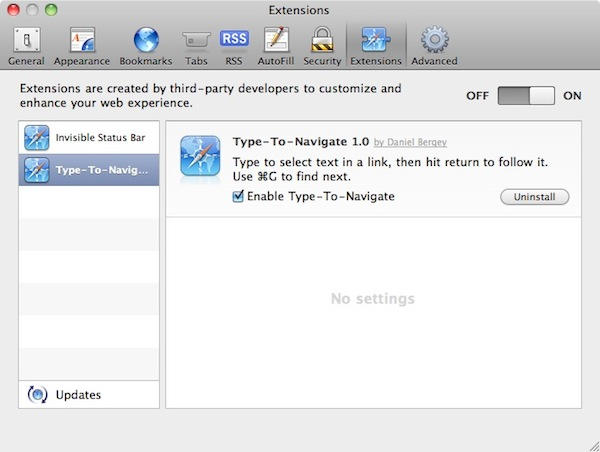
How To Start Using Extensions In Safari 5

Safari extensions preferences

Step 1: Open Safari 5’s preferences, and go to the Advanced tab.

Step 2: Click “Show Develop menu in menu bar”

Step 3: In the Develop menu, select “Enable Extensions”

Step 4: Go to Safari Extensions – which has emerged almost overnight as the blog for extensions news and links – and follow some links. Download some stuff.

Step 5: Needless to say, and as Safari will warn you: only install extensions from sources you trust. Let’s be careful out there.

DON'T MISS
How To Enable & Manage Extensions In Safari 5

Now, this is still technically a developer-only feature. That’s why it’s in the Developer menu. So, beware of bugs and oddness. So far, only one out of the three extensions I’ve installed has worked (Daniel Bergey’s Type-to-navigate), and the first time I restarted Safari after installing those three, it forgot about all of them and I had to re-download and re-install.

So if you want everything to be working perfectly, it’s probably best to wait until there’s a more official, non-developer means of installing extensions.

About the author

gilest

Giles Turnbull is a freelance writer in England. He writes for the Press Association and The Morning News. He has a website you can ignore and a Twitter account you needn't follow.

(sorry, you need Javascript to see this e-mail address)| Read more posts by .

Posted in 7, News, Software, Top stories |

  • Kranbollin

    Installed PageSaver and GoMBoX, and they both work. The former needs some work (better file naming) but could be very useful to me.

    Hoping someone writes an extension that disables the ‘resend form’ warning box that makes Safari such a pain to use for PubMed searches.

  • Michael

    I’ve installed GoMBoX and ported AdBlock. Only AdBlock is well. GoMBoX had crashed Safari till I deleted it manually. AdBlock is okay. Really blocks ads.

    P.S. Sorry for english…i’m from Russia. You won’t believe, but even here you can find people who love Apple…

  • Elmor Fudwel

    I have to admit that I haven’t followed the path mentioned above.

    I am hoping that someone has come out with a URL Snapback extension to replace the one that was previously in earlier versions of Safari.

  • Peter

    “Hoping someone writes an extension that disables the ‘resend form’ warning box that makes Safari such a pain to use for PubMed searches.”

    BIG second that, Kranbollin! I’ve been playing with the new version a little and seems great, but the problem you mention with PubMed makes Safari almost worthless for biomedical research.

  • http://www.facebook.com/joseph.cincotta Joseph Cincotta

    Step 3 does not work for me,
    “Step 3. In the Develop menu, select “Enable Extensions”

    Not an option at least on my new mac running Lion…. which offers only “enable Web GL”

