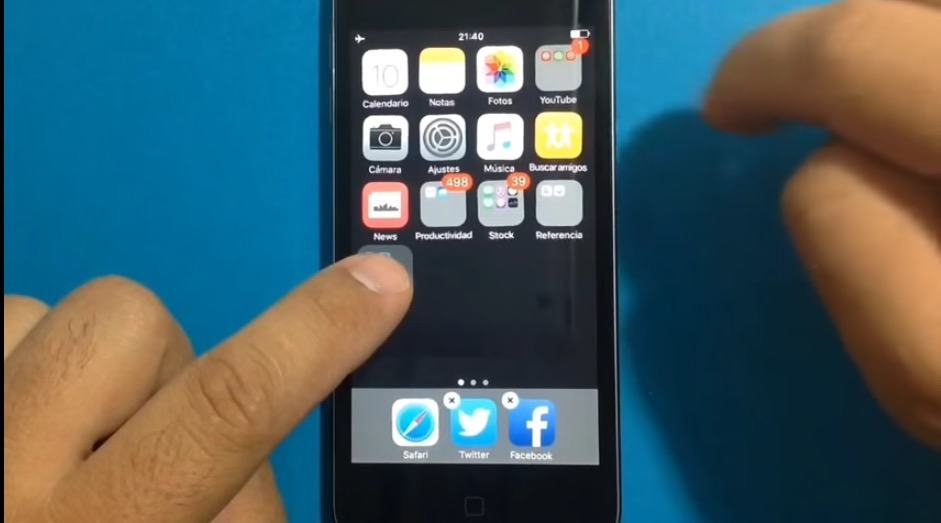
I’m not sure why iOS doesn’t officially support nested folders, despite the fact that people have been clamoring for them for years.
Needless to say, dropping a folder inside another folder is still a no-no in iOS 9.0.2 … unless you use this easy trick to nest your folders inside each other.
Here’s how easy it is to nest folders in iOS 9, as the above video shows:
- Put a folder on the top row of your iPhone or iPad screen.
- Tap and hold on the folder you want to nest. Don’t let go.
- Start continuously tapping on the folder you want to drag your nested folder to. This will take a few taps.
- Drag, drop and repeat.
If you like this tip, you might want to do it quick. Something tells me Apple, enemy to nested folders that it is, will close this vulnerability in iOS 9.1.
Via: Redmond Pie

John Brownlee is a writer for Fast Company, and a contributing writer here at CoM. He has also written for Wired, Playboy, Boing Boing, Popular Mechanics, VentureBeat, and Gizmodo. He lives in Boston with his wife and two parakeets. You can follow him here on Twitter.


9 responses to “How to nest folders in iOS 9”
If you restart your device, it comes back to normal.
oh no, seriously? I was just getting ready to do it. Glad I saw your comment
i can’t get it to work
It doesn’t even have to be the top row, there seems to be some really tiny trigger area that’s on the top-right-ish of the receiving folder. If you just tap in the center, it seems to never work. I just made it work on the 2nd and 3rd row (my last row) of folders :)
Glad to know, thanks
it works on 9.1 beta 2
We’ve been sble to do that since iOS 7 or 8. You just drag the app onto another and it creates a folder and just drag apps to the folder.
How stupid.
You can do it on iOS 8 too.