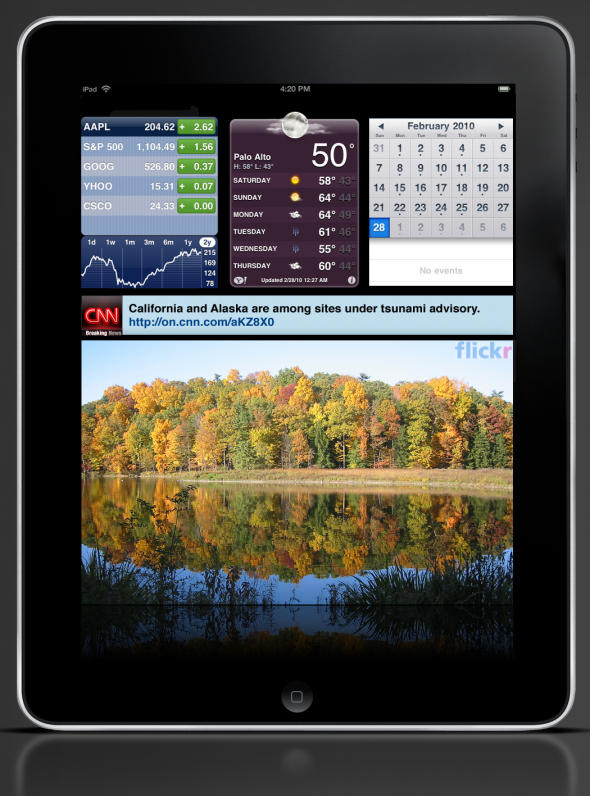
The iPad as a peripheral or secondary display

The iPad as a peripheral or secondary displayEven before Apple unveiled the iPad, I was curious if their tablet-device would be able to function as a small secondary display to desktop Macs. I’ve long liked the idea Mimo’s miniature displays: a ten-inch secondary display isn’t enough screen real estate to add to productivity, but they are great places to corral widgets, contact lists and the like. I would never buy one specifically for that functionality, though, which is what made the notion of the iPad doubling as one so appealing.

Unfortunately, it doesn’t look like the iPad will functionally work as a secondary desktop display out of the box, but David Klein over at The Apple Blog still thinks that the iPad could function as a peripheral, widget-based display through App Store offerings.

My perfect peripheral display app would come with a few basic widgets like a clock, calendar, stocks, weather, and access to photos on the iPad. The app could then offer upgrades (perhaps $2.99 each) for access to services like Flickr, Picasa, Twitter, Facebook, CNN (and other news sites), etc. The app could be free with the requirement that one of the widgets shows advertisements. A quick paid upgrade (perhaps $9.99) would remove the ads and offer a spot for another widget.

DON'T MISS
Is This How Apple Will Bring OS X’s Dashboard To iOS 5?

Klein’s vision of the iPad as a peripheral display is much different than mine — he wants an informative, intuitively laid-out widget dashboard, where as I want the iPad to be able to pair with a Mac and operate as a virtual display — but I don’t think these approaches are mutually exclusive. Klein’s is undeniably a more practical approach for an app developer to take, but I’m holding out hope that Apple itself will eventually allow the iPad to pair as a secondary display with a desktop Mac in some future update.

About the author

John BrownleeJohn Brownlee is news editor here at Cult of Mac, and has also written about a lot of things for a lot of different places, including Wired, Playboy, Boing Boing, Popular Mechanics, Gizmodo, Kotaku, Lifehacker, AMC, Geek and the Consumerist. He lives in Cambridge with his charming inamorata and a tiny budgerigar punningly christened after Nabokov's most famous pervert. You can follow him here on Twitter.

(sorry, you need Javascript to see this e-mail address)| Read more posts by .

Posted in iPad, News |

  • Tom Reynolds

    I’d guess that something similar to the VNC apps you can get for the iPhone would work similarly to what you want. Either way, if demand is there, I would imagine it to be a reasonably trivial app.

  • http://www.chillix.net Dave Hornsby (Chilli X)

    Hi John

    I commented on David’s original post that we’re obviously thinking along similar lines – check out our recent blog post and mock ups:

    http://bit.ly/6vJiaY

    http://bit.ly/aYQxtt

    We’ve started working on the real app now and I, for one, can’t wait to have my iPad sitting on my desk :)

  • Robin

    I would like to see that myself so I can keep TweetDeck and things like that which constantly send new notices over to one side so I’m now relying on 6 Spaces to see everything.

  • Alfred

    Written from a (possible) future:

    “When I’m using my copy of Pixelmator for iPad, I typically use two iPads. On one I have the main tools palette. On the other, the image displays. Optionally, I can have a third iPad, displaying the whole image full-screen, so while I’m zoomed in on a specific part using the 2nd iPad, I can easily see the changes in context on the third screen.

    It’s not unusual for someone to walk in on me and see four or five iPads scattered around my desk. Other designers still use desktops, but I can’t stand using the old keyboard and mouse anymore. I feel more productive when I touch my creations.”

    http://appleappraisal.wordpress.com/2010/02/22/our-ipad-future-5-possibilities/

  • TRRosen

    This already pretty much exists. There are plenty of iPhone VNC viewers. ( I Use Jaadu)
    All you need to add is a VNC server that can create a virtual screen such as the PC product Maxivista. This was done many years ago at a MacHack. The key is creating the virtual screen on the Mac.

