
Sure, you’ve got Touch ID set up on your iPhone 6, but you’ll still need a passcode to keep your iPhone secure. If you have an older iPhone without Touch ID, or your fingerprint isn’t recognized for any reason, you’ll need to fall back on a passcode.
If you want to make your passcode even more secure, try using our recipe for a code with special characters instead of a simple number-based solution.
Ingredients:
- iPhone, iOS 7 and up
- Settings app: Touch ID & Passcode pane
- Current passcode
Directions:
First up, swipe and unlock your iPhone, however you usually do that. I have an iPhone 6 plus, so I hold my thumb on the Home button until it unlocks. You can also swipe and tap in your current passcode.
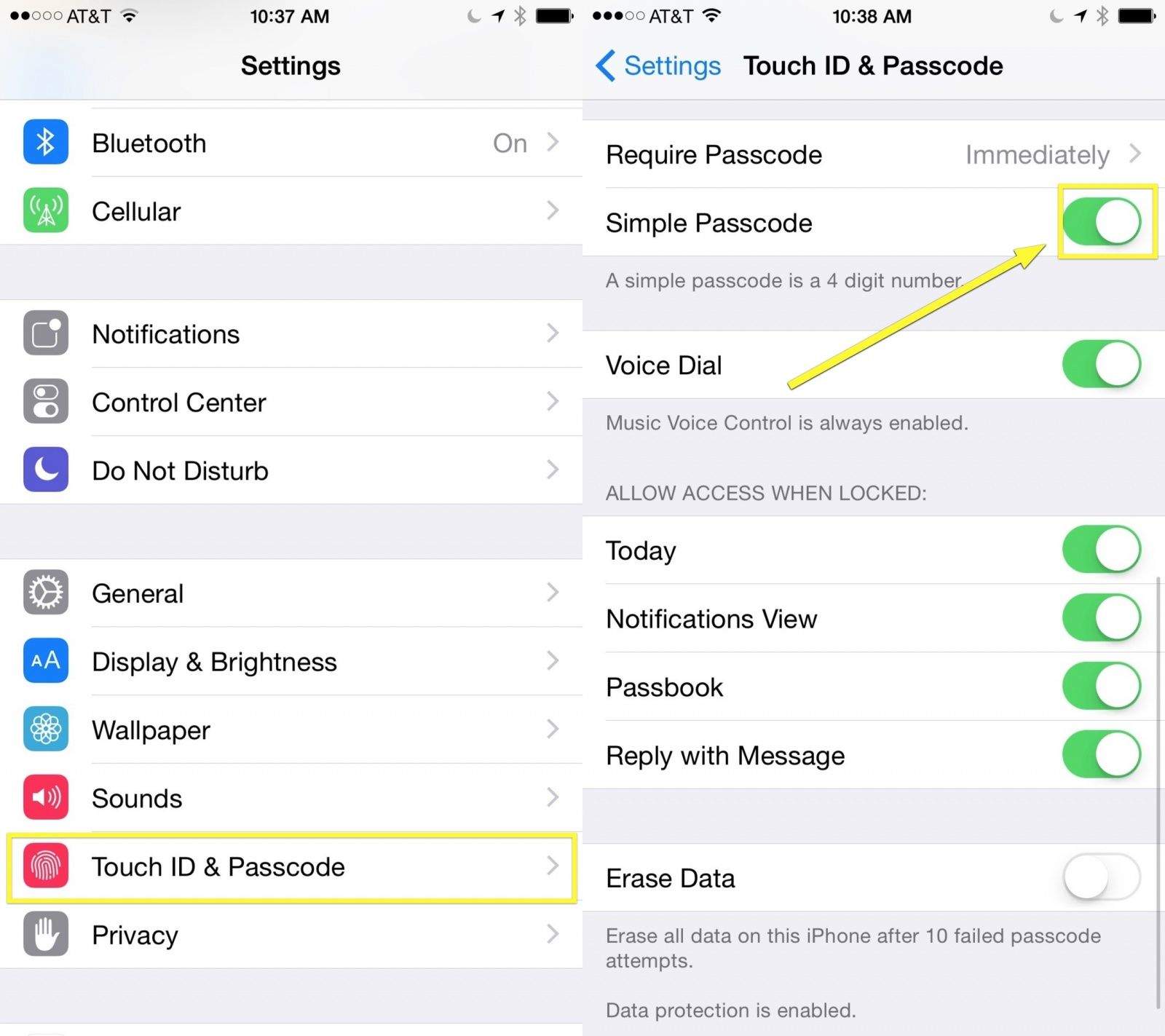
Now tap the Settings app and then scroll down to Touch ID & Privacy. This is where you can add more fingerprints to Touch ID and set either a simple or complex password. You’ll need to enter your current password again, here.
Scroll down past the Touch ID section and toggle the Simple Passcode button to OFF. You’ll have to enter your current passcode once more here. Apple isn’t kidding about security.
You’ll get a field to type in a new passcode, but the regular alphanumeric keyboard will appear instead of the numeric-only one. You can type in any password you like here on the keyboard, but for extra security, try tapping and holding on the letters to get special characters. For example, if you hold the N key down, you’ll get two more characters to choose from, the Spanish ñ and the accented ´n.
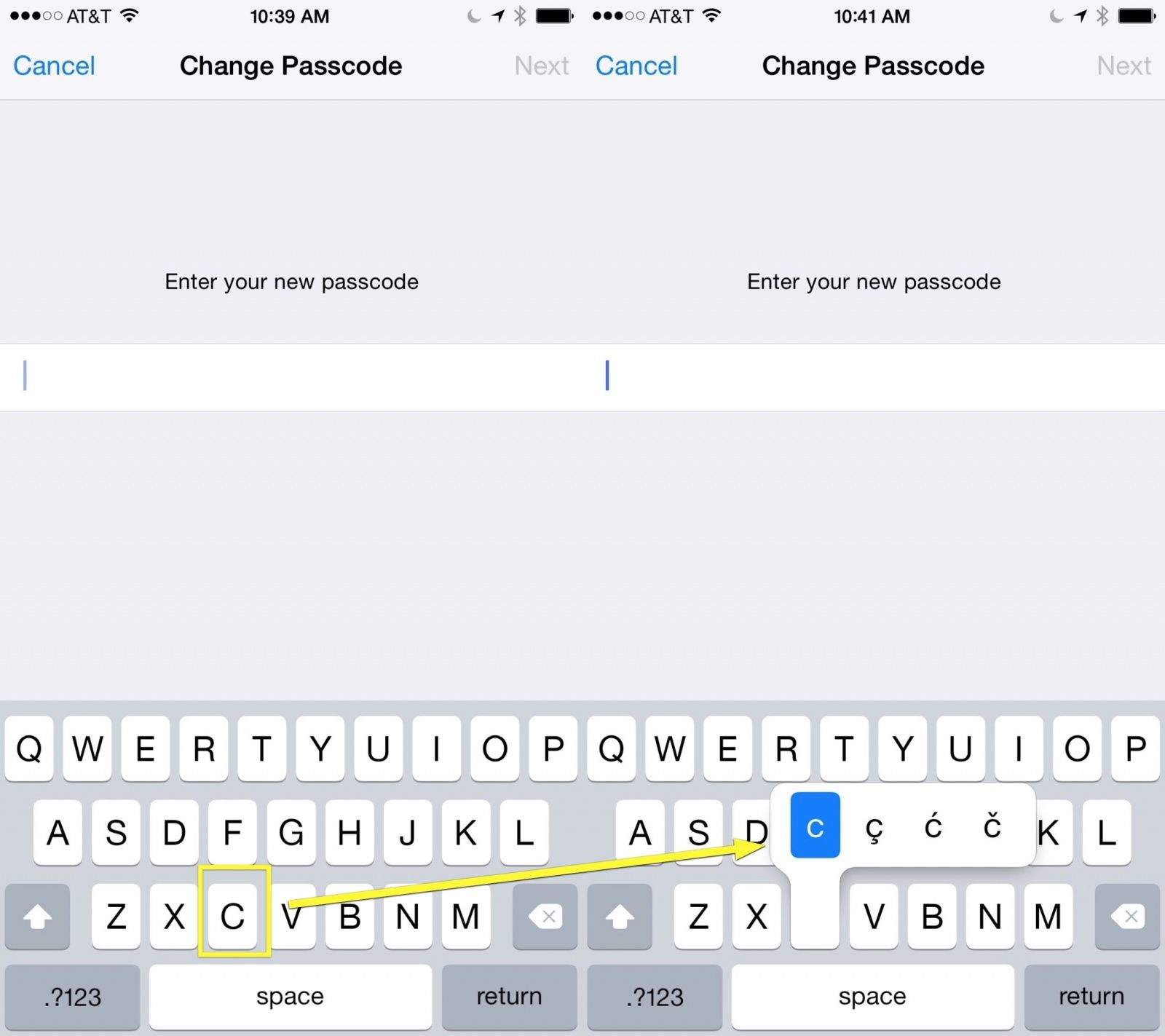
Using a few of these special characters makes your passcode more secure as there are even more characters that a hacker has to try, and most folks — unless they’re using some computer-aided brute force method — just won’t think to try all the special characters.
Be sure to remember your passcode, though, as you don’t want to have to reset your entire phone because you can’t remember whether that one character is an O, an ø, or an ö.
Via: Engadget

Rob LeFebvre is an Anchorage, Alaska-based writer and editor who has contributed to various tech, gaming and iOS sites, including 148Apps, Creative Screenwriting, Shelf-Awareness, VentureBeat, and Paste Magazine. Feel free to find Rob on Twitter @roblef, and send him a cookie once in a while; he’ll really appreciate it.


4 responses to “Create a more secure iPhone passcode with special characters”
It’s annoying enough having to have capitals and numbers in my P/W, let alone all this other crap. I’m only trying to keep out some random Nigerian hacker, not the NSA.
my thumb print only work 20% of the time.
Love this actually. Been using special characters since the day I got a 5S on launch day and carried over to the 6+ on launch day. Fingerprint sensor almost never fails so it’s a great extra security thing to put in place. Though, I liked it better before there was an article reminding people that it was an option.
It’s a good idea. However with the Touch ID there are times that if your finger is a little wet or even damp for whatever reason it doesn’t work. Or if the screen is wet. Same thing. So the password comes into play and with all these characters it’ll take forever to open the damn iPhone just to reply to a message with “k” lol