Review: Thoughts for Mac

20100225-thoughts.jpg

Thoughts is a desktop notebook app for Mac OS X, designed to look and behave like a real world paper notebook or journal.

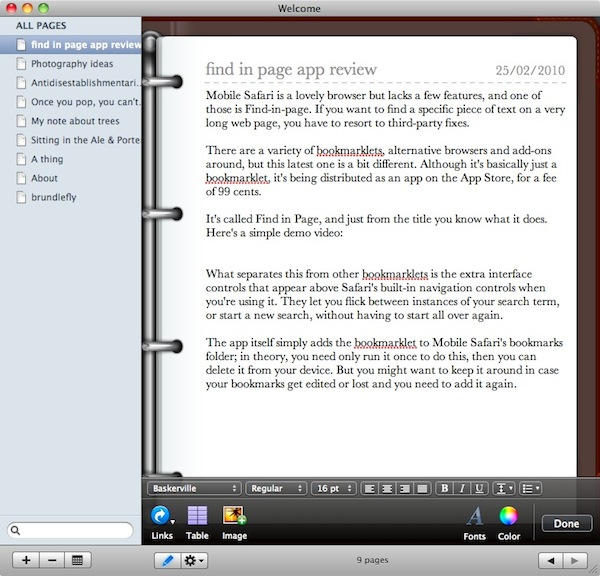
When you open the app you see a shelf where all your notebooks are stored. Notebooks open in a separate window and come complete with a turning-page visual effect.

The basic layout of every note page is the same; there are title and date fields at the top. The main note editing space has a nice-looking toolbar at the bottom where you can access all the formatting controls you’re likely to need.

One feature you don’t see in many rich text notebooks is the ability to insert links to almost anything, and this is something that Thoughts does nicely. The Links toolbar control lets you add a link not just to a web page, but to any file or even any individual email message stored on your Mac.

There’s a decent export function (to RTF, PDF, DOC, DOCX and ODT formats), and support for gestures if your computer is equipped with the right hardware.

DON'T MISS
Bulk Forward Your Email [OS X Tips]

The only big disappointment, though, was speed. The animated visual effects are cool the first time, but it would be nice if we had the chance to switch them off. Worse still was that Thoughts sometimes struggled to keep pace with my typing speed. Sometimes I found myself pausing my fingertips while the text display caught up with me. True, it was never very far behind, but when you type for a living even the smallest delay is very noticeable.

Thoughts is a notebook, not a layout editor like Pages. The formatting features are basic but fine for the sort of tasks you might expect of an app in this category. Visually it has some nice touches, but in use there are some strange behaviors that will hopefully be ironed out in forthcoming updates. Thoughts has potential, but it’s not quite there yet.

About the author

gilest

Giles Turnbull is a freelance writer in England. He writes for the Press Association and The Morning News. He has a website you can ignore and a Twitter account you needn't follow.

(sorry, you need Javascript to see this e-mail address)| Read more posts by .

Posted in Reviews, Software |

  • Edo

    IMHO the whole real world paper notebook analogy is misplaced. A screen is a screen and not a bunch of paper hold together by a metal ring.

  • http://www.joshrives.com Josh

    So what would you recommend for a good note-taking application. Right now I just use a text editor and/or Things

  • Mike

    No Syncing to iPod/iPhone… Deal breaker … Simplenote is easy, nice UI and syncs across all my devices …. http://simplenoteapp.com/

  • http://asia.cnet.com/blogs/sinobytes/ sirsteven

    For a writer or blogger I still strongly recommend Journler app, as it comes with all the necassary tagging and organisational facilities. Plus, it’s lightweight, and never crashes.

  • http://chaos.corrupt.net Jim

    Hey, does anyone know of something like this, except geared to sketches? I’m looking for something that would work like a physical sketchbook except that you’d draw in it with a tablet.

  • http://gilest.org giles

    Josh: I’d suggest something like Devonnote (version 2.0 of which has just been released, and I hope to write something up about it shortly).

  • http://blog.lobrecht.com/rick/ Rick Lobrecht

    Evernote is a nice note taking app. Mac, Windows, iPhone, Windows Mobile, Blackberry, and web.

  • shaunathan

    thanks for the evernote suggestion, this thing is amazing!

  • GQB

    This would be a nice iPad app.

  • jon

    Reminds me of Lotus Organizer from the early ’90s, which had a similar ring-binder look.

  • Greg

    I like my xPad for it’s simple basic interface. It handles images and formatted text well enough for me. And, it’s free.

  • Gene

    Lovely. It would be a great iPad app – but I already have plenty of tools on my Mac to make notes of all kinds. Not sure what niche it’s filling.

    I wonder why no pedant has yet commented that Safari *does* have “find in page.” ;)

  • Buck

    Seems like a lot of flash to accomplish simple tasks that so many other apps already do.

    I like TaskPaper as it is impossible to be distracted by the interface. For bigger projects and docs VoodooPad is more robust and flexible. I even use stickies to brain storm.

  • Peter

    Don’t forget Notebook from Circus Ponies, it’s a great app!!!

  • Anonymous

    Thanks for the review, Giles….very good overview of this program….I know you wrote it over a year ago, but I just discovered Thoughts yesterday….

    So, what do you think about Thoughts now versus some other programs like viJournal, MacJournal, Per Se, Journler, etc?

