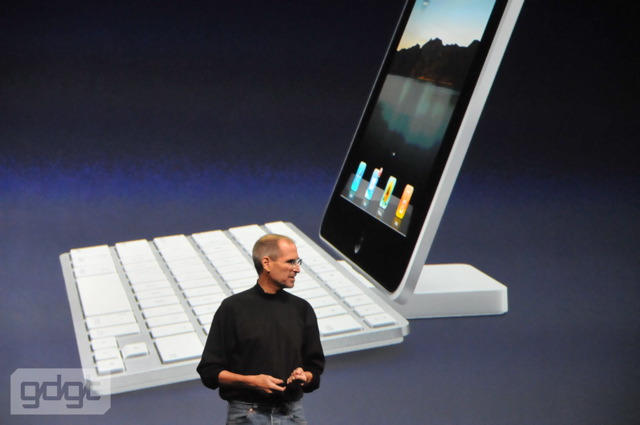
The iPad gets a keyboard dock

The iPad gets a keyboard dock

Typing on a capacitive touchscreen like the iPad when it’s completely flush with the table isn’t the most ergonomic of solutions, and the screen is certainly not in a position we’re used to looking at while typing, so Steve Jobs has just announced the iPad Dock.

“When you really need to do a lot of typing, this is the way to go. If you’ve got to write War and Peace, just plug your iPad in,” said Jobs.

He hasn’t announced a price, but providing this is cheap enough, this could do wonders to replace my netbook as my road writing warrior machine.

The question is: will the iPad support a mouse as well?

DON'T MISS
Air Beats iPad For One Road Warrior

[image via GDGT]

About the author

John BrownleeJohn Brownlee is news editor here at Cult of Mac, and has also written about a lot of things for a lot of different places, including Wired, Playboy, Boing Boing, Popular Mechanics, Gizmodo, Kotaku, Lifehacker, AMC, Geek and the Consumerist. He lives in Cambridge with his charming inamorata and a tiny budgerigar punningly christened after Nabokov's most famous pervert. You can follow him here on Twitter.

(sorry, you need Javascript to see this e-mail address)| Read more posts by .

Posted in Apple Tablet, News |

  • JD

    Or, if you have to write “War and Peace” you could use your iMac or Powerbook. Where does this fit in? Maybe all they were thinking is how to increase the revenues of the itunes store. Only niche I can think of is putting college textbooks on the itunes store and selling it to students.

  • http://www.szilveszter.ca WS

    “Typing on a capacitive touchscreen like the iPad when it’s completely flush with the table isn’t the most ergonomic of solutions”

    Actually, it is. A 0 degree or negative angle (-10 percent is optimal) provides the best environment for typing as it limits excessive wrist pronation and reduces RSI. The data has been around for a while now, but companies are still making keyboards with a positive slant so people can see the keys; however, their angles have been great reduced from those found in the past.

    So it has nothing to do with ergonomics, but rather traditional standards.

  • Josh

    “Actually, its.”

    Typing, as regards to your wrists, yes. Viewing a monitor that’s flat on a tabletop – 90 degrees down from your eyeline? No. Your neck needs to be straight.

    The real question, in my mind, is whether the iPad supports existing bluetooth keyboards. I’d hate to have to buy another if I already have one.

  • barryS

    Why would you need a mouse? Lift your hand off the keyboard, point on the screen, and bring your hand back to the keyboard. :)

  • http://www.toxicspark.com Andrew Macdonald

    “Why would you need a mouse? Lift your hand off the keyboard, point on the screen, and bring your hand back to the keyboard. ”

    Thats fine for the odd click, but can you imagine browsing the internet for hours on end like that? Hell, just for an hour, how many times would you have to lift your hand to click in that hour???? It’s just not ergonomic.

    The keyboard is a good idea, but it also needs to have mouse support. But then, why the hell buy a tablet. You just aswell have a Macbook or iMac.

  • Jesse P

    I was just looking at the tech specs on apple’s site and it lists that the wireless keyboard will work with the ipad but no mention of the mouse

  • barryS

    I think if you were browsing the internet for hours, you wouldn’t be sitting in a task chair at a desk; you’d be sitting in a comfy chair, a little more curled up – where the ergonomics would support more use of the hand and you’d be using the soft keyboard.

  • http://ergonomicedge.wordpress.com Cyndi Davis

    The Apple iPad has all the Ergonomic challenges associated with the laptop AND takes another step in the WRONG DIRECTION. Typing on the iPad touchscreen while the iPad rests on a flat surface will force the neck into more extreme static neck flexion or extension depending on the users posture. Eye strain is also a risk. TRANSLATED – typing on the iPad for any stretch of time will create neck pain, possible eye strain and could cause injury.

    The ability to attach a keyboard to the iPad (the iPad Dock) was a good move by Apple; but no consideration was given into the lack of adjustability of the height of the screen once it is attached to the iPad Dock. This was a missed opportunity by Apple to address head-on the Ergonomic issues related to laptop use (these issues are well-documented). The ability to telescope the iPad up and down would allow the iPad to be adjusted to the proper height for the user, ensuring neutral neck postures and subsequently, comfortable viewing.

    Check out our blog on this issue – http://bit.ly/ERGOLABiPAD

  • http://www.thequeerofus.com.au andy

    I can understand apple hold back on features like a disk explore and the ability to save files from the net that are not “pictures” – like exe’s, zips whatever… makes for a more effective low maintenance device, and more secure – but no mouse? I cant fathom why they would leave this out – its more comfy to use a mouse for 4 hours on youtube or aimless surfing- not to mention reading the news paper online with your arm at rest on the table rather than lift tap lift tap lift tap lift tap lift tap lift tap lift tap lift tap lift tap lift tap lift tap lift tap lift tap lift tap lift tap lift tap lift tap lift tap lift tap lift tap lift tap – spectacular FAIL if a mouse is not supported. – but then again – 2 years to get “copy paste” to the iphone…..

  • http://kevinyoho.blogspot.com/ Kevin Yoho

    If the iPad gets a keyboard dock, (very cool) why wouldn’t the iPhone fit into the same dock, as well? If so, then the keyboard love continues to the iPhone, too. Very, very cool.

  • Michael

    Hello,

    I would love a mouse option to use for doing something like web design or something of that nature. I think in that domain. The iPad would be taken more serious for a telecommuter to use to connect to get a job done. =)

    Maybe a blue-tooth keyboard with a trackball. There are also other inventions that could happen like a blue tooth game controller for the kids or double play.

    =) I myself woulf like the option of the mouse and the USB connector to connect my polar monitor.

    Thank you.

  • Sam

    Remote desktop and vnc apps need mouse support!!!!!!!!!!!! Let’s be cloud friendly.

