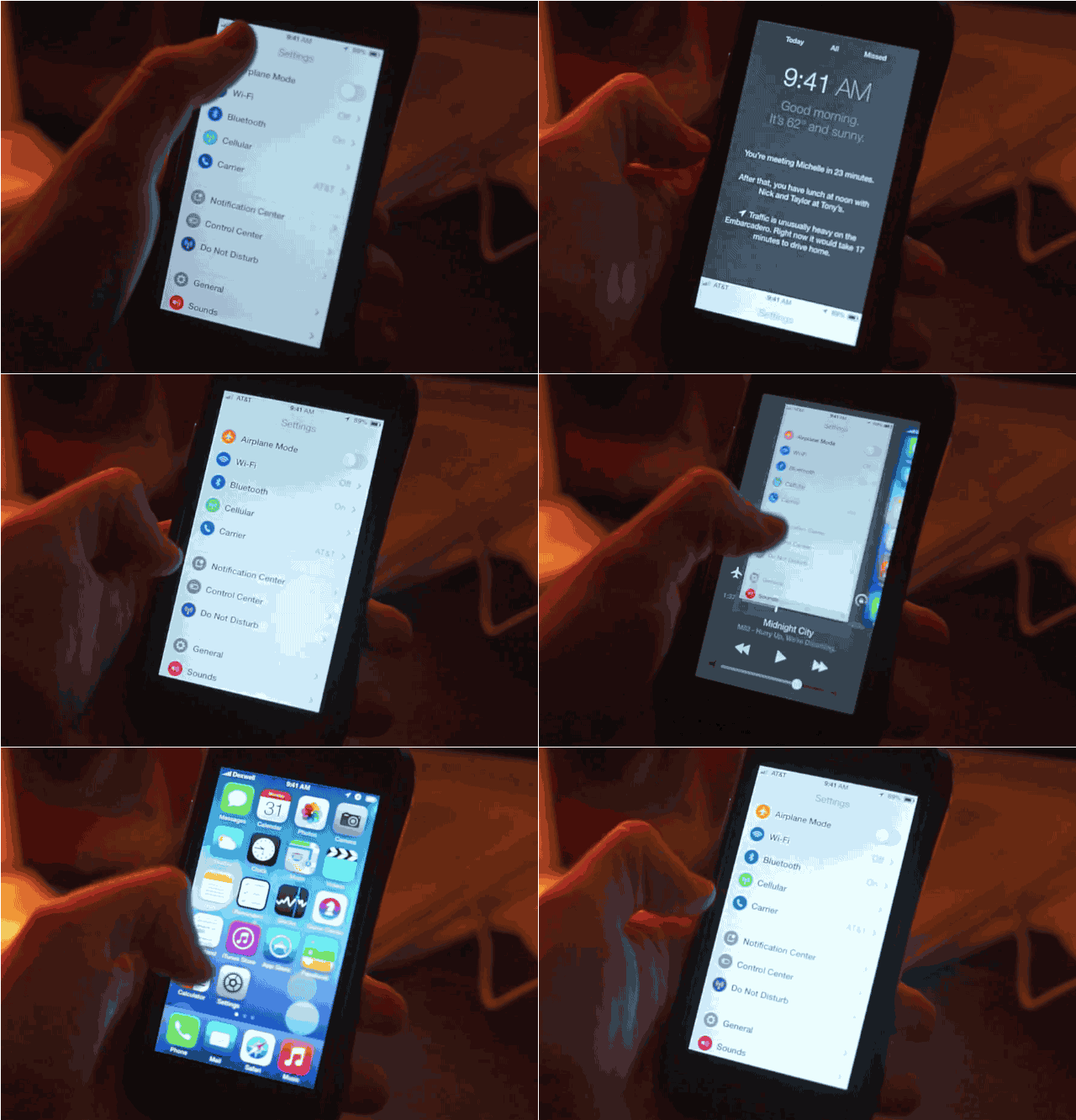
Control Center was one of the top touted features added to iOS 7, but while the new swipe up gesture to toggle it is great, you might find yourself using multitask function more, so Bill Labus created a gorgeous iOS 8 concept that merges multitasking with control center to give you quicker access to your most used controls.
“Flicking up from the bottom of the edge allows the multitasking app views to be tied directly to the gesture, which allows for direct manipulation and avoids having to wait for a passive animation to complete before interacting with them.”
Developers can grab the Xcode project and take it for a spin or you can get your fill from the video teaser below:
To add more customization the concept allows users to add their most used shortcut functions to the 5 button slots.
The brightness slider has been removed to make room for other elements, but I wouldn’t mind seeing it replace the volume slider seems how you still have hard buttons on the side.
What changes would you like to see Apple make in iOS 8? Drop your thoughts in the comments below.
Source: Dribble
Via: The Tech Block

Buster Hein is a freelance writer who lives in Phoenix, Arizona. Twitter: @bst3r.


30 responses to “This Gorgeous iOS 8 Concept Merges Multitasking With Control Center [Video]”
This needs to be a jailbreak. Auxo started out like this. Here’s to hoping!
Auxo 2 is coming. Maybe they’ll implement something like this?
I agree this has to be a Cydia tweak, it is probably the best looking hack that I have ever seen………please apple or someone develop this. It looks like the BB that my wife has she can do similar options on her BB Q10
I want them to bring back the quick posting to Twitter/Facebook. I’d also like to see that expanded to include other social networks. Make it an API that social networks can tap into and add quick posting ability.
This is a goofy multitasking tweak. I prefer the Sam Beckett multiwindow over this…
http://www.iphonehacks.com/2014/01/ios-8-ipad-multitasking-concept.html
Personal
*iOS 8 Additions*
Additions to iOS 8:
Airdrop from Mac to iOS
Return the Weather Icons to the top of the Notification Center
Add Social Network Status Sharing to Notifcation Center (Like iOS 6) [Twitter, Facebook, Google+]
iMessaging (More sharing than just pictures, videos, and recordings. ADD Voice Texts, Animated Emojis, Documents, and other files.)
Downloads in Safari App
Voice activated Siri [Hands-Free] (Ex. “Siri,..(Beep)..Play songs by Bruno Mars.” , “Siri..(Beep)..Find a Starbucks.”)
Siri Purchases songs on iTunes
Customized Control Center (Add other Setting options to replace ones you may not use. Ex. “Cellular Data, LTE, and Hotspot”)
Siri Setting improvements
Live Weather Icon on Homepage (Current Weather degrees and symbol; Like live Clock)
Add a battery saving setting (Customizable)
iPad Weather & Stocks Apps
Very nice list. I may just add some FaceTime improvements:
– Video chats with more than just two people.
– Ability to switch from voice to video chat, having one person use voice and the other use video.
– ability to remotely show someone else what’s on your iDevice’s screen in real time over FaceTime. In other words, when pressing the home button during a call, you get prompted if you want to display a paused photo of yourself or if you want to show what is currently on your screen.
Oh yes, most definitely. Thank you “Anonymous”. I agree and will be adding those to my list. Hopefully Apple will take our ideas into consideration.
-Zachary Donovan
Wow, it’s crazy that almost everything on your list came true!
Thank you very much.
Shut up and take my money!
Activating multitasking via swipe up is a great concept. I would keep the look of the multitasking UI the same (with screenshots on top and app icons below) because of the accelerated swiping speed on the icons. I would change control center activation via a second swipe up after the multitasking UI is activated.
P.S. Commenting on this site using an iPad really sucks.
I’ve already made my prediction that Apple will do this in iOS 8 (. Freakin’ awesome.
And also a very inconspicuous way of letting you guys know about this project I’m working on called Nostradamii (beta http://predictr.mutewitness.net)
I hope you guys will check it out, I’d love your feedback!
I would like them to drop a way for us user to be able to lock our secret apps and also didferent lock codes and for screen saver when u put them u cant put the whole picture it automatically zooms in on the picture then u have to pick a perfect spot for it to go. Also a better batter saver because my iphone dies really when im using it and when im not using it.. In like an hour with me not using my phone it would get to like 70 percent of when im not using it and when i do use it dies faster…
Excellent. Very intuitive.
“You’re Welcome” -BlackBerry 10
Looks like a BlackBerry 10 gesture ripoff
Concept looks like my BlackBerry Z10 gestures
Looks great but it would definitely still need that extra swipe up (on games and certain apps) so you aren’t mistakenly always accessing this part of the OS. Especially in Maps when you’re just trying to scroll around the map but you keep activating multitasking/Control Center.
I believe a lot of iOS will change once Apple goes with a bigger screen, which means we might actually get the ability to access more than one app at the same time. This will obviously translate to the iPad putting iOS on the same level as Windows and Android in terms of multitasking.
So even things like Control Center and Notification Center will more than likely look and behave differently.
the problem with this on the device is the top and bottom scroll will be affected if just swiping or pushing either ways would make the control center active
Apps running side by side, useful mainly on iPads.
What I would give for Apple to make a customizable Equalizer (frequency sliders) for the iTunes App… Is that too much too ask?
Wow the settings centre looks almost identical to my android..
Kewl, who’s betting that this will indeed happen in iOS 8?
OMG…. Apple Copied Samsung’s New Round iCons for graphical Settings Panels! …..I sense a another hellacious lawsuit, if Apple uses this interface! o_O ….. ;-P ….Tydia Tweak or not, it’s still Stealing!!! ….and I thought Steve was dead. It appears like Elvis and Hitler…. he’s still alive somewhere in South America “shameless about stealing great ideas” from Samsung’s New Touchwiz!
btw…. if that’s Multitasking, where’s the drag n drop App to App, PiP, PoP Pervasive Multitasking Samsung has? If they are going to copy Samsung, you’d’ think they’d at least get that…. right! ….oh that’s right, Apple hasn’t been able to do pervasive multitasking since dropping Copland and instead adopting NeXTStep’s “Preemptive Task Management”. Where iOS is still only suspending one task, to run another more important one.
Meaning…. yeah still stacking each task one on top of the other like NeXTStep had been doing for 10yrs prior to Copland and BeOS! :D …and that simply isn’t True Multitasking ala Copland and it’s Copland Finder on RISC processors are capable of doing both yesterday and today! ….thus iOS 8 will be shamelessly left wearing Lisa Frank Colors still painfully running on 30yo HFS+ file system. Pitiful to say the least!
I had some thoughts about improving the iOS experience for Business / Work Production – very cheap and cheerful video: http://www.youtube.com/watch?v=lL3L5D_nHQg
Boring.
still no default apps, still no widgets, still very limited sharing capabilities. still a grid of icons, and still a tiny little screen, among other things I won’t waste my breath to list.
it’s funny and ironic how the iPhone’s UX is so bad because of no hardware back button. They probably regret that, but it’s too late they can’t be seen to copy Android.
app developers must add back buttons to their app design, lol. what a mess. Imagine if it were up to web developers to put back buttons on all their web pages. Same thing with iPhone.
Android at the moment is mostly a pleasure to use, and a big part of that is having a hardware back button. On the iPhone, your hand covers the screen every time you need to go back. It’s no good.
Apple/iPhone is so way behind, its sad… You call going in and out of apps multitasking. What a joke… Look below and see what multitasking is, brought to you by Android. And BTW Im not limited to just split screen, oh no. Or 3 windows, I can have as many as I like to show. Its time to dump those Apple toys and pick up a real multitasking tool called Android.