Cinch Makes Window Resizing A Cinch

20091222-cinch.jpg

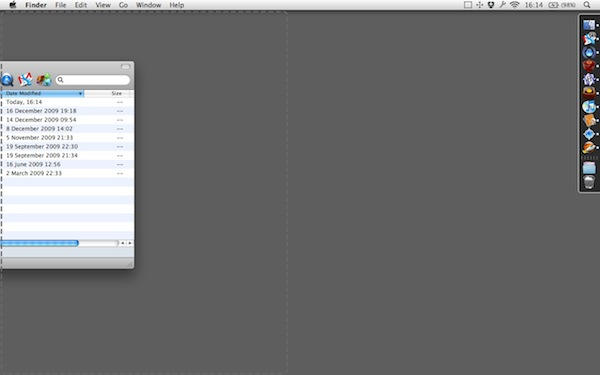
Cinch in action - note the visual feedback as a dotted outline of where the window will be moved to

One of the features I loved from the first moment I saw it in Windows 7 was Snap, the one that lets you instantly resize any document window by dragging it to one side of your screen.

Irradiated Software makes a Mac utility that does a similar job. It’s called Sizeup, and I find it pretty useful. But it’s keyboard-controlled, not mouse-controlled, and you have to remember some new shortcuts to get the most from it. How about a mouse-controlled alternative?

Enter Cinch, a new app from the Sizeup developers.

It’s nice and simple and does exactly the same job as Windows 7’s Snap feature. Drag to one side, and your window gets tiled – with helpful visual feedback showing you where it will go. Drag the window again, and it reverts back to its former size and position.

You can maximise a window just as easily by dragging to the top of your display. Here’s a quick screencast to show how it works:

DON'T MISS
Review: ShiftIt, An Open Source Window Resizer

Having tried both apps, I think I like Cinch more, mainly because I’ve always struggled to remember the correct shortcuts to use in Sizeup. Cinch is particularly useful for throwing a couple of Finder windows into place before doing a bunch of file moves. If you already have Sizeup, though, you might not want to spend a few dollars on Cinch as it replicates a lot of functionality; Sizeup can do everything Cinch can, and more, but just doesn’t do it via mouse commands.

About the author

gilest

Giles Turnbull is a freelance writer in England. He writes for the Press Association and The Morning News. He has a website you can ignore and a Twitter account you needn't follow.

(sorry, you need Javascript to see this e-mail address)| Read more posts by .

Posted in News, Reviews, Software |

  • scstsut

    It would be nice to have the price of the apps in the article.

  • scstsut

    $13 & $7 respectively

  • Edgar

    lol i was about to send u an email to you guys about this. its awesome. i found a krack jajaja buahahahaha! this app is awesome.

  • T.V.

    I’d like to seen a video of this. Sounds interesting, but I haven’t played with Windows 7 or either of these apps. Can we get more screen captures or a video!?

  • http://gilest.org Giles Turnbull

    T.V.: I’ve added a short screencast :)

  • Alex

    It would be nice if you didn’t have to buy a third party app to get apple resize windows properly …. Are you listening Steve ?

  • Simon

    Does anyone know what addon/app gives the big icons centered at the top of the finder window in the video ?

  • http://gilest.org Giles Turnbull

    Simon: no app or addon required; just drag application icons to the Finder toolbar and hold them there for a second or two; the other icons will move to one side and allow you to add your own. I keep these apps here so that I can easily drag files on to them from any Finder window.

  • Peter

    Why not try ShiftIt : http://code.google.com/p/shiftit/ as a free SizeUp alternative …

  • http://twitter.com/dfilteau Doug Filteau

    This is the same functionality as Windows7, which isn’t a bad thing.  The single corner window resize handle of the Macs’ has always been a bit of a throwback.

  • http://www.cach.me/blog Guy

    SplitScreen ( http://l.ginkapps.com/splitscreenapp ) is a much cheaper alternative that does the same thing.

