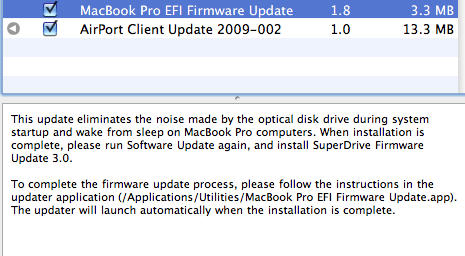
Apple updates Airport Software and MacBook / MacBook Pro EFI

macbook-pro-efi-firmware-update-1-8

If you’re set to automatically grab new updates, you’re likely to notice Apple’s Software Update burbling insistently in your dock for your attention, after Apple released a couple of updates of both their Airport software and the MacBook / MacBook Pro’s EFI.

The Airport Client Update 2009-002 is a routine update, fixing a few routine issues. The update solves the inability to turn the AirPort on or off in some cases after upgrading from Leopard, as well as an occasional loss of network connectivity when using Wake on Demand and the inability to create computer-to-computer networks or share Internet connections on some MacBook, MacBook Pro and Mac Mini computers.

The MacBook and MacBook Pro EFI Update is more interesting, in that with the installation of SuperDrive Firmware Update 3.0, the optical drive of these machines should no longer sound like Cookie Monster trying to chew his way through a sheet of plate glass when waking from sleep or start-up.

As usual, you can either load up Software Update to automatically suck them down and install them (restart required), or you can grab the latest updates from Apple’s support page.

DON'T MISS
Apple Releases Software Update To Prepare For New Time Capsules

[via TUAW]

About the author

John BrownleeJohn Brownlee is news editor here at Cult of Mac, and has also written about a lot of things for a lot of different places, including Wired, Playboy, Boing Boing, Popular Mechanics, Gizmodo, Kotaku, Lifehacker, AMC, Geek and the Consumerist. He lives in Cambridge with his charming inamorata and a tiny budgerigar punningly christened after Nabokov's most famous pervert. You can follow him here on Twitter.

(sorry, you need Javascript to see this e-mail address)| Read more posts by .

Posted in Macbook, MacBook Pro, Software | Tagged: , |

  • Idan

    A welcomed update.

  • Luca

    Why does my mid-2009 Macbook Pro installs the Airport update but not the EFI? I tried downloading the update from the Apple Website, but OSX says I don’t need the update? My drive does do the usual weird noises, the update was very welcome!
    Any help?

  • jsk

    I wonder why the EFI firmware update didn’t include the new MacBook Pros. Now my 13″ MBP still makes this sound, because it isn’t qualified for update.

  • Steve

    Love hte Cookie Monster analogy. The sound of silence after I installed was most welcome!

  • Steven

    I guess I’m a little twisted at times as I kind of enjoy that SuperDrive sound when I boot up. It’s one of those small things that let me know that I’m on my Mac and not on some PC at school or work. Shoot me!!

  • Steve

    @Steven Turn your sound up and get the old school Apple chime blast and then you’ll know! I often turn my sound right up when I restart so it comes through nice and loud to impress all of my PC colleagues. They gasp in awe.

