(sorry, you need Javascript to see this e-mail address)

Top stories

Filter posts by: Mac iOS Hardware Software

How To: Change Your iPhone’s Default SSH Password

ikee_iphone_wallpaper

If you jailbreak your iPhone, the first thing you ABSOLUTELY MUST DO is change the default filesystem password.

When you jailbreak, the filesystem’s password is set to the common password “alpine.” As people usually don’t bother changing this password after performing a jailbreak, it’s really easy for hackers to get access to any jailbroken iPhone/iPod Touch on a public network.

EDIT: Just confirmed with GeoHot and it seems that at least blackra1n doesn’t install SSH by default, therefore this should not be a problem if you used blackra1n to jailbreak, unless you installed the OpenSSH package from Cydia.

An Australian hacker called Ashley Towns demonstrated this by circulating the first known iPhone worm, known as Ikee, which replaces your lockscreen wallpaper with an image of Rick Astley. Luckily Town’s Rickrolling is benign. He wrote the worm to demonstrate how easy it is to break into jailbroken iPhones.

Changing the password is quick and easy — after the jump is a tutorial showing how to change the SSH password.

Note: There is no need to follow this guide if you haven’t jailbroken your iPhone/iPod Touch.

Ingredients:

Jailbroken iPhone / iPod Touch
Cydia
MobileTerminal

Here’s how to change the default SSH password after jailbreaking:
SSH-PW-0

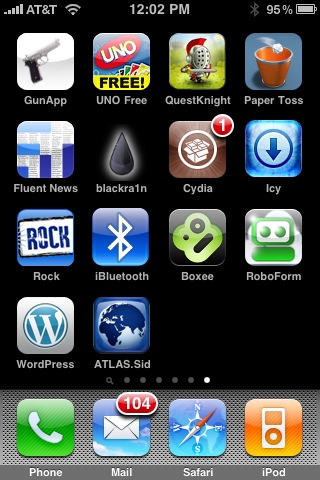
1. Make sure you have Cydia installed on your jailbroken device. If you don’t already have MobileTerminal installed, launch Cydia and tap the ‘Search’ tab in the bottom navigation bar.
SSH-PW-1

SSH-PW-2

SSH-PW-3

SSH-PW-4

SSH-PW-5

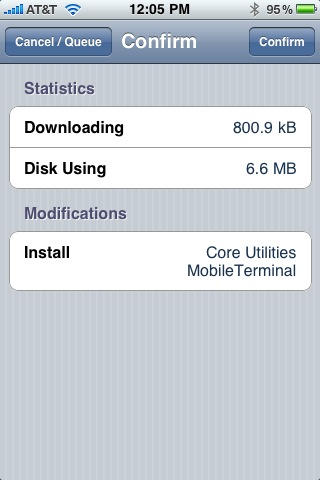
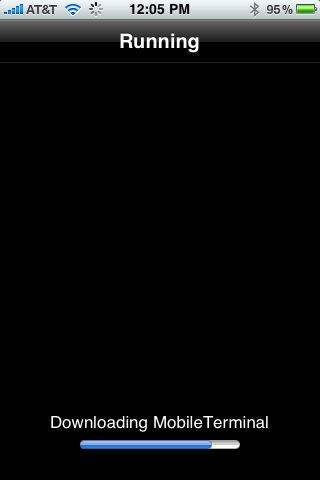
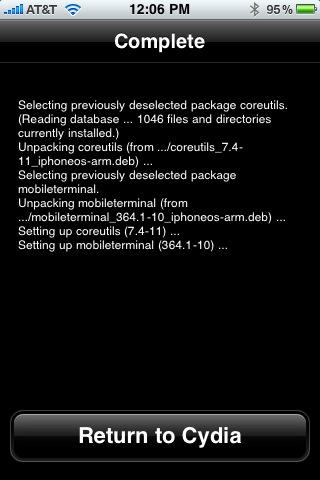
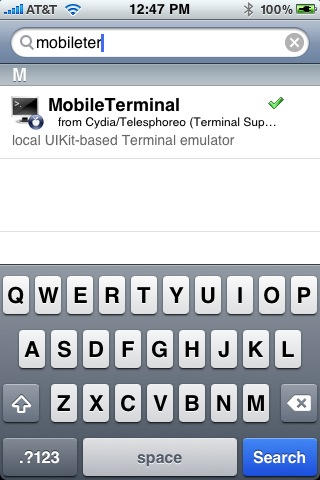
2. Type ‘MobileTerminal’ in the search field and select the first result. Select ‘Install’ on the top right corner and tap ‘Confirm’ on the next screen. It will now install MobileTerminal on your device. Now, tap on ‘Return to Cydia’ and tap home button.
SSH-PW-6

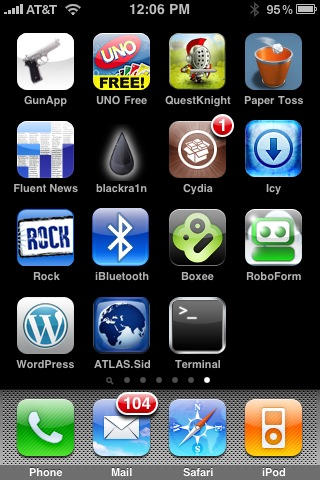
3. Navigate to the newly installed ‘MobileTerminal’ application and tap to open.
SSH-PW-7

SSH-PW-8

SSH-PW-9

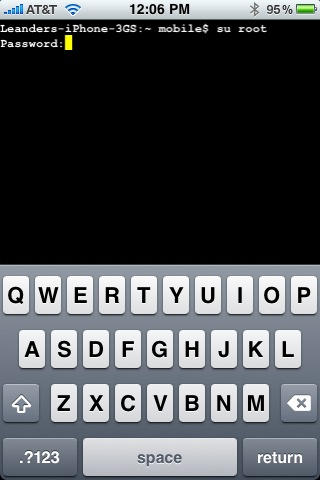
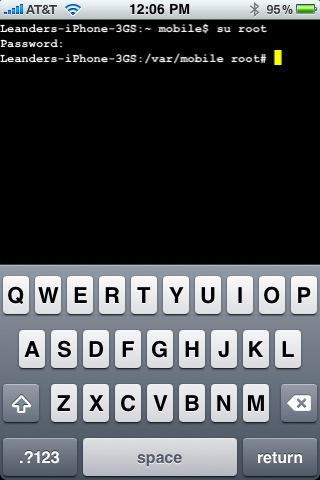
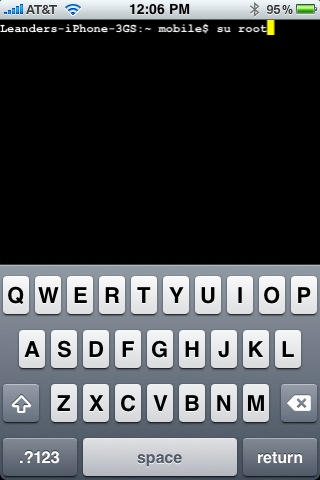
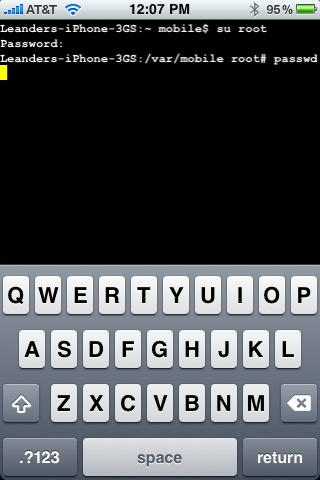
4. In MobileTerminal, type ‘su root’ and tap return. It will ask you for a password, enter ‘alpine’ and tap return again.
SSH-PW-10

SSH-PW-11

SSH-PW-12

SSH-PW-13

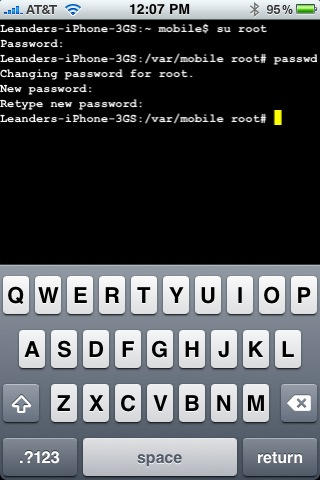
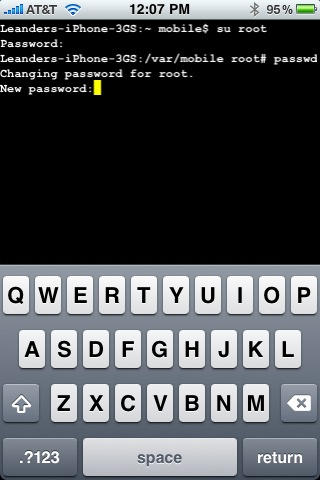
5. Now, type ‘passwd’ and then tap return. Type in a new password such as ‘secret’ and tap return. Retype the new password to confirm and then tap return one last time to change the password.

6. Now, your SSH password will be changed and your device will be protected against any future hacks that use SSH to access your device.

About the author

Sayam Aggarwal

Sayam Aggarwal is a 18-year-old student living in India who has been an Apple fan for almost 5 years. He has worked with ModMyi, one of the leading iPhone communities, as an author for more than a year. He spends most of his free time on the Internet fetching the latest news regarding Apple and its entire product range. Follow him on Twitter!


(sorry, you need Javascript to see this e-mail address)| Read more posts by .

Posted in How-To, iPhone 3G, iPhone 3G S, iPod Touch, Top stories |

  • Adam

    I know I’m kind of behind the game with jailbreaking and such, but I wanted to thank this article, and Jim (I had already changed root pw, but realized that mobile was still default and didn’t know how to change that). Thanks!

  • Anonymodude

    HEY EVERYONE! The easiest way to change your root and mobile passwords.

    Just install ‘Rock’ from Cydia if it wasn’t preinstalled. When it starts up for the first time, it should prompt you to change the passwords anyway. No MobileTerminal necessary! ^^

  • venie

    Can iphone 4 run the terminal?

  • Reverie

    For those running iOS4 and are having trouble running MobileTerminal (since the official upgrade isn’t released), you can also change your psswd through Terminal on your Mac.
    I find it much easier :)

  • Reverie

    @venie, yes it can but only the new version (426) which is the unoficially release (may be buggy still) but running fine for me on iphone4 4.0.4

  • Reverie

    @venie, yes it can but only the new version (426), but only the unofficial release is out (may be buggy still). but running fine for me on iphone4 4.0.4

  • Reverie

    sorry for the double post, tried stopping the msg to edit but kept sending them through :P

    iphone4 4.0.1 **

  • Canuck

    To my understanding if you use SBsettings you can turn your ssh on and off via a toggle. This should protect you against hackers. [At least it should...to be honest I haven't tested it for iOS 4] Note that it is automatically turned on if you reboot your iDevice.

  • Hugh

    1 problem I downloaded Terminal and proceded to run the app and it crashes 2 seconds after I taped on the app’s icon do I need additional packages before the app with work?

    iPhone 3GS with iOS 4.0.1 with latest Jailbreak

  • George

    @Hugh, I have the same exact problem. iPhone 3GS iOS 4.0.1 with latest jailbreak. I think Mobile Terminal is unstable for our configuration unless someone out there has it working.

  • nick

    It might be useful to note to people that Mobile Terminal doesn’t work on iOS4 and just exits!! There’s a beta version of it, but telling people that Jailbreak is so easy and then leaving them hanging for a simple password reset is just… lame.

  • syed

    Just let you know that if you have macbook you can also change the password without installing mobile terminal.. this is just another way to do it.

  • George

    SOLUTION: if MobileTerminal crashes on your iPhone then try installing Rock App. It’s the other app store. Once installed click on it and it will prompt you to change your SSH password.

  • Quizzeh

    How do you change the ssh password with the macbook terminal?

  • Jeremy

    @Hugh and @George, same problem here as well. MT seems to be incompatible with iOS4.

    @George, is RockApp stable, safe, and reliable? I’m hesitant to get into yet another app store situation…

  • George

    @Jeremy, Yes, Rock App has been stable for me.

  • Bill

    I jailbroke my phone. After going through the Cydia and Rock stores I couldn’t see the point. I restored back to factory settings.

  • http://listener42.livejournal.com Listener

    Every time I try to load Mobile Terminal, it drops out (or whatever you call it when a program spontaneously quits). I turned off SSH in SBSettings, and that was good enough for me.

  • The chief

    At this time there is NO WAY to change the root password on IPhone 4! Do not listen to these comments! Keep your eye out for the terminal update and keep your ssh disabled for the time being! If you don’t know WTF your talking about keep your mouth shut!

  • The chief

    Rock app is the same as cydia! Idiot!

  • George
  • McEvil

    @The chief

    Dont be such a feckin twat its not nice to call ppl names you tosser

  • Mudgy

    The best way to change your Jailbroken iOS4 SSH password is to install Rock and run it.

    You can find Rock in the Cydia store as “rockapp”. Rock is another store like Cydia, but it is a little different. For instance, when you start the app, it will tell you your phone has the default password and you should change it. Also, it saves all your licenses so when you upgrade the OS, you can install all your apps (with license) easier.

  • Novice

    After I downloaded MobileTerminal from Cydia; I tap the App icon but it only springs back to Springboard without doing anything…also the screen is just an empty black screen. Can you tell me what the issue could be?

    Thanks for your help.

  • Mattmdc

    To install Mobile Terminal on iPhone OS 4, do the following simple steps. 

    1) Open Cydia
    2) Go to Manage
    3) Sources
    4) Click Edit then Add the following source: http://www.podzombie.com/repository/
    5) Look under this new Source when downloaded and you will find Mobile Terminal (iPhone 4 compatible). 

    Confirm the installation, the application will install and work like a charm. 

    Hope this helps. 

  • Mark S

    @Mattmdc Thank you! Finally got a working Mobile Terminal following your instructions and made the password change.

  • http://www.plugenjoy.com Johan_the_great

    Hi there, thank you for this nice how to!
    I’ve made a how to if you’re having trouble to start the mobileterminal after using www(dot)jailbreak(dot)me

    Cheers,
    johan_the_great

  • Kathy Gleason

    Not a techy. I installed the package mobileterminal. Tried to get it to launch,,,,no joy. Looked in your forum and found instruction on what to do to install. Followed these instructions and Installed http://www.podzombie.com/repository/.

    I’m now getting an error message:
    Did not find repository
    The indicated reposity could not be found. this could be because your are tying to add a legacy installer repository (these are not supported). Also, this interface is only capable of working with exact repository URL’s” Any ideas on what I’m not doing or doing wrong?

    Any help would be greatly appreciated. Thank you.

  • http://www.plugenjoy.com Johan_the_great

    Hi Kathy,

    Here you can find the how to, also which cydia repository you have to use to get the iOS4 compatible MobileTerminal beta version :)

    Cheers,

    Johan_the_great

  • http://www.plugenjoy.com Johan_the_great

    Damn i forgot to add the link :D

    http://www.plugenjoy.com/how-to-jailbreak-an-ipod-touch-and-get-access-to-the-console/ (same applies for the iPhone as well)

  • john

    For me, it’s launching then shutting down immediately.

    • Justin

      you need to download the new moble terminal from http://code.google.com/p/mobileterminal/downloads/list for it to work. The one on Cydia doesn’t work with newer devices

    • furfree

      try to download it from the xsellize source, (http://cydia.xsellize.com) direct to the phone.

      • http://profiles.google.com/jmsaltzman Jeff Saltzman

        Worked for me, thanks!

      • Дмитрий Власов

        thanks a lot

      • Stewart NFS

        I just got Terminal from there and now when I go to remove it it crashes when it gets to “M” in packages.

  • Enemy07

    cydia:manage: sources: edit: add: http://www.ijailbreak.com/repository/

    search: mobileterminal: click first one (Not UKIT based one)

    go through same steps listed as above.

  • http://www.techsangv.com sanjeev

    i Tried but i am getting some problem in it..like it restarts again and again

  • b0mbjack

    if it’s crashing try downloading Mobile Terminal (iOS4) – worked for me. thanks for the article.

  • Idkjhjuj

    load from xsellize on cydia and it worked first time! Thanks

  • Anonymous

    So, I’m confused, if you jailbreak you iPhone, do you have to change your password? Or is it only if you install OpenSSH?

    • Anonymous

      usually root is never enabled on apple devices (except for mac os x server). if you jailbreak your iphone, this process also enables root and sets the root password to “alpine”. (and apparently also the password for user “mobile”)
      You need ssh to get a command line into the os which enables you to change the root password on your jailbroken device to something else but “alpine”.

  • Jackdaniels

    It is now SU > ‘current password’
    then reset it with ‘passwd’