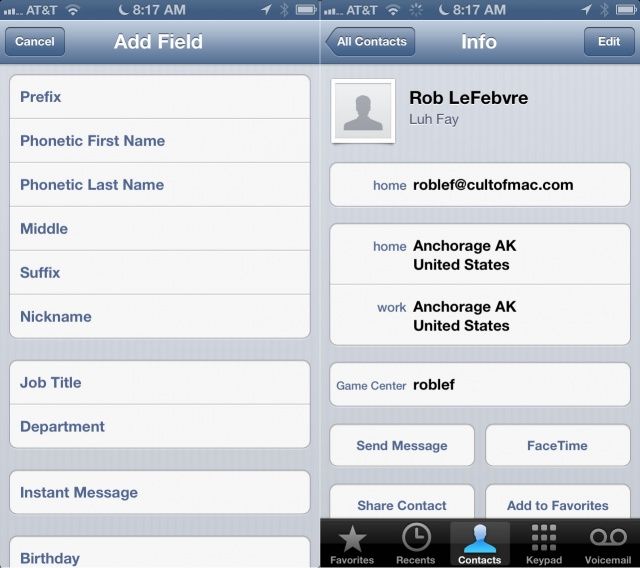
As a person with a funkily spelled last name, at least for English speakers, I appreciate that Siri tries to say my name, but I never really assumed she could pronounce it correctly. If you’re having trouble with Siri’s pronunciation of any of your contact names, here’s an easy trick to get her to say it correctly.
Tap on the Contacts icon on your iPhone, iPad, or iPod touch, and tap into the contact you want to add a phonetic spelling to. Tap on the Edit button in the upper right hand corner, and then scroll to the very bottom of the contact info. Tap Add Field, then choose Phonetic First Name or Phonetic Last Name. Fill in the field with a phonetic spelling of the name you want Siri to pronounce.
Once you’ve done the above, then Siri should be able to pronounce the contact name correctly. Use combinations of letters that make the best sense for phonetic spelling, and you’ll get better results. It should also help when you ask Siri to call or text that contact, as it should use the phonetic spelling when listening to your voice, as well.
Via: OS X Daily

Rob LeFebvre is an Anchorage, Alaska-based writer and editor who has contributed to various tech, gaming and iOS sites, including 148Apps, Creative Screenwriting, Shelf-Awareness, VentureBeat, and Paste Magazine. Feel free to find Rob on Twitter @roblef, and send him a cookie once in a while; he’ll really appreciate it.

