Keyboard shortcuts are great. They let you do things on your Mac faster, letting you get to more stuff in less time. In Safari, for example, Command-1, -2, -3, and so on will open the sites in the Bookmarks Bar in order, from left to right.
There’s a Favorites Bar in the OS X Mail app that works similarly. You can drag Mailboxes that you use often to it. To show it, go to the View menu in Mail and choose Show Favorites Bar.
You can also use the Command-1, Command-2, Command-3, and so on to go to the mailboxes in the first, second, third (and so on) positions in the Favorites bar.
Which is pretty neat, but you can also do this when the Favorites Bar isn’t showing. Head up to the View manu, and choose Hide Favorites Bar. Then hit Command-1, Command-2, or the Command key plus the number of the mailbox you want to go to. You’ll still go there, even though the Favorites Bar is hidden. Slick!
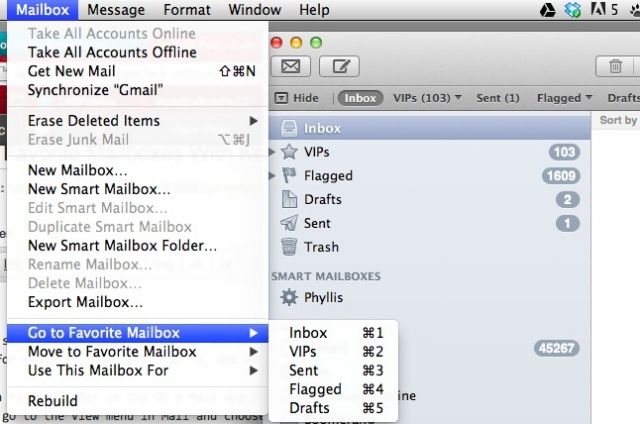
If you forget which mailbox is which Command key combination, click on the Mailbox menu, then hover over the Go to Favorite Mailbox menu item. You’ll see all the Favorites Bar mailboxes there. You can choose it there, as well, but use the keyboard shortcut and commit it to muscle memory. You’ll thank us later.
Via: Macworld Hints

Rob LeFebvre is an Anchorage, Alaska-based writer and editor who has contributed to various tech, gaming and iOS sites, including 148Apps, Creative Screenwriting, Shelf-Awareness, VentureBeat, and Paste Magazine. Feel free to find Rob on Twitter @roblef, and send him a cookie once in a while; he’ll really appreciate it.

