One of the cool unsung new features of iOS 6 is the way it doesn’t ask you for a password every single time you go to make an app purchase. Remember those days? Ugh.
The downside of this convenience is that anyone who uses your iOS device within about 15 minutes of you having entered the password–like to buy that free game app for your kid, you know, the one with the in-app purchases–they will be able to purchase other apps or (gasp!) complete in-app purchases without entering the password. No, Apple, I really don’t want $100 worth of Smurf Berries.
Short of turning off in-app purchases–which, really, you should if you have children using your iOS device often–there’s another way to protect yourself from this kind of snafu.
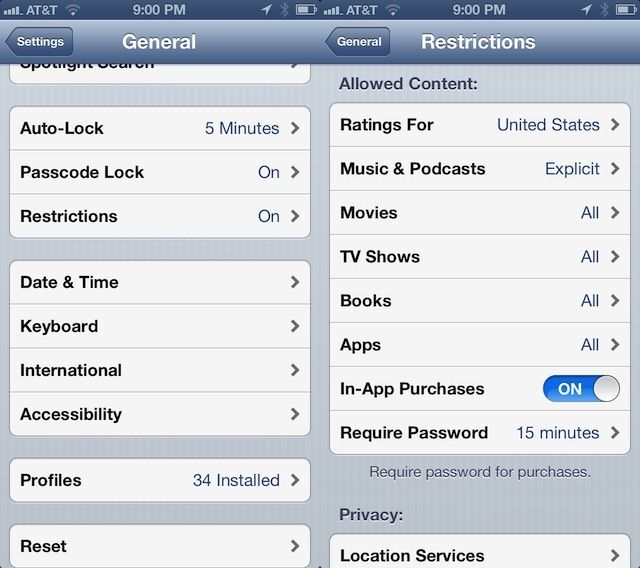
Hop into your Settings app, then tap on General. Scroll down to the Restrictions area, and tap into it. Enable Restrictions with a tap on that button at the top, there, and enter a Restrictions Passcode. This can be totally different than your Lock Screen password, if you have clever kids. You’ll be asked to enter the passcode twice, to make sure it’s one you can type in twice in a row the same way.
Scroll down to the Allowed Content area, and find Require Password. Tap on it and set it to Immediately. That way, no matter what, your iPhone or iPad or iPod touch will always ask for a password when any in-app or app purchase is requested, by you or anyone else. You lose a bit of ease, here, but it just might be worth it to avoid paying too much for Dragonvale eggs, if you know what I mean.
Via: Macworld Hints

Rob LeFebvre is an Anchorage, Alaska-based writer and editor who has contributed to various tech, gaming and iOS sites, including 148Apps, Creative Screenwriting, Shelf-Awareness, VentureBeat, and Paste Magazine. Feel free to find Rob on Twitter @roblef, and send him a cookie once in a while; he’ll really appreciate it.

