We all have too many apps, I’m guessing. As an app aficionado, I have hundreds of apps across several pages, many of them buried within folders. iOS is organized for visual memory; I’m usually flipping through pages and looking for the app I need based on where it is on the page, how the icon looks, and what other apps it’s near.
Once past the first page or two, however, and especially in folders filled with a bunch of apps, that visual strategy starts to break down. Typically, I’ll swipe right from the Home screen and type in the name of the app, then tap on it to launch it. This works fine, but eventually takes more time than just knowing what folder the app resides in. Here’s how to find out.
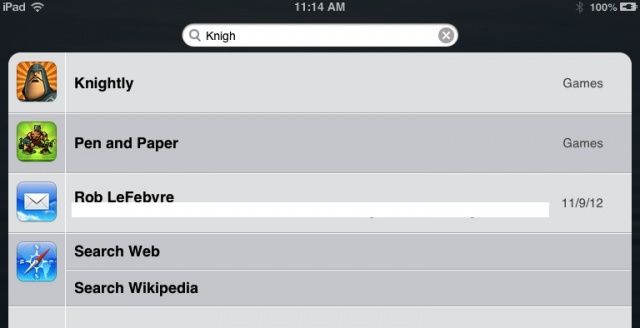
On any iOS device, press the Home button once from any screen to get back to the Home screen. Press it again–or swipe to the right–from the home screen itself, and you’ll see the search field for Spotlight on iOS. Type in the name of the app you’re looking for, and it will appear in the search results below.
Look just to the right of your app name, and, if the app is in a folder, the folder name will be displayed there. If you’ve named your folders uniquely, you’ll be able to hop back into the main iOS screen, navigate to the folder in question, and then launch your app. Do this a few times, and you’ll automatically start to remember where the app is, no longer needing to use the Spotlight trick for apps you look for frequently.
Via: OS X Daily

Rob LeFebvre is an Anchorage, Alaska-based writer and editor who has contributed to various tech, gaming and iOS sites, including 148Apps, Creative Screenwriting, Shelf-Awareness, VentureBeat, and Paste Magazine. Feel free to find Rob on Twitter @roblef, and send him a cookie once in a while; he’ll really appreciate it.

