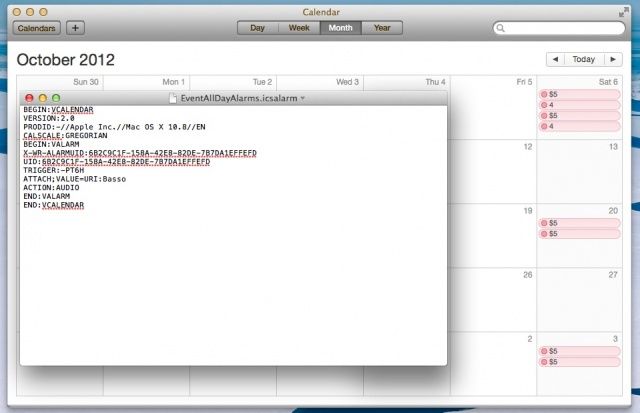
When you create a Calendar event, you have the option to have your Mac notify you of that event before it happens. In the case of an all-day event, however, you don’t have an easy option to change the time of day you’ll get the notification.
It can be done, however, with a little digging into the filesystem and a configuration file, letting you change the time of day you’re notified by default for all-day events.
First up, head to the Finder and hit the Command-Shift-G keys on your keyboard. Type or paste the path ~/Library/Calendars/ into the resulting dialog box. Now, in my Calendars folder, there was a bunch of other folders, all named with odd combinations of numbers and letters. What we’re looking for is a file called EventAllDayAlarms.icsalarm. I found it in the folder that was last modified today, but you may not be able to search for this file in your Finder search bar. Open the folder that ends with .caldav to start. If the file isn’t in there, then open the other ones until you find it. Open it in TextEdit or a similar text editing program, like TextWrangler.
Once you’ve gotten EventAllDayAlarms.icsalarm open, you’ll see a line that says something like:
TRIGGER:-PT15H
This tells your Mac to Notify you 15 hours before the date of the all-day event. You can set this to be an actual time of day, or set it to a negative value to have Calendar remind you of your event a certain number of hours before the day, as well. For example,
TRIGGER:PT6H
Will notify you at 6AM of the day in question.
TRIGGER:-PT3H
Will notify you 3 hours before your event’s date.
NOw you can control when that notification comes in for your all-day events, instead of just living with whatever your Mac chooses for you by default.
Source: Macworld Hints

Rob LeFebvre is an Anchorage, Alaska-based writer and editor who has contributed to various tech, gaming and iOS sites, including 148Apps, Creative Screenwriting, Shelf-Awareness, VentureBeat, and Paste Magazine. Feel free to find Rob on Twitter @roblef, and send him a cookie once in a while; he’ll really appreciate it.

