Our recent preview of Lightroom 3 – Beta has generated a lot of buzz about the future of digital processing. One of the questions that keeps coming up is: how do I migrate from Aperture to Lightroom?
Well, it’s not has hard as you think, as long as you’re willing to invest a bit of time up-front to do it right.
Follow us after the jump, and we’ll have you loving Lightroom in the amount of time it takes to get a pizza delivered.
A word on directories and such
Now I intentionally do not store images in different directories. A directory hierarchy is just another kind of metadata IMHO, and I prefer tagging and rating instead. If you use directory structure as some kind of implicit metadata (and that’s what it is folks), and want those preserved, you’re gonna have a lot more work ahead, you’ll need to use the process below on each of your main directories or albums.
Instead, you might consider this move as an opportunity to improve the quality of metadata in your library.
The work around this problem is simple: just go into each album or directory, and tag all those images with the directory or album name, then you’ll be able to recreate that structure once you get to Lightroom.
———
Right up front, our biggest hurdle is that for RAW files your local adjustments (contrast, exposure, etc), aren’t going to survive the move –and we don’t want to loose all that work. Additionally, the process for JPG, TIFF, and RAW files are different.
First we’re gonna create a couple of smart albums in Aperture.
- Gather all your photos in Aperture that have adjustments by creating a smart album with the following settings (You need to press the “+” sign next to the search box to add the ‘Search by Adjustments’ feature):
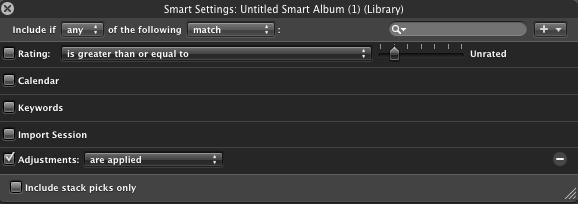
- Next I gather all the non-raw files together. I only use JPG, but if you also use TIFF or PSD, you’ll need to create an album for each. This is as simple as searching for “JPG” or “TIFF” in the smart album box:

- Lastly, like the above, create a smart album with just your RAW files (for Nikonians, search for ‘NEF’)
Now it’s time to export. RAW files and JPG/TIFF files require a different treatment, make sure you export each smart album to a different directory on the disk.
For your RAW masters, export your photos from Aperture using “Export Masters” and make sure the “IPTC4XMP sidecar file” selected under “Metadata” on the export screen. Per below.
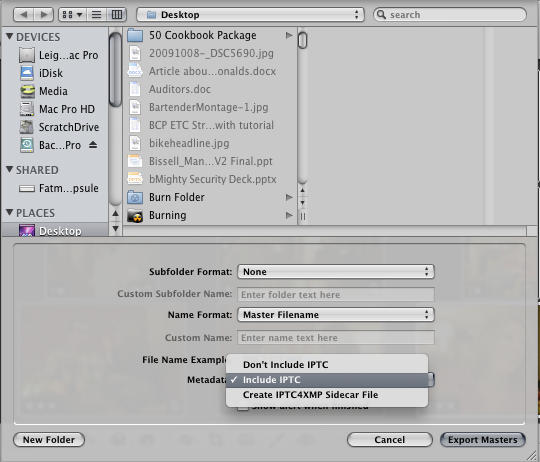
Using your “Made Adjustments” smart album, Use “Export Versions” export these files as either JPGs or TIFF at maximum quality t select “Include IPTC” selected under “Metadata” on the export screen per the above. –DO NOT attempt to use the sidecar file, it won’t work.
For your remaining JPG’s or TIFFs, repeat the process above. Select “Export Versions”, and use “Include IPTC”, under Metadata.
Importing into Lightroom 3 Beta
A word of advice. Don’t. –Really, Lightroom 3 is in beta, and isn’t production ready. I’m using LR3-Beta as part of my “Deep Dive” into the product. If you depend upon your images for some or all of your income, use Lightroom 2 instead, the processes are similar enough that you ought to be able to follow along.
–IMPORTANT NOTE: It is worth noting, for your LR2 users out there, that while moving images into LR3 is as easy as pie, what you get is the current version of the file with all adjustments, I’ve not been able to remove all adjustments. – Such is life in Beta-land.
Down to Brass Tacks
For your RAW files, select “File”, “Import Photos”, select “Copy as DNG”, in the “Apply During Import” section, add some metadata like: “Undeveloped RAW” (because that’s what they will be), select a destination directory, and press “Import”
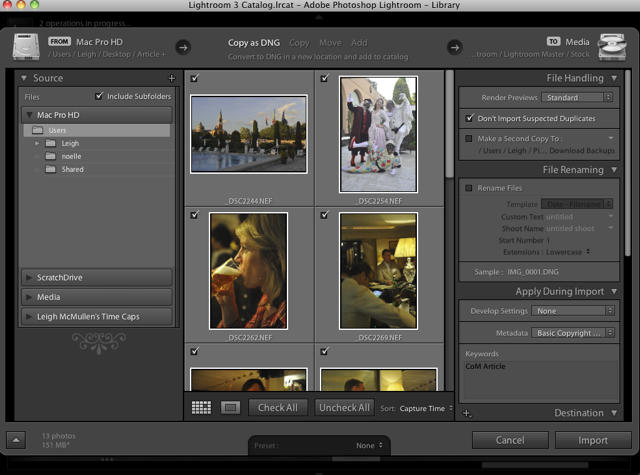
For each of your other export directories, (JPG’s, Images with Adjustments, etc), follow the same process, adding metadata that makes sense.
And there you are, all your images, ratings and tags are in Lightroom.
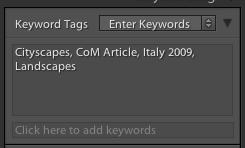
You can play around with smart collections to restore any directory or album structure you had in Aperture, also you can create some queries to locate your “Developed” images and their underlying RAW files and stack them together. Use these tasks as an opportunity to get to know your new partner in the digital darkroom a little better.
Now, if Aperture 3 comes out with a built in image editor, we’ll follow this article up with another describing how to move back.

Leigh McMullen leads the Advisory Services & Strategy practices for the professional services arm of one of the Big-Five firms. He has written several books that would cure any insomnia you might have, and is an avid Mac junkie.

