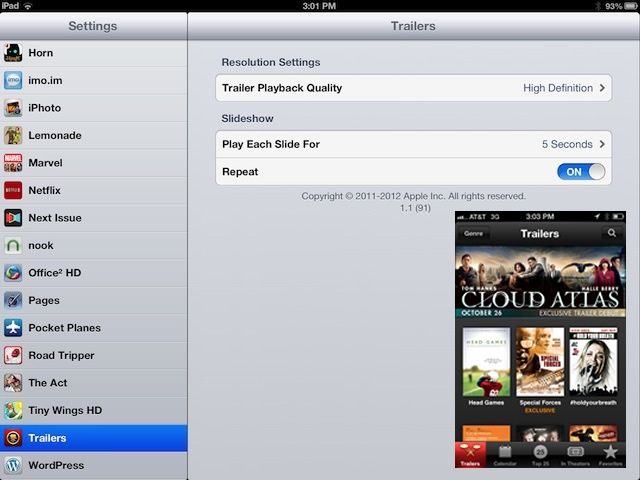
I love movie trailers. I can while away a ton of time just tapping through new trailers via iOS’s universal iTunes Trailers app, checking out all the movies I’d like to see. It’s pure eye-candy, and usually contains most of the good stuff from movies, without all the annoying filler (I kid, I kid–sort of).
Of course, one of the (many) guilty pleasures of owning a new iPad is the super high resolution it affords. When playing movie trailers, then, why not be sure to have your iPad default to the 1080p High Definition when you’re watching the latest Cloud Atlas trailer, for example? Why not, indeed! Here’s how.
I’m assuming you already have the iTunes Trailers app. If not, head to the App Store and grab it.
Once it’s downloaded and installed, launch the Settings app and scroll down the left-hand pane to the list of third party apps and tap on Trailers. Tap on the Trailer PLayback Quality and choose High Definition. Boom. You’re done.
The same process works on the iPhone or iPod touch as well, though I find that having the Quality set to Auto on my more mobile iPhone allows things to work more smoothly when I’m out and about. You’ll also need to be careful you don’t overdo your data plan, especially if you don’t have an “unlimited” plan.
You’ll now be able to watch iTunes movie trailers in beautiful 1080p resolution on your iOS device, so pass the popcorn.
Via: OS X Daily

Rob LeFebvre is an Anchorage, Alaska-based writer and editor who has contributed to various tech, gaming and iOS sites, including 148Apps, Creative Screenwriting, Shelf-Awareness, VentureBeat, and Paste Magazine. Feel free to find Rob on Twitter @roblef, and send him a cookie once in a while; he’ll really appreciate it.

