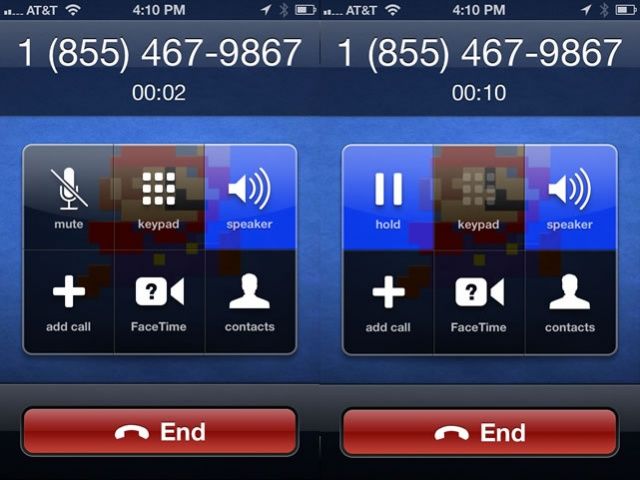
Here’s another one of those quirky, brilliant hidden features of the iPhone’s operating system. I’m sure you’ve all muted a phone call while on the line with someone, right? What about when you’re on speaker phone? Mute makes sure that the other person can’t hear you, but you certainly can still hear them. That can be frustrating, especially when in a room with other folks, like during an interview.
Sometimes it’s just good to mute both sides of the conversation, right? Hold is the way your iPhone can do that.
The process is simple. While on a phone call, tap and hold the Mute button. It will turn into a “Hold” button, and will highlight in blue, just like the Mute button does. When Hold is enabled, no one on the call will hear anyone else.
OS X Daily, where I found this tip originally, says that this feature is only available on AT&T and T-Mobile GSM network iPhones in the US, while Verizon and Sprint don’t support the feature on their CDMA phone networks. I suppose you can just use the Mute button, then, and just turn off speakerphone for a moment.
Bottom line, this seems like a silly little feature, but it’s there, so if you need it, now you know how to access it.
Got an iOS tip of your own? Need help troubleshooting your iPhone, iPod touch or iPad? Drop me a line or leave a comment below.
Source: OS X Daily

Rob LeFebvre is an Anchorage, Alaska-based writer and editor who has contributed to various tech, gaming and iOS sites, including 148Apps, Creative Screenwriting, Shelf-Awareness, VentureBeat, and Paste Magazine. Feel free to find Rob on Twitter @roblef, and send him a cookie once in a while; he’ll really appreciate it.


2 responses to “Use Hold Instead Of Mute On Your iPhone [iOS Tips]”
Not really a “silly little feature”, it’s to enable conference calling.
If you put one call on hold and add a second call you get the option to “swap” i.e. switch between the two callers leaving the other on hold, or to “merge calls” in which case, assuming your mobile account is provisioned for conference calling, you get both calls connected and the people on the other end of both calls can hear one another.
Watch out for the costs though. My service provider takes only the first call out of my free minutes, the second call is billed at my “additional calls” rate, even though I have unlimited voice calls.