One of the limitations of the iPhone and iPod touch version of Safari has always been a lack of tabbed browsing. Granted, there’s only so much space on the smaller mobile screen, but all the same – tabbed browsing is great.
So is being able to open tabs in the background, so that you can continue reading, say, an article on Cult of Mac, but still save an interesting link in another tab, just like you can on the Mac with a Command-click. With a simple Settings tweak, you can.
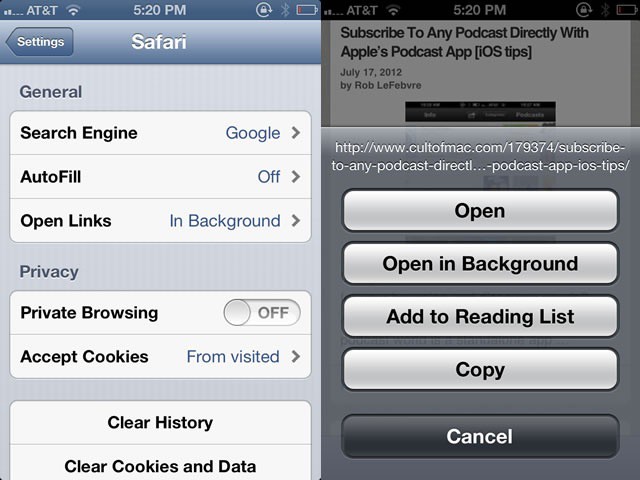
When you tap and hold on any link on a web page, Safari’s default behavior on the iPhone is to ask if you want to open the link, open it in a new page, Add to Reading List, or Copy it. Choosing Open in New Page will do just that, but in the foreground, taking you away from your current web page.
To change this behavior, quit out of Safari and open your Settings app. Scroll down to Safari, and tap through to the Safari settings. Tap on the Open Links button and then choose In Background. Now, when you are in Safari, tapping and holding on a link will give you the option to Open in Background.
Now you can browse the way you want to, without having to interrupt your flow too much to open links in Safari for later browsing.
Got an iOS tip of your own? Need help troubleshooting your iPhone, iPod touch or iPad? Drop me a line or leave a comment below.
Via: CarryPad

Rob LeFebvre is an Anchorage, Alaska-based writer and editor who has contributed to various tech, gaming and iOS sites, including 148Apps, Creative Screenwriting, Shelf-Awareness, VentureBeat, and Paste Magazine. Feel free to find Rob on Twitter @roblef, and send him a cookie once in a while; he’ll really appreciate it.

