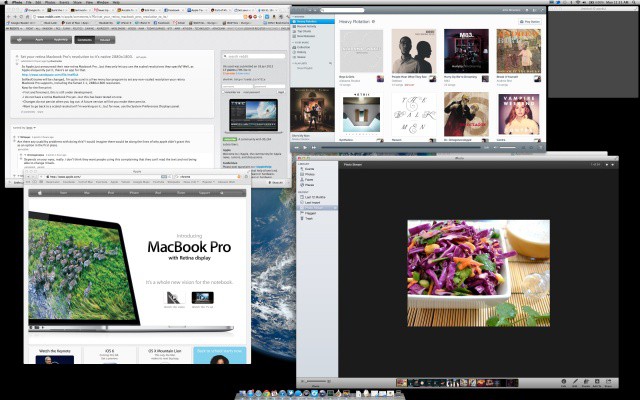
The new Retina MacBook Displays may have an incredible resolution of 2880 x 1800 pixels, but OS X doesn’t treat it as such. Instead, it treats the display as a 1440 x 900 HiDPI display in its default configuration, meaning that while text, video and images may look crisper, you don’t actually get 2880 x 1800 pixels worth of desktop space.
In the Displays panel in Systems Preferences, you can tell your Retina MacBook Pro to give you more desktop space, up to the equivalent of 1920 x 1200, but that’s as far as it goes. What if you want a 2880 x 1800 desktop, though, with each pixel mapped one to one? There’s an app for that.
The program is called SetResX, and it is a free menu bar program that allows you to set your Retina MBP display to a number of desktop resolutions, including:
• 2880 x 1800
• 2560 x 1600
• 2048 x 1200
• 1680 x 1050
• 1440 x 900 (no HiDPI)
• 1280 x 800
• 1024 x 768
• 800 x 600
• 640 x 480
It works well enough, and in 2880 x 1800, really puts into perspective just how crazy pixel packed the Retina MBP display is. Everything is microscopic! It’s not a usable resolution, to be sure, but it’s still plenty cool to see. You can barely see the menu bar!
Source: Reddit

John Brownlee is a writer for Fast Company, and a contributing writer here at CoM. He has also written for Wired, Playboy, Boing Boing, Popular Mechanics, VentureBeat, and Gizmodo. He lives in Boston with his wife and two parakeets. You can follow him here on Twitter.


8 responses to “This Is What A Retina MacBook Pro Desktop Looks Like At 2880 x 1800”
I graduated from crappy resolutions such as 1366×768 and 1280×800. After I got the 15in MacBook Pro and set to 1920×1080-equivalent, the small text caused eyestrain. Sometimes I set to the true 2880×1800 so my Java programs, Unity 3D and FlightGear work pixel-perfect. I adapted to it after a few days, however. Now, I think I can spend a few days to get used to the tiny text of 2880×1800.