Mac OS X hides files in many ways. One way, a holdover from its Unix legacy, is with dot-files. In other words, if a file is named with a period before the file name (.Hiddenfile), that file will not show up in the Finder. One way to show these files is with a Terminal command like this:
defaults write com.apple.Finder AppleShowAllFiles YES
This works all well and fine, but requires a second trip to the Terminal to reverse it (by changing the YES to NO, natch). Today, we’re going to tip you off to an app that does something similar, yet without the need to hop into Terminal.
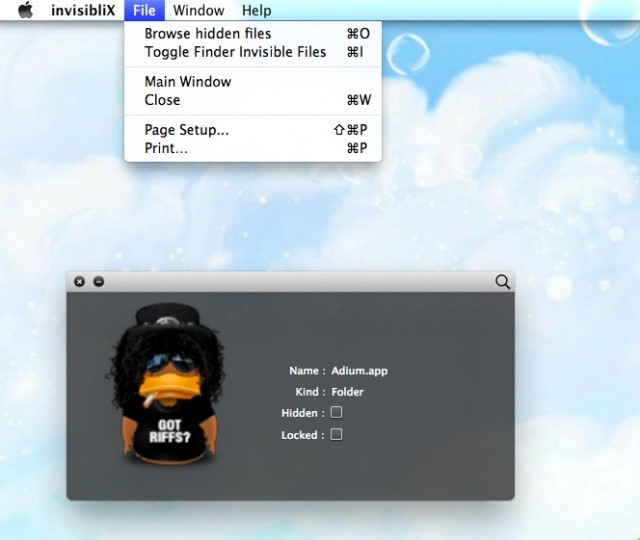
InvisibliX is a little free utility app that can be downloaded from the developer’s website. On launch, it will ask you to accept or reject it’s BSD licence (you can disable it if you like), so go ahead and accept. Once you do so, a Drop window will appear. You can drag any file into this window and see it’s name, kind and whether it is hidden or locked, like a glorified Get Info command.
The real power here, though is in the menus. Choosing “Browse Hidden Files” from the File menu will bring up a standard open dialog, though with one major difference: all the files Mac OS X hides by default will be visible in that dialog box. Pretty slick, right? But wait, there’s more. Choose “Toggle Finder Invisible Files” in the File menu and all the files that are hidden will become visible in the Finder. Nice!
To reverse it, simply choose the same menu item again. No longer will you be a slave to remembering the Terminal command, or looking it up like I do every single time you want to find a hidden configuration file on your Mac. The app requires at least OS X 10.5 and an Intel Mac.
Find a sweet tip for Mac OS X? Got a troubleshooting issue? Post it in the comments below!

Rob LeFebvre is an Anchorage, Alaska-based writer and editor who has contributed to various tech, gaming and iOS sites, including 148Apps, Creative Screenwriting, Shelf-Awareness, VentureBeat, and Paste Magazine. Feel free to find Rob on Twitter @roblef, and send him a cookie once in a while; he’ll really appreciate it.

