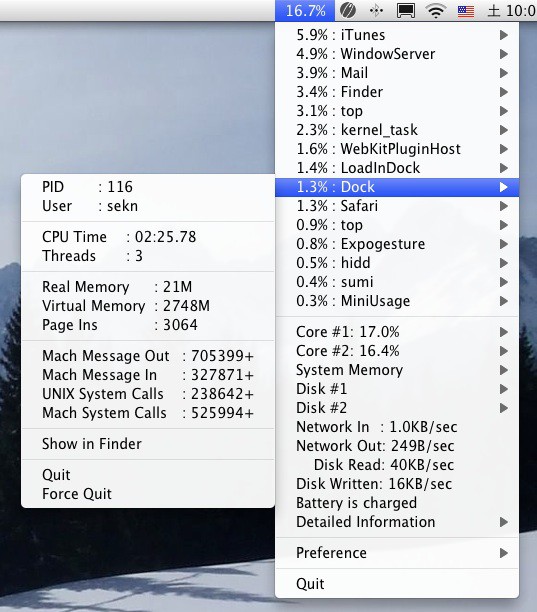
MiniUsage is a clever little menu bar app for Mac OS X 10.5.8 or later. It allows users to see what’s going on within their system, from memory to CPU to disk access, right from the OS X menu bar. It’s also compatible with AppleScript, so savvy users can geek out a bit and customize the behavior of the app.

Most of the usage data can be found elsewhere, like in Activity Monitor or commands in the Terminal, but it’s nice to have quick access to all this information in one place, easily accessible with a mouse click.
MiniUsage is donationware, and the developers ask that if users use and enjoy it, they make a small donation to the Japan earthquake and tsunami disaster (they suggest the American Red Cross).
[Source: FreeMacWare]

Rob LeFebvre is an Anchorage, Alaska-based writer and editor who has contributed to various tech, gaming and iOS sites, including 148Apps, Creative Screenwriting, Shelf-Awareness, VentureBeat, and Paste Magazine. Feel free to find Rob on Twitter @roblef, and send him a cookie once in a while; he’ll really appreciate it.

