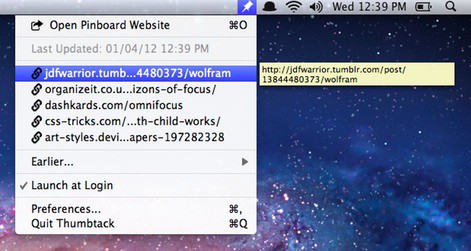
ThumbTack is a Menu Bar utility for OS X that puts your most recent Pinboard bookmarks in easy reach, no matter what application you’re using.
Once you’ve signed in, an unobtrusive pin icon appears in your Menu Bar. Click this and you’ll see, in a drop-down list, the last five links you saved on Pinboard. A handful more are available with another click on the Earlier… button.
ThumbTack is beautifully made. It’s a tiny application in many respects, making very few demands on your system or on your screen’s precious pixels.
It has a stated goal: to provide quick access to your most recently saved bookmarks, and nothing more. That’s what you get. That and nothing more.
A question you may ask yourself is: “Why should I pay two dollars for something I could achieve by clicking a bookmark in my browser?” The answer lies in your personal use of Pinboard. Occasional users won’t see the utility, but if you return to Pinboard frequently on a daily basis, you might.
Even so, it would be nice to see a few more features. There’s no way of seeing each link’s metadata, the tags and comments you saved alongside it. Since that metadata is often as useful as the link itself, it would be nice to make it visible in ThumbTack, either as part of the list or in the tooltip that appears when you hover over one of the saved links.
Nevertheless, we like it. Recommended for serious Pinboard users.
[xrr rating=60%]

Giles Turnbull is a freelance writer in England. He also writes for the Press Association and The Morning News. You can find out more at his website, and follow him on Twitter @gilest.

