

Once you’ve connected to a Wi-Fi network on your iPhone, iPod touch, or iPad, your device remembers its credentials and, for your convenience, connects automatically next time. However, this isn’t always helpful. Sometimes we connect to hotspots accidentally, and it’s frustrating when your device connects to a network you don’t want it to.
You can prevent this by “forgetting” the networks you’ve previously connected to. Once forgotten, your device will no longer connect automatically, and only when you tell it to. Here’s how to forget a Wi-Fi network.
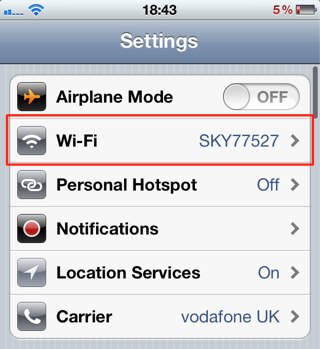
To do this, you’ll need to be within range of the Wi-Fi network you’d like to forget, otherwise it won’t show up on your iPhone. When you’re ready, open up the Settings app and tap on the ‘Wi-Fi’ tab.
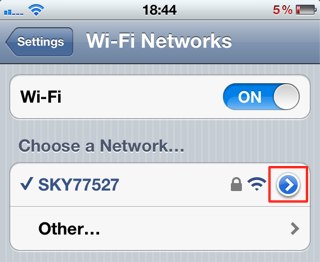
You’ll now be presented with a list of Wi-Fi networks in your vicinity. You’re probably already connected to the network you want to forget, so it shouldn’t be too hard to find. Once you’ve got it, tap the blue arrow alongside its name.
Now tap the ‘Forget this Network’ button.
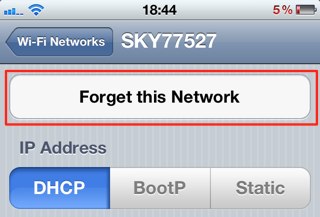
Your device will now forget the credentials for that network, including any security password, and will no longer connect automatically when your device discovers it. But it won’t be blocked forever. If you’d like to reconnect to the network at anytime, simply tap on its name within the Wi-Fi menu, and enter the security code.

Killian Bell is a freelance writer based in the U.K. He has an interest in all things tech and also covers Android over at CultofAndroid.com. You can follow him on Twitter via @killianbell.

