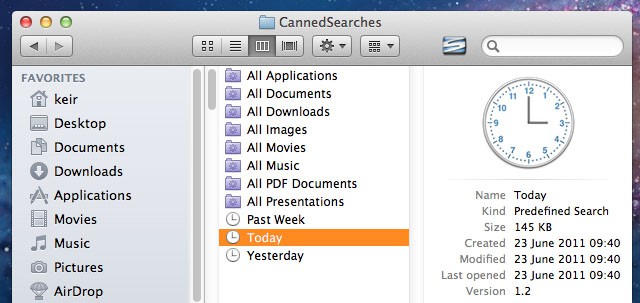
Wouldn’t it be useful to click a link in Finder that showed only files accessed or created today, yesterday, or within the last week? That would make it significantly easier to find files you’ve been working on but forgotten the location of.
Users of OS X Leopard and Snow Leopard already have this at their fingertips in the Finder sidebar, but Apple saw fit to remove it from OS X Lion, its latest release. Here’s how to restore it.
Here’s another tip from Mac Kung Fu, which contains over 300 tips, tricks, hints and hacks for OS X. It’s available from Amazon as well as other bookstores, and also as an ebook for all eReaders.
To make this a reality, open a Finder window and hit Shift + Command + G , then copy and paste the following into the dialog box that appears: /System/Library/CoreServices/Finder.app/Contents/Resources/CannedSearches. Then hold down Command, and click and drag the Today, Yesterday, and/or Past Week files to the sidebar within Finder. Clicking any in future will show just the files as discussed previously. The search results will be mixed in with any apps you accessed the previous day, but you can click the Kind header in Finder to sort them so that your documents are separated out.
Log out and back in again, and File Open/Save As dialog boxes within applications will also show the shortcuts.

Keir Thomas (http://keirthomas.com) is the author of Mac Kung Fu, which contains over 300 tips, tricks, hints and hacks for Mac OS X Lion. He’s also the author of over 10 other computing titles.


15 responses to “See Only Files Created Today Or Yesterday [OS X Tips]”
Great tip! Thanks!
Hmmm, I followed the instructions but I couldn’t drag the individual search files to the sidebar – only the “Canned Searches” folder. Am I missing something?
I can’t get it to work. I get a circle with a bar every time I try to drag the canned searches to the sidebar. I’ve tried different spots on the bar, but I can’t get it to work.
Same problem here. Will let me drag into individual folders, but not onto the finder bar itself.
Same problem. Unless I am missing something, the canned searches can not be moved to the sidebar.
I had the same issue. Instead I created and Alias of each and was able to drag the alias to the sidebar.
I had the same issue. Instead I created and Alias of each and was able to drag the alias to the sidebar.
Guys… Hold Command and then drag to the sidebar o/
Yup. That did it.
Thanks. I’ve edited the posting to include this vital step :-)
Hold down Command before dragging the file across.
Hold down Command before dragging the file across.
Hold down Command before dragging the file across.
Hold command and drag one at a time.
thanks for the tip!