Mobile menu toggle

Add Today’s Date To Notification Center [Video How-To]

By

Notification

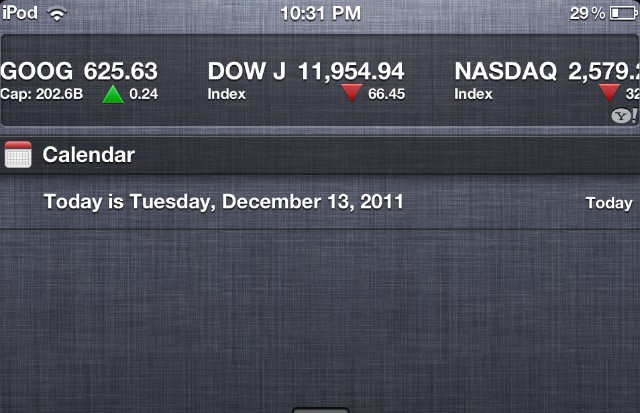
Notification Center is a useful little addition to iOS, but it’s very limited. As of now, you can’t customize it to show much more than Stocks and Weather. In this video, I’ll show you a little workaround that will allow you to display the current date in Notification Center.

You can download the script from Mac OS X Hints.

  • Subscribe to the Newsletter

    Our daily roundup of Apple news, reviews and how-tos. Plus the best Apple tweets, fun polls and inspiring Steve Jobs bons mots. Our readers say: "Love what you do" -- Christi Cardenas. "Absolutely love the content!" -- Harshita Arora. "Genuinely one of the highlights of my inbox" -- Lee Barnett.

13 responses to “Add Today’s Date To Notification Center [Video How-To]”

  1. Andreas Booher says:

    Seems easier to me to just check the date by either looking at the Calendar.app icon or if that’s not easy to find, the date is also listed on the lock screen.

  2. Brandon Dillon says:

    Nice tip thanks

  3. hippcatt says:

    Yea, seems like a lot of hassle. To check the date, I just look at my iCal icon.  Simple.

  4. Jreshow says:

    Sweeet! Im doing this. SWEEEETTTT!!!!!!!! Thanks! I may just donate .99 cents too i suppose.

  5. Jreshow says:

    This is about a easy, convient, little pull down of the thumb way to just peek at the date when needing to refer to it quickly.., effortlessly. Connivence exists when it’s that easy already. 

  6. sudoash says:

    I can’t really use this, as I need to see multiple calendar events in Notification Centre. I will probably end up with multiple “Today is..” events on a quiet day.

  7. joewaylo says:

    I think Apple should add the date in mm/dd or dd/mm international format on top of the screen to flash every few seconds. Then again you could also ask Siri for today’s date.

  8. Ric Aja says:

    I’m looking for that mouse’s effect … Where I can download or buy ?

  9. Timothy Gregoire says:

    its a feature in screen flow during editing. screen is $99 and in the MAS

  10. Sang Park says:

    well those method assume you are on a home screen or lock screen. This method would work anywhere on iPhone. Say you are composing an email and need to refer to today’s date. You would either have to exit out of mail, find Calendar.app and see the icon or lock the phone, check the date, and unlock the phone. With this method, you can simply pull down the notification center and get the date

  11. Sang Park says:

    This is pretty convenient. But unfortunately it does affect Calendar.app’s notification. If you actually use the notification center to view the day’s event this may not be the best option. Is there a third party calendar application that can do same thing?

  12. Andy Murdock says:

    I’d like to see the timer time show up on this screen.

  13. irvinezekiel says:

    It’s asking me “Where is the CharacterPalette.app?

Leave a Reply

