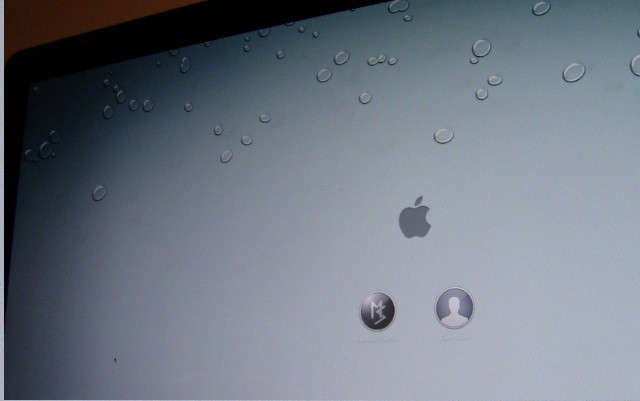
Sick and tired of seeing the same old linen wallpaper on the login screen every time you boot up your computer? It can get pretty boring after a while. In this video, I’ll show you how to change Lion’s login screen wallpaper to whatever you’d like.
Our daily roundup of Apple news, reviews and how-tos. Plus the best Apple tweets, fun polls and inspiring Steve Jobs bons mots. Our readers say: "Love what you do" -- Christi Cardenas. "Absolutely love the content!" -- Harshita Arora. "Genuinely one of the highlights of my inbox" -- Lee Barnett.
34 responses to “Change The Boring Default Login Screen Wallpaper In OS X Lion [Video How-To]”
where did you get that 2560×1440 iOS 4 desktop wallpaper?
I would also like to know where he got the wallpaper :D
This one for PSD: http://dribbble.com/shots/1070…
Or http://jeanmarcdenis.me/goodie…
there you go:
http://browse.deviantart.com/c…
there you go:
http://browse.deviantart.com/c…
Me to Want! ;) EDIT: Got/Found it. Here we go-> http://j.mp/rPU0Pv
Found it http://airplane.deviantart.com…
Got/Found it. Here we go-> http://j.mp/rPU0Pv
Here we go-> http://j.mp/rPU0Pv
I’ve found two not sure which one it is. enjoy.
http://bit.ly/ugRpi9
http://bit.ly/t27XUp
I’m guessing the wallpaper is http://nyolc8.deviantart.com/a…
I tried the above procedure, and while it does work, as far as changing the login screen background, I have a problem with it. Specifically, the image I changed the background with, doesn’t appear as it appears inside Lion, i.e. after I am logged in. It appears much lighter, as if it is over-exposed. I tried with two different pictures and the result is the same. Has anyone else noticed this?
I think the reason that happens is because there is a gradient overlay that comes with the login screen that makes the center brighter and the edges darker. When you look at Apple’s linen background for the login screen, it is actually not one complete background; it’s a smaller picture that is tiled, and the same gradient overlay is still there.
give us you wallpapers, please
Link to the above wallpaper-> http://j.mp/vjrbqg
here u go-> http://j.mp/vjrbqg
here u go -> http://j.mp/vjrbqg
http://cl.ly/280S0O29143x1t1E2…
take it
Me too.
Wallpaper found here: http://osxdaily.com/2011/03/20…
and me please!
Michael Steeber, you better give us the wallpaper link or else!
Thanks Michael for the how-to! Just FYI, there’s also a free app that will do this for you called Loginox. Works with SL and Lion too. :)
I#m not to 100% sure, but I Think the wallpaper is called “iDrops” You can download it at deviantart.com oder iconpaper
Here is the Link to the wallpaper:
http://nyolc8.deviantart.com/a…
Have fun and enjoy the wallpaper
Best regards
http://fc05.deviantart.net/fs7…
Here:
http://osxdaily.com/2011/03/20…
Ok, I found the wallpaper http://nyolc8.deviantart.com/a…
Cheers!
http://i.imgur.com/15gUW.jpg
This also changes the wallpaper used during a VNC login session. The linen wallpaper takes a long time to draw over slow connections, so I changed it to a plain graphic. That sped things up a bit, but Apple overlays a very subtle circular fade to the graphic.
Here you go. For all those that wanted that water droplets image.
http://irismendoza.deviantart….
You’re welcome…
As there was no response I found it myself!
Check it out – http://macthemes.net/forum/vie…
Just google iDrops wallpaper guys! ;-)
Upon opening the “Framework” (inside the System Folder) … there was no “kit” to select from. Retracing the instructions, I think I opened another library and THEN a system file … rather than the system file, then the library. Order is important. (Who would’ve thought there would be two libraries and two system files (and two framework files). Confusing.
Has anyone figured out how to remove that annoying overlay?

