
Mobile menu toggle

Enable Hidden Secrets and The Debug Menu In Disk Utility [OS X Tips]

By •

Diskutility

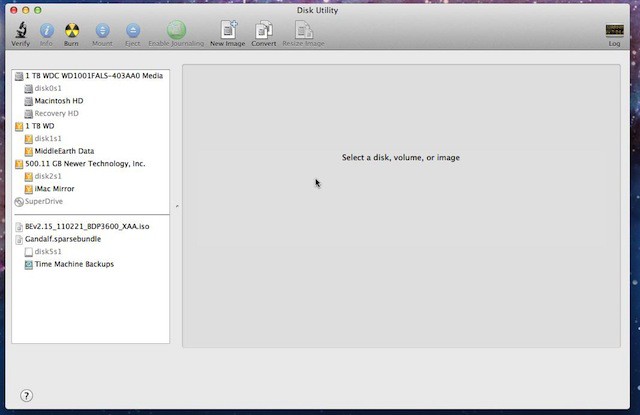
This tip is especially handy for Mac OS X Lion users, but it should even work with Mac OS X Snow Leopard too. You’ll be able to activate a hidden debugging menu and other hidden secrets in the Disk Utility app on your Mac in the folders Applications –> Utilities.

In order to turn on these features launch the Terminal app in Applications –> Utilities.  If Disk Utility is running close it. Now enter the following command and press enter in Terminal:
defaults write com.apple.DiskUtility advanced-image-options -bool true

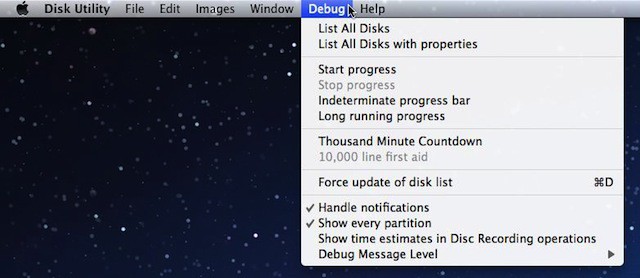
This will activate the new Debug menu which looks like this:
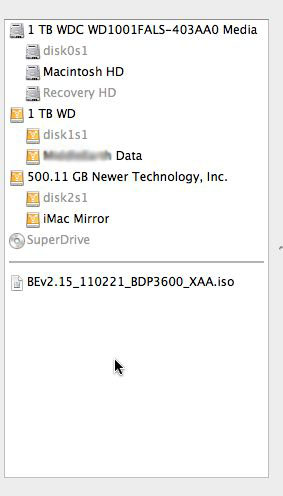
If you select the option Show Every partition in the Debug menu you’ll be able to see the Lion Recovery HD partition in Disk Utility which is normally hidden from view.  It will look something like this:
 

  • Subscribe to the Newsletter

    Our daily roundup of Apple news, reviews and how-tos. Plus the best Apple tweets, fun polls and inspiring Steve Jobs bons mots. Our readers say: "Love what you do" -- Christi Cardenas. "Absolutely love the content!" -- Harshita Arora. "Genuinely one of the highlights of my inbox" -- Lee Barnett.

Popular This Week

37 responses to “Enable Hidden Secrets and The Debug Menu In Disk Utility [OS X Tips]”

  1. jjlharrison says:

    Not working for me. :(

  2. Dallas Harris says:

    nor me either

  3. Courtenay Penick says:

    nor me

  4. Dallas Harris says:

    Try this:defaults write com.apple.DiskUtility DUDebugMenuEnabled 1got it from Here:http://macs.about.com/od/using

  5. Dallas Harris says:

    Try this:
    defaults write com.apple.DiskUtility DUDebugMenuEnabled 1

    Found it here:
    http://macs.about.com/od/using

  6. ErinsDad says:

    No joy here, either. Re-did, rebooted, too.

  7. Robert says:

    In the dutch version, it won’t work also.

  8. Al says:

    That command didn’t work for me but this one did.

    defaults write com.apple.DiskUtility DUDebugMenuEnabled 1    

  9. Lab says:

    Um, that worked the first time, Al. Maybe you should have written this article.

  10. Al says:

    I’m not that good. I got the information from here.

    http://reviews.cnet.com/8301-1

  11. ErinsDad says:

    Works!  Thank You!

  12. DavidWMartin says:

    Curious – what OS? It worked great for me on Mac OS X Lion 10.7.2 on an iMac.

  13. Brucem40 says:

    Worked for me too. Thanks

  14. onegiantleap says:

    Worked, thanks a lot!

  15. Tony says:

    Also running Lion 10.7.1 on an iMac and worked same way.

  16. Tony says:

    Also running Lion 10.7.1 on an iMac and worked same way.

  17. Tony says:

    Tip didn’t work while yours did just fine.Tks.Running Lion 10.7.1 on an iMac.

  18. RichardHenderson says:

    Yep, like the other commenters, the article didn’t enable debug, but this did (running 10.7.2). Thanks.

  19. guru_i says:

    defaults write com.apple.DiskUtility DUDebugMenuEnabled 1 yep this one worked for me too..Thanks AI

Leave a Reply

