
Tracking shipped packages is fast and easy in Mac OS X Lion due to Apple Mails tight integration with WebKit. It is also one feature that Apple brought to Mac OS X from iOS that I actually like.
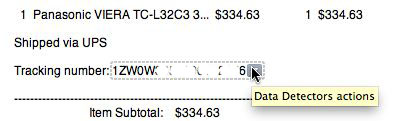
If you hover the mouse cursor over the tracking number and Mail recognizes it the number is surrounded by a dotted rectangular outline. If you click the down arrow you get two options: Track Shipment or Copy.
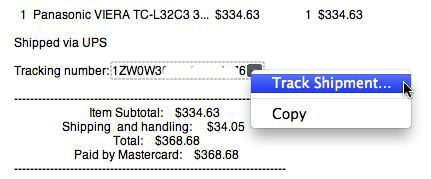
The latter copies the shipping number to the clipboard and the first option opens a window like this:
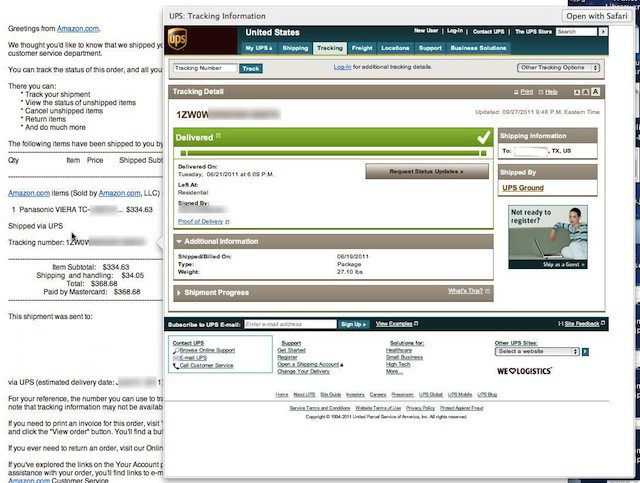
In this case the package shipped via UPS so Mail opens up a Quick Look of the website that tracks the package for UPS. This short cut means that you don’t have to launch Safari or switch to it to view package tracking.
If you dislike the data detection feature in Mail you can turn it off by opening the Mac OS X Terminal app and entering the following command and pressing return.
defaults write com.apple.mail DisableDataDetectors YES
If you want to turn data detection back on just changed the YES above to NO.

David W. Martin has more than 20 years of experience in the industry as a programmer, systems and business analyst, author, and consultant. David has written for CNET’s iPhoneatlas.com, MacLife.com, CultofMac.com, BYTE.com and recently for aNewDoman.net. He comes to Cult of Mac’s website with deep knowledge and passion for the all things Apple. Follow David on Twitter @david_w_martin or see what he’s up to now at davidwmartin.com.


8 responses to “Easily Track Your Packages In Mac OS X Lion Mail [OS X Tips]”
I discovered this accidentally in Lion and have used it a few times. I think it’s great, very helpful.
This actually also works with other countries’ postal systems. It surely works with the French mail tracking numbers (experience done with an order on Amazon.fr)
This functionality has also been available in Yahoo Mail.
sweet. didn’t know
I got a tracking number from Canada Post, but the Quick Look Tracking opens up to USPS.
Is there a way to change that?