httpv://www.youtube.com/watch?v=RCfn8tDqa9U
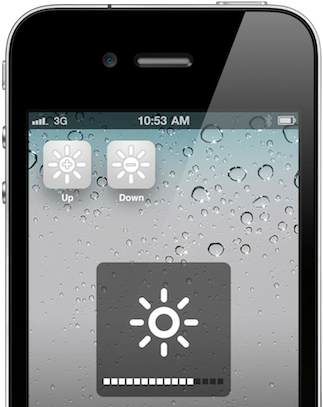
Brightness Icons is a tweak for jailbroken iOS devices that makes it easier than ever to adjust the brightness on your device. No longer do you have to navigate your way around the Settings app to dim your display — simply do it right from your home screen.
The free tweak, which is available from Cydia now, places two icons on your home screen labelled ‘Up’ and ‘Down’. As you’d expect, tapping the Up icon will turn your brightness up, while tapping the Down icon will turn it down. Holding each icon will quickly adjust the brightness to its maximum/minimum level in an instant.
The Brightness Icons tweak does require Winterboard to be installed on your device, which you may already have, but if you don’t, you’ll need to install that, too.
I’m a big fan of Brightness Icons — what do you think?
[via iDownloadBlog]

Killian Bell is a freelance writer based in the U.K. He has an interest in all things tech and also covers Android over at CultofAndroid.com. You can follow him on Twitter via @killianbell.

