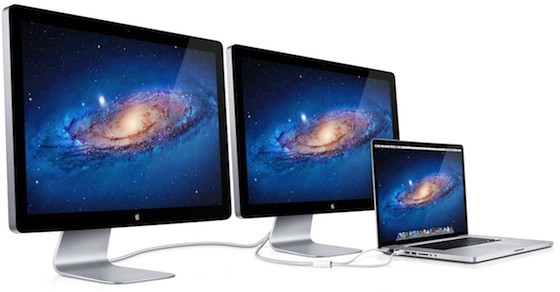
One of the cool things about Apple’s new Thunderbolt I/O standard is its daisy chaining abilities. You can string one Thunderbolt device through another one to a single Thunderbolt port with no degradation in speed or quality.
So let’s say you’ve got Apple’s old 27-inch Cinema Display, the one that connects through Mini DisplayPort. You may have gotten the notion in your head when Apple started shipping out Thunderbolt versions of the Cinema Display of daisy chaining them together. After all, why not? Other Thunderbolt peripherals can handle a Mini DisplayPort monitor. 54 horizontal inches of muilti-display splendor should easily be at your fingertips!
Think again.
According to a new Apple support document posted in the wake of Apple shipping out its first batch of Thunderbolt Cinema Displays, you can’t daisy chain a Mini DisplayPort monitor off of a Thunderbolt Cinema Display.
My guess is that there are going to be a few returned Cinema Displays with this revelation. After all, other Thunderbolt accessories can daisy chain a Mini DisplayPort monitor, so it’s not entirely unrealistic to expect Apple’s first big Thunderbolt accessory to manage the same trick. Apparently not, though.
[via MacRumors]

John Brownlee is a writer for Fast Company, and a contributing writer here at CoM. He has also written for Wired, Playboy, Boing Boing, Popular Mechanics, VentureBeat, and Gizmodo. He lives in Boston with his wife and two parakeets. You can follow him here on Twitter.


16 responses to “Well, Shoot… You Can’t Daisy Chain A Mini DisplayPort Monitor Off A Thunderbolt Cinema Display”
lame.
I wouldn’t have expected it to work. Especially not how the picture is showing.
OMG Apple! I was going to purchase a Thunderbolt Display in order to daisy chain it with my 27″ Cinema Display. It is a shame… :(
Just buy two new displays!
Sent from my iPhone
Steve
:-)
Have you noticed the Late-2011 iMac model in the compatibility list at the Apple Support document? Is an iMac upgrade coming later this year? Or just a mistype at apple.com?
how about putting another thunderbolt device between the displays? Ah right, there aren’t any..
Christoph, that’s the first thing that entered my mind as well. Mine arrives this coming Tuesday and I’m already running a Cinema display off a Promise TB RAID. I’ll try inserting the TB Display between the Mac and the RAID in this chain and report back then…
It arrived. I tried. Nicht. Nada. Oh well!
Mac Mini–>TB Display->Promise RAID–>MDP Display
No worky. Below is output from System Report. Specifically, note the Pegasus status (Status:No devices connected).
Mac mini:
Vendor Name:Apple, Inc.
Device Name:Mac mini
UID:0x0001000C1F299160
Firmware Version:22.2
Port:
Status:Connected
Link Status:2
Port Micro Firmware Version:2.0.7
Cable Micro Firmware Version:0.1.18
Thunderbolt Display:
Vendor Name:Apple, Inc.
Device Name:Thunderbolt Display
Vendor ID:0x1
Device ID:0x8002
Device Revision:0x1
UID:0x00010001001EEDA0
Firmware Version:22.2
Port:
Status:Connected
Link Status:2
Port Micro Firmware Version:0.0.21
Cable Micro Firmware Version:0.1.18
Port:
Status:Connected
Link Status:2
Cable Micro Firmware Version:0.1.18
Super Port Micro Firmware Version:0.0.21
Pegasus R-Series:
Vendor Name:Promise Technology, Inc.
Device Name:Pegasus R-Series
Vendor ID:0x2
Device ID:0x1
Device Revision:0x1
UID:0x0002000000006790
Firmware Version:22.2
Device Micro Firmware Version:1.0.0
Port:
Status:Connected
Link Status:2
Port Micro Firmware Version:1.4.14
Cable Micro Firmware Version:0.1.18
Port:
Status:No devices connected
Link Status:7
Port Micro Firmware Version:1.4.14
Odd. MacWorld ran tests and claim they connected a MDP Display to a Pegasus R6 and it worked:
http://www.macworld.com/articl…
I just tried again and it still doesn’t work, so either:
1. They were using pre-thunderbolt FW upgrade, and the upgrade disabled this?
2. A 27″ MDP behaves differently than a 24″ MDP.
3. The Mini’s Thunderbolt is not the same as the Macbook Pro they were using (I’m sure the Mini uses Light Ridge instead of the lamer Eagle Ridge though).
4. I’m using a Pegasus R4 vs their Pegasus R6.
5. My Mini has integrated graphics rather than the AMD (I went with a BTO Mini Server which doesn’t allow adding the AMD Radeon. This might be the reason, actually…
I tried the following:
1. Swapped the connections on the Pegasus (TB Display out connected to left, then right, ports). No difference, didn’t really expect there to be.
2. Disconnect/reconnect TB at the Mac Mini (this resulted in the TB Display blacking out and the MDP display taking over. Sigh!
3. In Display Preferences, click Detect Displays. This had no effect.
4. Reboot Mini. No difference.
Anyway, if you have a MBP 15″ or 17″, your mileage may very well differ.