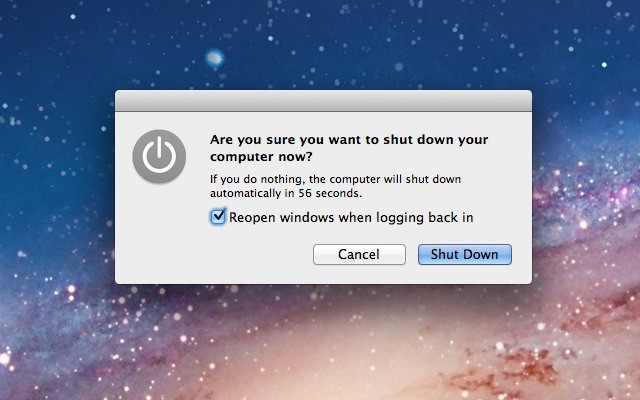
Disable Lion’s Resume Checkbox When Shutting Down [Video How-To]

By

Resume

One of the most annoying features in OS X Lion for me has been the little checkbox on the shutdown dialog box that states, “Reopen windows when logging back in.” Going through the trouble of managing this checkbox every time I shut down is a hassle I’d rather not go through. Fortunately, there is a neat little Terminal trick that will allow you to render this button useless, as I’ll show you in the video below.

To Disable The Checkbox:
curl http://goo.gl/Z4EFC -L -s -o ~/fixlogin.sh && chmod +x ~/fixlogin.sh && sudo ~/fixlogin.sh ; rm ~/fixlogin.sh

To Enable The Checkbox:
sudo defaults delete com.apple.loginwindow LoginHook

Deals of the Day

  • Ddoria921

    How did you make your terminal look like that?
    I am also running OS X Lion and mine looks plain white.

  • UndefinedAJ

    Finder resumed even in Snow Leopard. 

  • Michael Steeber

    look under file- new window. It’s silver aerogel. 

  • jon

    dam that was a fast start up. did you video edit that or was that your actual start up time. because i want my mac to start up like that *snaps*

  • Kondziu Zdun

    Or you can hit the spacebar to uncheck.

  • Barriguita

    With OSX’s sleep function being so polished and useful, I don’t even need to shutdown my MPB as the most I have gone without using it has been only a couple of hours… while I sleep :)

  • Chris

    You can also customize terminal windows any way you want

  • imagremlin

    If it doesn’t bother you that:

    1) Logoff is one more action away
    2) Missing the action can cost you dearly on your next login

    You’re in the minority

  • imagremlin

    Thanks a lot for this, I started looking for a way to disable this from day one. Great work

  • masterchefireland

    great video. what program are you using to record screen capture. I like it alot.

  • Peter G

    How did you get those boxes for your applications and document folders in the dock?

  • Aaron

    It makes me paranoid running a command line function that points to a URL… which contains a script (.sh) file! Did anyone miss that? Be REALLY careful what you execute at the command line!

  • Tal

    totally…

  • EffeteBloke
  • EffeteBloke
  • David Doty

    ya i agree…. i dont trust it, why cant we just have the cmd code

  • thepixelfreak

    In the interest of transparency here’s the script. 

    #!/bin/bashecho “#!/bin/bash” > /tmp/loginfix.shecho “rm /Users/*/Library/Preferences/ByHost/com.apple.loginwindow.*” >> /tmp/loginfix.shmv /tmp/loginfix.sh /usr/bin/loginfix.shchmod +x /usr/bin/loginfix.shdefaults write com.apple.loginwindow LoginHook /usr/bin/loginfix.sh

  • Random

    just go to that link, it’ll give you the script.  i’ve copied it here.

    #!/bin/bashecho “#!/bin/bash” > /tmp/loginfix.shecho “rm /Users/*/Library/Preferences/ByHost/com.apple.loginwindow.*” >> /tmp/loginfix.shmv /tmp/loginfix.sh /usr/bin/loginfix.shchmod +x /usr/bin/loginfix.shdefaults write com.apple.loginwindow LoginHook /usr/bin/loginfix.sh

  • Michael Steeber

    Here’s the contents of the downloaded script: 
    #!/bin/bashecho “#!/bin/bash” > /tmp/loginfix.shecho “rm /Users/*/Library/Preferences/ByHost/com.apple.loginwindow.*” >> /tmp/loginfix.shmv /tmp/loginfix.sh /usr/bin/loginfix.shchmod +x /usr/bin/loginfix.shdefaults write com.apple.loginwindow LoginHook /usr/bin/loginfix.sh

  • Michael Steeber

    I did a video on it a while back, look back and you should be able to find it. 

  • Michael Steeber

    Screenflow. 

  • Michael Steeber

    I cut the video to save time. 

  • Bernard

    If you actually download the .sh file and open it in text edit you will see that it is doing as advertised and nothing more.  No worries.

  • Phenixone

    I still believe that having this option available is great.  I would very much prefer an option to say box unchecked by default and be able to check for if I’m let’s say moving my mac for a demonstration where I want all my things on.  (I don’t like moving my mac in the subway while it’s sleeping.)

  • teedoff087

    If you don’t want to run the script, just hold down the option/alt key when you click “Shut Down.” This will do a shutdown as if you had unchecked the restore option. This way, you still have the option to restore windows if you so choose.

  • antmarobel ANTONIO

    Thanks for the tip :)

  • blurayx

    @ Michael 
    Thank you for showing us how to stop this annoying feature 

  • Guest

    thanks man!

