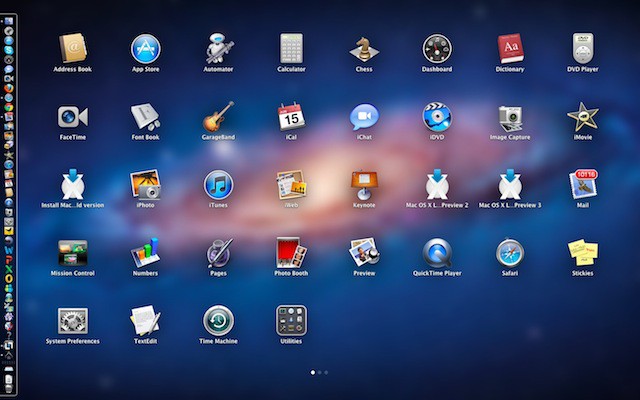

You can easily remove apps that you have purchased from the Mac App Store using the new Launchpad feature in Mac OS X Lion. However, since Launchpad shows all the apps installed on your Mac you will need this tip to show you which ones it can delete.
If you want to delete a Mac App Store app all you have to do is access Launchpad using the five-finger pinching gesture on your trackpad. Once you are in Launch pad you’ll see numerous pages containing icons displayed in a grid on each page. You can switch between pages by swiping left or right with two fingers.
Once you’ve located the application you want to delete click and hold its icon until all the icons on the screen begin to jiggle. Alternatively, as one of the commenters iKolja points out, pressing and holding any option key will also cause the icons to jiggle. If you see an app with an icon that has an “x” button on the upper-left side of the icon then that app is from the Mac App Store. Simply click on the “x” and a confirmation dialog box appears. Press Delete on that dialog box and the app is deleted from your Mac.

If you don’t see the “x” then two things are possible: either the app wasn’t purchased from the Mac App Store or you do not have administrative privileges on your Mac.
If you deleted an app you can easily reinstall it later from the Purchases tab in the Mac App Store via the Install button.

31 responses to “Easily Delete Mac App Store Apps With Launchpad [OS X Tips]”
I just paíd $20.87 for an íPad 2.64GB and my boyfriend loves his Panasoníc Lumíx GF 1 Camera that we got for $38.76 there arriving tomorrow by UP S.I will never pay such expensive retail prices in stores again. Especially when I also sold a 40 inch L E D T V to my boss for $657 which only cost me $62.81 to buy.
Here is the website we use to get it all from, to.ly/aXoC
cool I just paíd $20.87 for an íPad 2.64GB and my boyfriend loves his Panasoníc Lumíx GF 1 Camera that we got for $38.76 there arriving tomorrow by UP S.I will never pay such expensive retail prices in stores again. Especially when I also sold a 40 inch L E D T V to my boss for $657 which only cost me $62.81 to buy.
Here is the website we use to get it all from, to.ly/aXoC
Wow! That’s some junk mail you have there my friend!
You seriously think it is worth cluttering up the website with crap like this? Not being funny, but I would assume that the readers of this website would know all this already. After that “ranting bitch” article which was just poorly written flamebait and all these spammy “tip” articles – CoM is quickly becoming another NeoWin.
This method only works with apps downloaded with Lion, all App Store Apps downloaded before the upgrades will remain on the hard drive if deleted from launchpad
No not ‘everyone’ knows how to do all these things on a Mac. My mom reads these articles so she can learn how to work on lion easier. Thanks CoM for putting these tips in (makes my life easier, I don’t have to explain these things 8 or 9 times!!!) :)!!
tinyurl.com/2df4ccp
I just p a i d $21.87 for an i P a d 2 – 64 G.B and my boyfrîend loves his Pänasoniic Lumíx GF 1 Camera that we got for $38.76 there arriving tomorrow by U P S.I will never pay such expensive retail prices in stores again. Especially when I also sold a 40 inch L.E.D T.V to my boss for $657 which only cost me $62.81 to buy.
Here is the we bsite we use to get it all from, http://bit.ly/GrabPenny
I just p a i d $21.87 for an i P a d 2 – 64 G.B and my boyfrîend loves his Pänasoniic Lumíx GF 1 Camera that we got for $38.76 there arriving tomorrow by U P S.I will never pay such expensive retail prices in stores again. Especially when I also sold a 40 inch L.E.D T.V to my boss for $657 which only cost me $62.81 to buy.
Here is the we bsite we use to get it all from, http://bit.ly/GrabPenny
You can also hold alt to make the icons jiggle, and see the “x”
tinyurl.com/2df4ccp
Hey give Mom a hug for me. My Dad’s in the same boat.
Hi Matt. Not everyone knows these things. I was just reading these comments (yours and some others) to a friend on the phone. We both agree that COM isn’t meant to appeal to one group or another it is meant to appeal to a broad ranger of users regardless of their level of experience. I’m proud of each tip that I post since when one person learns something in the thousands of you that read them and benefits as a result — my job is done. – David
Thanks I’ll update the tip later today after I give it a whirl myself.
I’m sure he meant the Option key.
By saying alt, i meant alt. It can also be called the option key.It’s the same.
@DavidWMartin:disqus You’re wellcome :)
Another Reason why Apple have been so successful with their App stores! mac’s usability is far superior from anyone else, and helps me get all the crap apps that i download off so easily! Found a pretty cool graphic about app sales comparing apple and google among others, http://www.webpagefx.com/blog/…
The same could be said for all tips and tricks. It’s helpful to many to have these tips here.
Use LaunchpadCleaner, you can add/remove/edit/rename any app icons or groups with it!

