How to Make iCal Look the Way it Did Before Lion

How to Make iCal Look the Way it Did Before Lion

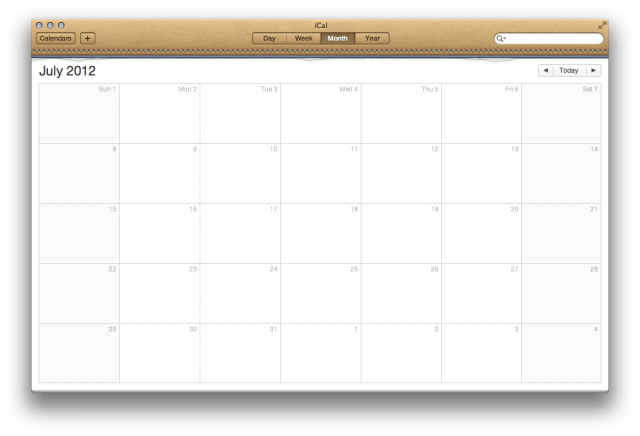
In OS X Lion, Apple redesigned iCal with a new faux leather look that resembles a physical calendar binding. This type of design choice is called “skeuomorphic,” because it was, “deliberately employed to make the new look comfortably old and familiar.” Lion’s version of iCal takes the old look and feel of a physical calendar and ports that to a virtual application.

While some may like the new look of iCal in Lion, many have raised complaints. If you’d like to make iCal look like it did in Snow Leopard, we’ve got just the trick to return iCal back to its monochromatic glory.

Before we begin, it’s very important that you backup iCal in case anything goes wrong. If you follow the instructions, everything should work fine, but it’s always important to take precautions.
How to Make iCal Look the Way it Did Before Lion

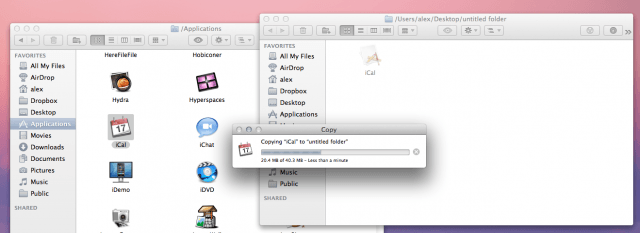
To backup iCal in its native Lion state, create a new folder on your desktop and navigate to your Applications folder and find the iCal icon. Copy iCal from your Applications folder to the new folder you just made by selecting the iCal icon and hitting Command+C to copy. Then select your new folder and hit Command+V to paste and copy all of iCal’s contents. The Finder will then copy iCal.

Once you’ve done that, make sure you quit iCal on your Mac. Backing up and then quitting iCal is very important before you try to change the app’s content files.

How to Get the Old iCal Back:

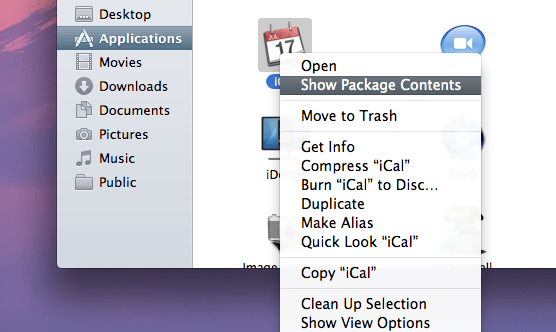
Step 1: In your Applications folder, select the iCal icon and right click. Then click “Show Package Contents.”
How to Make iCal Look the Way it Did Before Lion

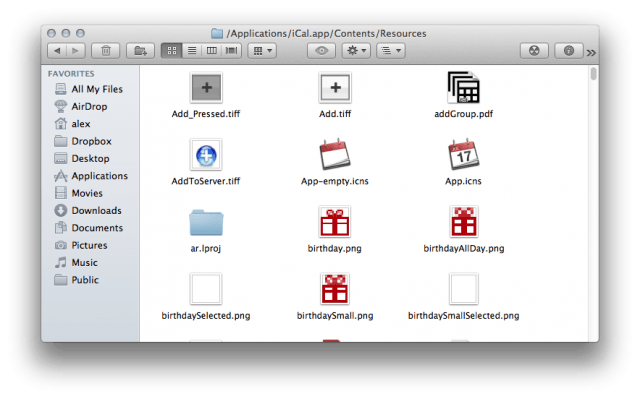
Step 2: Open the “Contents” folder, and then open the “Resources” folder.
How to Make iCal Look the Way it Did Before Lion

Step 3: Download this zip file to replace iCal’s leather theme with a solid grey bar. These files come courtesy of Simple and Usable.

Step 4: Drag the contents of the ical_lion_silver folder to iCal’s Resources folder. You can easily do this by hitting Command+A to select all files to then drag over.

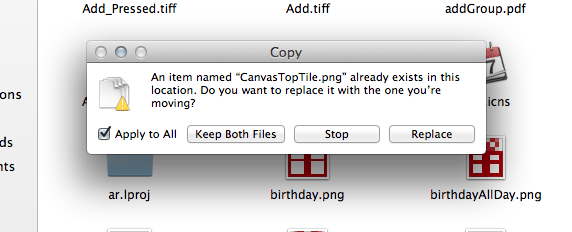
Step 5: Finder will ask you if you want to “Keep Both Files,” “Stop,” or “Replace.” Select the “Apply to All” checkbox and hit “Replace.”
How to Make iCal Look the Way it Did Before Lion

Step 6: You will then have to authenticate this action in Finder with your administrator password.

How to Make iCal Look the Way it Did Before Lion

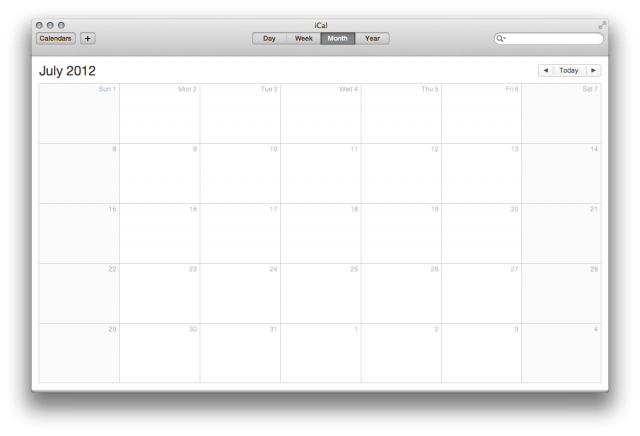
Step 7: Close all of your Finder windows and open iCal. The leather theme should be removed and replaced with the monochromatic look from Snow Leopard.
How to Make iCal Look the Way it Did Before Lion

That’s it! No more leather in iCal on Lion!

DON'T MISS
How to Give Address Book A Clean and Simple Look in Lion

Apps you might like

  • Chris Whittaker

    Hey, if you’re so resistant to change, why not just keep Snow Leopard installed.

    • http://digitizedsociety.tumblr.com DigitizedSociety

      because some people like the GUI to be consistent while using the latest greatest software.

    • http://www.facebook.com/people/Peter-Reynolds/1516728940 Peter Reynolds

      It was design change for the worse.  Like vinyl ‘wood’ on an Audi dashboard.

    • http://twitter.com/Cowicide Cowicide

      So if Apple made the texture look like a baboon’s ass, you’d keep it?

    • http://twitter.com/Cowicide Cowicide

      This….

  • Emil

    That looks even worse with the yellow shadow around all text…

    • Prof. Peabody

      Yeah, hacking stuff is never perfect.  You have to be seriously OCD to bother with this kind of thing for the most part, (but not OCD enough to care that the result is not perfect).  

  • http://www.facebook.com/profile.php?id=596381628 Tomi Morillo

    I wanna have Address Book the way it was pre-Lion… this new UI sucks..

  • Anonymous

    I can live with iCal, the Address Book though…

    • http://www.alexheath.me Alex Heath

      Check back tomorrow :)

  • http://pulse.yahoo.com/_CP4IRMGKH55PFVDWN6G5BRRJXM Ramón

    What I miss most is the leftmost column and the colors. I keep many calendars and color-coding them helps them pop out on the page. These pale, washed out pastels aren’t a better alternative to the previous ones.

    • Anonymous

      Check out BusyCal from BusyMac: http://www.busymac.com/
      It’s like “iCal Pro” and has the same design sense as the original.  I use it exclusively, and it works great.  Syncs perfectly with Google Calendar, no muss no fuss.

    • Colin Brady

      Totally agree.  Did you find a way to get the color coding back?

  • http://pulse.yahoo.com/_CP4IRMGKH55PFVDWN6G5BRRJXM Ramón

    What I miss most is the leftmost column and the colors. I keep many calendars and color-coding them helps them pop out on the page. These pale, washed out pastels aren’t a better alternative to the previous ones.

  • http://twitter.com/Jonathan_M Jonathan Mitchell

    Go here if you want address book as well as ical. Way simpler than what was posted above. 

     http://macnix.blogspot.com/2011/07/change-mac-os-x-107-lion-ical-skin-to.html

    • http://twitter.com/pwolfinger Pete Wolfinger

      This would be great if the Address Book mod actually made it look like a normal app. You know… normal traffic light buttons, simple rounded border… none of this “book” appearance… you know what I’m saying? I don’t see the point of only doing part of a job.

  • http://www.facebook.com/people/Kevin-Daniels/100000402160799 Kevin Daniels

     was laid off in 2008, that being said. I have been an Apple fan since 1997. I was given Lion as a gift read though the Apple website about Lion. I run Logic 8 to help me de-stress and to take my mind off of being unemployed. I tried to open Logic 8 and found that it is not compatible with Lion. Nowhere on the Apple website states that. I just got off the phone with Apple and that said either upgrade Logic or I’m SOL.

    UPDATE:

     open /Applications/Logic Express.app/Contents/MacOS/Logic Express This is the command to enter into terminal to get Logic 8 to work in Lion. Apple disabled it so you would would have to upgrade to the latest version of Logic.Great way to do business with you customers .

  • http://twitter.com/digihead Girts Dumpis

    i’m totally disappointed with new calendar! old one wasn’t a very best on earth but new one is pure crap! why they removed sidebar w months and calendars? usability is worse than previous one, what are designers in apple thinking?

  • http://twitter.com/Cowicide Cowicide

    Maybe change the main “LeatherTile.png” to something like this?

    http://www.flickr.com/photos/49403380@N00/5989398514/lightbox/

  • Anonymous
  • http://pulse.yahoo.com/_ZHIV4RDQFBFRXJBXFCQIDW4SB4 Jeffrey

    A HUGE, HUGE thank you for this tip.  I don’t understand why Apple would want to make my calendar look like a Franklin Planner from the 1980s.  Actually, my guess is that everyone at Apple thought the monthly page flip animation was so cool that they had use it.  Lion iCal was a huge step backwards.  Thank you again for this fix!

  • Lawrence N Fenton

    @google-55272f22889ac32961db62f277bf886c:disqus Couldn’t aggree with you more, Chris. Furthermore, my Partner is dyslexic and colour variations between applications helps him distinguish what he’s actually looking at, the buff colour marks this to be the Calendar and not, say, the Mail app, especially when you move into Exposé. A homogenised look, however well executed, can look rather flat, particulary the ‘chrome/metal’ look of so many other applications. Texture also brings some interest to these sleek and sometimes cold, everyday tasks. But if you want to fiddle with Lion (sounds kinda pervy) after barely 10 days of its general release, then go ahead, and whilst your at it, cover the other apps you dislike on the screen with gaffertape and draw on an ironic 8 bit line of ASCII in green…..

  • http://www.supershops.org dongche70
  • Anonymous

    I like the leather look, esp in full screen, it gives me a warm kinda cozy visual feel.

  • Anonymous

    Uh…Alex…that is *not* the way iCal looked before.

    To my mind the *biggest* problem with the new iCal is that if I’m viewing it in Week View (my personal preference) there’s no way to skip ahead a month. I can only skip week by week, which is awkward when I’m booking things for November now.

    In the old version of iCal I could do this. In the new version I need to leave Week View and switch to month, click the date, then change to week, then cross my fingers hoping I didn’t make a bad mouse click.

    So, Alex, this is *not* the way iCal looked before. You’re just removing the skin, dummy.

    • http://twitter.com/jikoy1 jikoy

      I just paid $22.87 for an iPad2-64GB and my girlfriend loves her Panasonic Lumix GF 1 Camera that we got for $38.76 there arriving tomorrow by UPS. I will never pay such expensive retail prices in stores again. Especially when I also sold a 40 inch LED TV to my boss for $675 which only cost me $62.81 to buy. Here is the website we use to get it all from, CoolCent. com

    • Anonymous

      Check out BusyCal from BusyMac: http://www.busymac.com/
      It’s like “iCal Pro” and has the same design sense as the original.  I use it exclusively, and it works great.  Syncs perfectly with Google Calendar, no muss no fuss.

    • http://twitter.com/rpsx2 PS

      it’s pretty obvious this instructs on how to just change bitmaps. what do you expect, a re-programming of iCal, somehow? reverse engineering of it, change these 300 characters in a hex editor, and all is okay? what is wrong with people where they get some free product or information, and it is not want, so somehow they get angry. get a grip. be nice.

  • Justin Terry

    So, this is great, as far as looks go. 
    I did this to both my address book & iCal and now neither will sync with my mobile me. 
    Shouldn’t have to sacrifice the syncing feature just for a new look, right?
    Any ideas on how to have the minimal look and full functionality?

  • Anonymous

    This is great; thanks.  Please build a tutorial for Address Book as well.  Do you know of a way to make the scroll bar in Safari and Finder the width they were in SL?  The narrow bar is great for a laptop, but sucks on a large monitor.

  • Anonymous

    This is great; thanks.  Please build a tutorial for Address Book as well.  Do you know of a way to make the scroll bar in Safari and Finder the width they were in SL?  The narrow bar is great for a laptop, but sucks on a large monitor.

  • Anonymous

    This is great; thanks.  Please build a tutorial for Address Book as well.  Do you know of a way to make the scroll bar in Safari and Finder the width they were in SL?  The narrow bar is great for a laptop, but sucks on a large monitor.

  • Anonymous

    This is great; thanks.  Please build a tutorial for Address Book as well.  Do you know of a way to make the scroll bar in Safari and Finder the width they were in SL?  The narrow bar is great for a laptop, but sucks on a large monitor.

  • Anonymous

    This is great; thanks.  Please build a tutorial for Address Book as well.  Do you know of a way to make the scroll bar in Safari and Finder the width they were in SL?  The narrow bar is great for a laptop, but sucks on a large monitor.

  • Alicewalker

    Thanks so much! That leather look was ugly

  • Steve Steele

    Thanks!

  • Steve Steele

    Thanks!

  • Visage Eleven

    Ugh! I need to get rid of that leather and the torn page! How can Apple get so shockingly cheesy…Thanks for this.

  • Tim

    Apple really dropped the ball on this one …  My wife is visually impaired and she cannot see the light grey text font. 

  • Johnnnydadda

    Is there any way to get iCal 3 back?
    ICal 4 has dropped notes for the edit panel making it more clumsy.
    It’d be cool to have a quarterly and year view and for the month to be either side of the current date instead of locked to the calender month.

  • Luis

    Need to see 1 or 2 month calendar on the side while looking at week’s calendar! In the old fashion iCal it resulted very convenient, now I just can’t find the way to add the month’s calendar as a side view….

About the author

Alex HeathAlex Heath is a news contributor at Cult of Mac. He also covers jailbreak news and reviews. He previously served as an editor for iDownloadBlog. You can find out more about him on his personal site and also follow him on Twitter.

(sorry, you need Javascript to see this e-mail address)| Read more posts by .

Posted in How-To, Top stories | Tagged: , , , |

