How to See Your OS X Lion Download Progress

How to See Your OS X Lion Download Progress

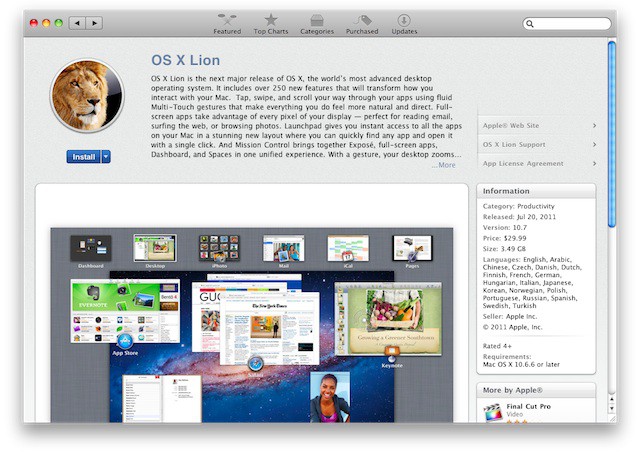
In case you’ve been living under a rock, Apple has released OS X Lion for $30 in the Mac App Store. Lion was made available this morning for download, and will be sold at Apple stores on a USB thumb drive in August.

If you’ve started downloading Lion, you may notice that it takes a lot longer to download than most apps. That’s because it weighs in at a hefty 4GB. Luckily, there’s a way to at least see your Lion download progress as you wait.
How to See Your OS X Lion Download Progress

You’ll notice that when you start your download, all you get is a little blue progress bar under the app icon in your Mac’s dock. That’s hardly sufficient if you need to see how much time is left for your download to finish.

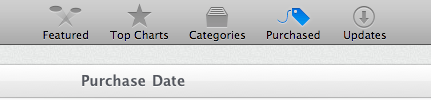
If you head over to the Purchases tab in the Mac App Store, you can see a list of all the purchased content you’ve downloaded. Once you buy Lion, you can hop over to this tab and watch the time estimate of how long until the download finishes. Pretty hand for those of us with Lion fever.

[via TUAW]

DON'T MISS
How to Pause an App Download [iOS Tips]

Apps you might like

  • http://www.facebook.com/erfan.severi Erfan Severi

    got mine :D

  • http://www.facebook.com/erfan.severi Erfan Severi

    got mine :D

  • http://www.facebook.com/mattharrisglobal Matt Harris

    Thank you for this post, all I could see was the progress bar which told me nothing. This helped a lot. Mine is going so slow. 

    • http://www.facebook.com/profile.php?id=1234838173 Finlay MacArthur

      Same here, mines working out at 1 Gb per hour.

  • http://profiles.google.com/eric.sondeen Eric Sondeen

    45 min download for me early this morning…  Comcast–pretty good bandwidth.

  • http://pulse.yahoo.com/_XBYT7GJTPVA6IFZIIXNZIHQCLY justin

    Thank you for this… This helps me alot, i can see where the progress bar is going… Mine is very slow (871.36MB of 3.74GB-1hr 25mins). 

  • http://pulse.yahoo.com/_XBYT7GJTPVA6IFZIIXNZIHQCLY justin

    Can’t Wait man!!!……….:)

  • http://twitter.com/edario Edgar Quintero

    Yea well don’t forget to set your Mac to non sleep mode, came back and it was stuck at 600mb… had to pause it and unpause it to get it going again, simply resuming from sleep doesn’t do it.

  • http://www.facebook.com/profile.php?id=697540676 William Brynjolfsson

    go to the mac store- got mine in less than 5 minuets- installing it was a different ball game.

  • http://www.facebook.com/profile.php?id=1200544224 Austin Sersen

    Thanks for the tip.  Less time than I thought it would take.

  • http://twitter.com/HuggingFitMum HuggingFitMum

    Thanks for this post! Been wondering how long it would take! I still have 3 hours to go!

  • Randall Hudson

    Figuring that the entire world was going to trying to download this yesterday (according to Apple there was over 1 million downloads in the first 24 hours) I opted to wait a day. It took all of 18 minutes for me to download it tonight.

  • http://pulse.yahoo.com/_3ALBBRRMZCU3NWCA2KWOTNGVWE SandyS

    Thanks for this!  It shows exactly how far and how long to go!

  • http://www.facebook.com/profile.php?id=657526758 Lorna Yonés Semidei

    thanks a lot!! Apparently the whole world is downloading this. lol 2 more GB to go! ;-)

  • Anonymous

    Well I was a UT99 addict. After installing Lion I get the message that Power PC apps can no longer be accessed. Going through withdrawal pains and it’s only been a few hours :(

  • http://www.facebook.com/profile.php?id=886110323 Aitor Riano Ojanguren

    wow thanks!!

  • Lenna Saeidzadeh

    Fantastic thanks! 

  • ric

    Thanks wasn’t even sure if it was working, takes a while for even a little green bar to start showing.

  • Anonymous

    Neat thank you.

  • Allemania_ak

    Good grief this download is slow!! It’s been downloading for 3 hours now and it is only at 710.07 MB out of 3.79 GB and says that it still has anywhere from 12-23 hours to go (the time keeps changing)! I wonder if I should just pause it, reset my internet and come back to resume the download again??

    • Allemania_ak

      I forgot to add that I don’t see a “little blue progress bar” under my App icon on my dock. The only way I could tell it was downloading is when I clicked on the purchases icon and it is showing the progress there. But as I said, it is very, very slow.

  • http://www.facebook.com/people/Gary-Dhillon/621702626 Gary Dhillon

    good one thanks..

About the author

Alex HeathAlex Heath is a news contributor at Cult of Mac. He also covers jailbreak news and reviews. He previously served as an editor for iDownloadBlog. You can find out more about him on his personal site and also follow him on Twitter.

(sorry, you need Javascript to see this e-mail address)| Read more posts by .

Posted in How-To | Tagged: , |

