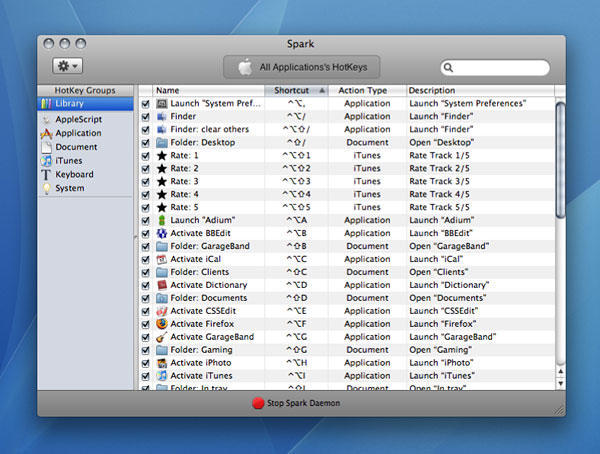
What it is: A hot-key manager, enabling you to define system-wide shortcuts for launching applications, opening folders, and performing other Mac actions.
Why it’s good: For many Mac users, there comes a time when stashing regularly used apps and documents in the Dock no longer cuts it. Spark enables you to define keyboard shortcuts to access these things instead, meaning you don’t have to lift your hands from the keyboard to launch a new app. By defining a personal system (such as Control+Option+letter for apps/Control+Shift+letter for folders), you can set certain modifiers to apply to certain types of item, adding a key letter from an item’s name as a mental trigger. Advanced actions enable you to take things further (turning the trigger into a toggle, launching an app and hiding others, and so on), and shortcuts are also available for iTunes controls (such as rating tracks) and system functions.
In use, Spark is stable, set-up is simple and flexible, and after a week’s use the shortcuts you define become second nature, burned into your muscle memory. In fact, new Macs feel naked without Spark.
Where to get it: Spark requires Mac OS X 10.4.11 or later, and is free. It’s available from Shadow Lab—and please bung them a few bucks as a donation if you use Spark regularly.

Craig Grannell was once Cult of Mac’s designer and an occasional contributor. Find out whatever he’s doing now on Twitter @CraigGrannell or his website, craiggrannell.com.

