(You're reading all posts by John Brownlee)

About John Brownlee

John Brownlee John Brownlee is Cult of Mac's Deputy Editor. He has also written for Wired, Playboy, Boing Boing, Popular Mechanics, VentureBeat, and Gizmodo. He lives in Boston with his girlfriend and two parakeets. You can follow him here on Twitter.

(sorry, you need Javascript to see this e-mail address)

iAd Workbench Lets Devs Advertise Their Apps For As Little As $50

best-screen

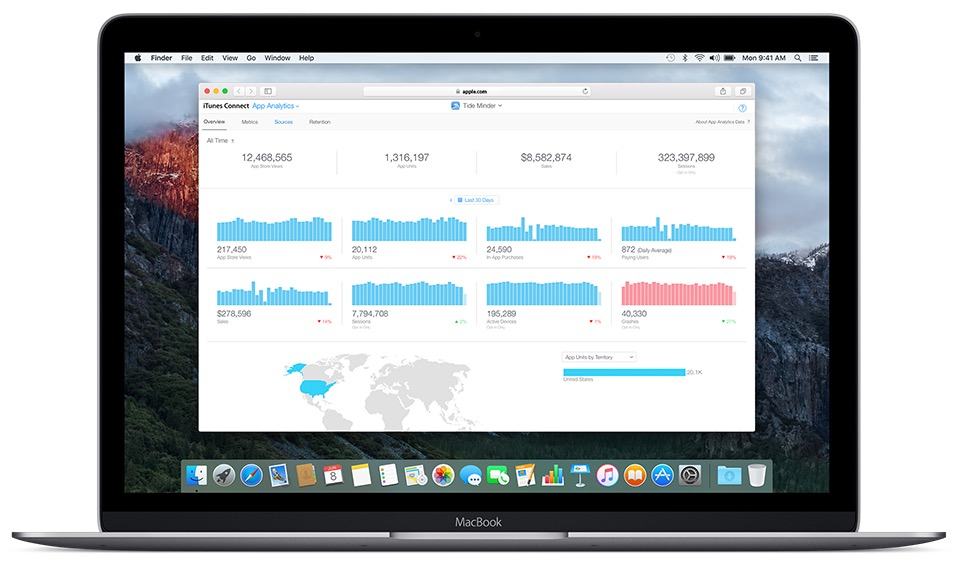
iAd has not been a big hit for Apple. Although the service was launched with a lot of fanfare about ads that you truly want to play around with and unheard-of levels of engagement, iAds hasn’t really taken off.

Part of the issue was Apple’s strategy: they focused on targeting large companies and demanded they make huge minimum buys-in. There was no dipping a toe in iAd: you either didn’t use it at all, or plunged right into your neck for hundreds of thousands of dollars.

Apple’s waffled on that before, allowing ad developers to start hocking their own apps on the iAd network starting in 2010. Today, however, Apple has added an iAd Workbench, making it even easier (and way, way cheaper) for developers to advertise with the network.

Read the rest of this post »

What OS X 10.10 Will Look Like After Jony Ive Brings It In Line With iOS 7

os_x_mavericks__desktop_by_ohsneezeme-d68l41f

One thing’s for sure: once you have iOS 7 installed, OS X Mavericks sticks out like a sore thumb. iOS 7 is where Apple’s software design is headed, and OS X Mavericks is what Apple’s software design aesthetic is fleeing from.

Clearly, OS X Mavericks was left alone this year because Apple couldn’t concentrate on two design overhauls at once. Instead, Ive & Co. simply satisfied themselves with stripping out some of OS X’s more Forstallian flourishes, like the Corinthian leather and gray linen textures.

But what about next year? What would OS X 10.10 look like if brought in line with the design of iOS 7? DeviantArt user Ohsneezeme‘s concept, while not perfect — he hasn’t touched the icons or the dock — is a strong guess.

I like it. What about you?

OS X Mavericks Will Now Let You Schedule App Updates For The Evening

testing

This is a neat little new detail in OS X Mavericks: if there are updates available for your system, the Notification will allow you to delay installing them for an hour, or until the evening when your system isn’t busy. And you can actually dismiss the damn thing now without it just immediately popping back up!

For other things new in OS X Mavericks, check out our gallery round-up.

OS X Mavericks Isn’t Named After A Cat: It’s Named After A Dog

2008-06-26_White_German_Shepherd_Dog_Posing_3

Yesterday, Apple unveiled OS X 10.9 and joked that after a decade, they were ditching their scheme of naming OS X releases after cats because they’d simply run out of big cat names to use. Instead, from now on, they’d name future versions of OS X after places in California, starting with OS X Mavericks, named after a famous Californian surfing spot.

What’s pretty funny about the choice of ‘Mavericks’ as a name for OS X, though, is that the real-world location is named after a German Shephard, meaning that argue switched from naming their OS X releases after cats to naming them after dogs instead!

Read the rest of this post »

Why You Probably Shouldn’t Install iOS 7 Right Now [Opinion]

IMG_2379

In the words of Apple itself, iOS 7 is the biggest change to their mobile operating system since the introduction of the original iPhone back in 2007. It’s more functional then ever, it’s prettier than ever: it’s the very definition of digital design purified and clarified down to the very basics of form merged with function.

Understandably, that means that many people are tempted to install it on their devices, either by forking over $99 for an Apple developer account or paying five or ten bucks to someone online to register your UDID for you.

We know it’s hard to wait, but you really shouldn’t do it. Here’s why.

Read the rest of this post »

OS X Mavericks: Here’s What’s New [Gallery]

OS-X-Mavericks-Features-MacBook

Although it’s not quite the overhaul we’re seeing in iOS 7, OS X 10.9 Mavericks is an exciting new update to OS X that crams a lot of new features into the Mac operating system, including Maps, iBooks, iCloud Keychain, a new Safari, a more powerful Finder with tabbed windows and tagging, better Notifications, far improved battery life support, and much, much more.

We’re still delving into Maverick and spotting the best features. Here’s everything new we’ve spotted so far, and we’ll be updating this post with more screenshots of the new shiny in OS X Mavericks.

Read the rest of this post »

How You Close Apps In iOS 7’s App Switcher [GIF]

Screen Shot 2013-06-11 at 10.07.04 AM

iOS 7’s new Multitasking app switcher is pretty nifty, and also pretty obviously inspired by popular jailbreak app switcher Auxo. One of the many ways in which iOS 7 Multitasking borrows cues from Auxo is how you actually kill running background apps: with a swipe! We’ve made a nice little animated GIF showing how it works.

Read the rest of this post »

Here’s Where To Download OS X Mavericks’ Beautiful New Wallpaper [Image]

W8IdvVk

If you want to make your Mac look like it’s running OS X Mavericks but don’t want to wait for fall (or for the Apple developer site to stop crapping itself), here’s the default wallpaper OS X 10.9 now uses.

Looks great, doesn’t it? Download it in high-resolution here or here directly from Apple.

iOS 7’s Maps Icon Is No Longer Trying To Kill You [Image]

enhanced-buzz-29031-1339521580-1

From top to bottom: pre-iOS 6 Maps icon, iOS 6 Maps icon, iOS 7 Maps icon.

When Apple unveiled iOS 6’s new Maps icon, it became an emblem for everything that was wrong with Apple Maps, a service that — at launch — was widely criticized as being inferior to Google’s own maps data, which every previous version of iOS had shipped with.

Why the icon? Because it gave directions that would probably end up killing you if you followed them in real life. But that’s all changed in iOS 7.

Read the rest of this post »

Why iOS 7’s New Signal Dots Represent Apple’s Ultimate Victory Over AT&T & Verizon [Update: Oops!]

936931_10151502377238753_1841468068_n

Update: This post is wrong. Once we downloaded iOS 7, it was clear that the carrier name is still very much a part of iOS, even though Apple didn’t show it in their keynote. Mea culpa!

With iOS 7, Apple is getting rid of the signal bars in the top left-hand corner and replacing them with five dots to represent signal strength.

This is a good move, because the iOS signal bars have been incredibly misleading for years, although it remains to be seen if the new dots will come with controversies of their own.

Here’s the thing I really found interesting about it, though. Notice there’s no room for a carrier name anymore. Apple has finally succeeded in removing every trace of carrier branding from every iPhone they sell.

Read the rest of this post »