Up next in 10


More Apple news: http://www.cultofmac.com
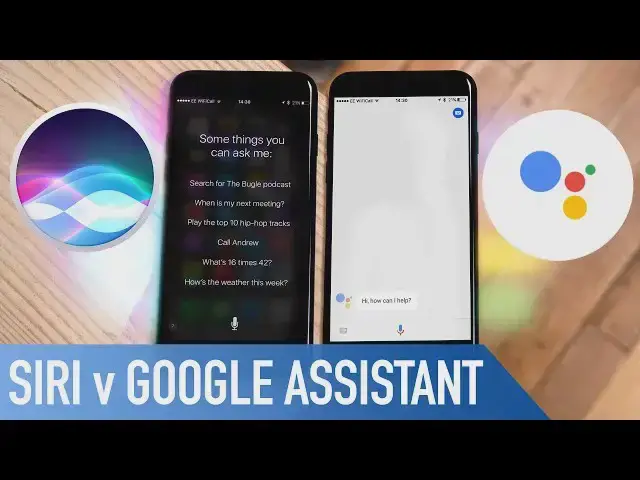
Google Assistant for iOS was released at Google I/O, and having never tried it before...I thought it was only right to put them head to head. Which do you think is the ultimate virtual assistant?
Follow us!
Twitter: https://twitter.com/cultofmac
Facebook: https://www.facebook.com/cultofmac
Instagram: https://instagram.com/cultofmac/
Show More Show Less View Video Transcript
0:00
Who's better, Apple or Google
0:03
I'm all level. This is the top result. Hey guys, Stephen Cult of Mac here
0:11
Now, at Google I.O. Last week, it was announced that Google Assistant was heading over to iOS
0:16
Now, I've never given it a go, so I thought in this video, I'd put Siri and Google Assistant head-to-head
0:21
So, let's get started. Here on the left, I've got my iPhone 7, with Google Assistant installed, and on the right, I've got my friend's iPhone 6 to use Siri
0:30
Both are connected to the same Wi-Fi to be as fair as possible. So let's open up Google Assistant
0:35
What's the weather like tomorrow? Here's the forecast for tomorrow. It'll be mostly sunny tomorrow in Salford with a high of 19 and a low of 12
0:43
Both on par there. Both have pretty much the same information. How long would it take to travel to the moon
0:51
About three days. Here's what I found on the web for how long would it take to travel to the moon. Apollo missions took about three days to reach the moon
0:57
So, Google actually given me a definitive answer here, while Siri brings me to a web page
1:03
Let's ask another. Who was Steve Jobs? Thanks for asking about Steve
1:09
According to Wikipedia, Stephen Paul Jobs was an American entrepreneur, businessman, inventor and industrial designer
1:15
Again, both redirected me to relevant sites, but with Google reading some information to me
1:20
Tell me a joke. Two iPhones walk into a bar. I forget the rest
1:27
Tell me a joke. One joke coming up. What did the snail say while sitting on the turtle
1:35
Wee! Google definitely has a better delivery. Can you wrap? Okay, here goes
1:45
I wrote this one myself. Apologies in advance to the Sugar Hill gang I said a hip Save me from the kippy the peak peak and pop and you don stop Spass a rocket To the Pong the Tudgy Sayap jump the doozy To the rhythm of the ontology
2:02
Can you rap? Okay, it didn't do anything there. Let's try again
2:08
Can you rap? I'm not much of a rapper, but I can sing
2:13
Happy birthday. Sing happy birthday. Happy birthday to you, happy birthday to you
2:25
Happy birthday to you. Happy birthday to the person whose birthday it is
2:32
Happy birthday to you. Open the Facebook app. Sorry, I don't know how to open that, but I'm still learning
2:46
Google can't open any apps at the moment. open any apps at the moment unless they're one of their own like Gmail, but I'm sure
2:51
that I'll be sorted in the future. Set a timer for two minutes
2:56
Okay, two minutes and counting. Both did that no problem. Stop timer
3:03
Sure, consider it cancelled. Okay, I stopped the timer and reset it to two minutes
3:08
Where is Apple based? Here's a summary from Wikipedia. Check it out
3:14
The Apple campus is the corporate headquarters of Apple Inc. located at one infinite loop
3:19
Siri has provided me with a straight-up map, whereas Google is using Wikipedia again
3:22
to relay the information. Remind me when I get home to put the washing
3:26
in the washing machine. Okay, I'll remind you when you arrive at home
3:34
Yes. That works fine on both, but obviously Siri already knows where home is
3:41
Remember 34219 Okay I remember that Okay I remind you So Google has this little trick where it remember information that you tell it to
3:53
whereas Siri will just add it to reminders. What was the number I asked you to remember
3:59
Hmm, I don't recall. It is 34,219. Those are all the reminders you have
4:05
Okay, even though Siri has placed it under reminders, it got it straight away. Let's phrase it differently for Google
4:10
What did I ask you to remember? I don't understand. What did I ask you to remember
4:20
Here's what you asked me to remember recently. May 22nd, 2017. Remember 34,219
4:28
There we go. Remember I'm parked in Block 5 Row A. Okay, I'll remember you parked in Black 5 row 8. Okay
4:39
Okay, I'll remember that you parked in Black 5 row 8. But I can't determine your parking. Both have taken that note, even if Google misunderstood me, but Siri has gone the extra step and dropped a pin in maps
4:51
Play J.P. Cooper Passport Home. Play J.P. Cooper Passport Home
5:11
Play J.P. Cooper, Passport, Home. All right
5:21
It's doing an awful job at that. Play Bruno Mars, Uptown Funk
5:29
Playing music. I Not quite what I asked for but close
5:49
Give me directions for Manchester Trafford Centre. Get you directions to a true Trafford Centre
5:58
Siri has opened up maps, ready with directions, whereas Google has tried to go to the Google Maps website
6:03
which is still loading. Take a selfie. I can't take pictures on iPhones
6:12
Siri has opened up the camera app here, no problem, with the front facing camera selected
6:17
Again, this could be something that Google adds in the future. We'll have to wait and see. Call Donna
6:27
Both can do it, only Google requires me to tap call. Overall, I'm really impressed with Google Assistant
6:33
and as time goes on, I'm sure it's going to get even better for iOS, especially when it's able to integrate the third-party apps
6:39
the same way it does with Google apps. The only problem I found so far is every now and then it won't understand me
6:44
which is probably due to my accent, and it does also freeze from time to time
6:50
The only bonus Google has over Siri is that you can actually type in your questions if you don't want to say it out loud
6:56
I'm personally going to still use Siri as it's become second nature to me, and it works nine times out of ten
7:01
Plus, now that I own a car with car play, I use it more than ever. Well, it's it for this video, but let me know in the comments section down below, which assistant you prefer
7:11
Are you sticking with Siri, or are you jumping ship and switch into Google Assistant
7:15
Let me know in the comments down below. Also, if you enjoyed this video, go ahead and hit that like button
7:20
And don't forget to hit subscribe, so don't miss a single video from Cult of Mac
7:24
I'll catch in the next one
Consumer Electronics
Software
Science
Intelligent Personal Assistants