Reeder for Mac Beta is Out, Awesome

Reeder for Mac Beta is Out, Awesome

Silvio Rizzi had a damn good day. Not only did the Swiss creator of Reeder, the must-have Google Reader, um, reader for iOS, pushed out version 2.2 for iPhone, adding Facebook integration and a one-swipe gesture to send an article to Instapaper, but he also released Reeder for Mac Draft 1, a beta but still extremely polished RSS for everyone’s favorite non-touch OS.

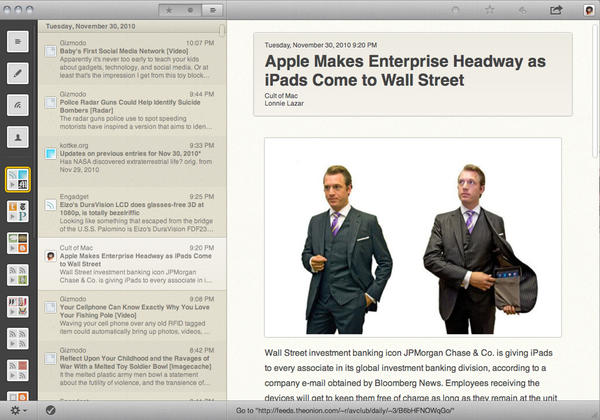
I’ve been using it for the past several hours, and I can confirm that it’s the perfect desktop companion to on the go RSS-ing — I’m never popping open Google Reader in a browser ever again. As you can see from the screenshot above, it’s very clean, evoking the look of the iPhone and iPad versions, but with an interface well-suited to the comfy confines of OS X. Specifically, there are a few simple drop-down menus for the cursor-inclined, as well as keyboard shortcuts. Lots and lots of keyboard shortcuts. It’s actually possible to refresh, browse, read, switch folders and mark everything as read without so much as touching a mouse or trackpad, if that’s your preference.

More than anything, it just feels right, a really interesting OS X aesthetic for the post-iOS era, much as Lion was described during the Back to the Mac event. The big buttons could be tapped with a finger, but they’re actually very careful to be the same scale as the Apple Menu icon or any menu bar widget. Rizzi has said he would be interested in selling Reeder through the Mac App Store, and Apple could hardly ask for a better early entrant — this is the kind of superior UI the next-generation Mac deserves: elegant, clean, optimized for trackpad and keyboard, but free of legacy thinking from when the Mac’s original interface was created.

That said, this is very much a beta (or just barely post-alpha) release, so not everything is ironed out fully. There’s no feed management, search, or downloads yet, and there are a few confusing elements. For example, if you open an article in the original web page, to return to your feed index, you either need to click an easy-to-miss X button in the upper left of the browser window, or hit shift-cmd-W. Hitting cmd-W closes the entire Reeder window, and it can’t relaunch without a restart — why allow closing the full window at all?

Also, the look is a bit too minimalist in spots, the column of icons down the left edge represents folders and individual feeds (if any) not in folders. The use of four prominent logos from within is clever, but I can only identify which folder is which on my system based on their order, which I’ve memorized. At least showing names upon mouseover or selection would be a nice gesture toward those of us without perfect memories.

But still, this is a knock-out, one of the most delightful Mac apps I’ve tried in awhile. Can’t wait until it gets a bit more seasoning.

Where to get it:
Reeder for Mac Draft 1 is a free public beta and is available from the developer’s website. No word on which versions of OS X it supports, and I tested it on Snow Leopard on a 2008 13.3’ aluminum MacBook. It was zippy It’s only available off the Internet, but maybe he’ll mail you a 3.5’ floppy if you ask nicely.

Rating: ★★★★★★★★☆☆

Via TechCrunch

DON'T MISS
Reeder for Mac Hits the Mac App Store

Apps you might like

  • Loser

    i was looking for a long time a nice reader to replace the NetNewsWire and maybe this one will do the trick (it is a very early edition though).
    I found out that if you change the size of the left column you can have all the feeds organized in the folders as you have arranged them, similarly to NNW. The only thing that bothers me is that when i open a page in safari it can’t load in the background.

  • http://twitter.com/benptooey Ben Smith

    On your last point, I discovered that increasing the width of the left feeds column introduces a wider style, including the name of each feed. I thought I was going to find that annoying too until I found that. Should be the default really, or at least a Preferences option. Still, early days, and it looks great!

  • Andrea

    Pete, it is not awesome. It’s the death of usability and productivity. At least for content producers and people who need to get connected to the news fast.
    It’s stylish and appealing to normal readers, of course, and that’s ok, but I really can’t get that excited about it.

    ;)

    • Grant

      Is this sarcasm? Reeder loads your articles very quickly, has many keyboard shortcuts to quickly navigate through your feeds, and even pre-loads web views in the background so they open nearly instantly when you want them. How could this be more usable and productive?

    • nobody

      <>

      Could you elaborate please?

      I was an early adopter of NetNewsWire but recently I got bored (in fact it was much before than “recently”) and went to Google Reader with the nice clothes of Helvetireader…

      And I appreciate really Reeder!
      I don’t get your comment…

      • AppleCentric

        I used to be a NNW user too, but got tired of not being able to share things to Facebook and othe quirks. Also, Safari 5, with extensions (AdBlock, GReader, Google Reader Styles, and ClickToFlash) and Safari Reader, make for an almost unbeatable experience. I do appreciate Reeder; I think it has a lot of possibilities, and I’ll be curious to see where it goes. I’m definitely curious to test out their iPhone app!

  • Vlad

    Is it just me? Whenever Reeder is running, Safari simply can’t open certain web pages, and google notifier goes off. It’s weird, but when I turn reeder off everything starts working again.

  • http://unclejerry.net unclejerry

    Must only be for Snow Leopard. Got the big cross out overlay on the icon when I unzipped it in regular ol’ Leopard.

    • http://armesphotography.com/ Nathan

      You’re right – I have 10.5.8 and got the crossed out icon also.

  • Maverick

    I am new to this software. Does it require an account somewhere?

    When I start is asks me to sign in?

    thanks for the help.

  • denny

    i like the app but the most that its got going for it is its looks.
    i wish the navigation from the left side icons to the stories were more fluid, unless i didnt find a way i had to click the stories panel instead of just using the right and left arrows, other things i thought it needed were:
    ———————————————————————
    -background loading (tabs)
    -arrow keys for navigation
    -names or folder names on the left side panel
    -refresh indicator, i cant tell when its refreshing or not.
    -search bar to search feed contents
    -maybe a full screen mode?
    -the scroll bar looks kind of weird
    -keep it ad free
    ———————————————————————
    and thats all i can think of for now.. i know its just a beta but its december and were allowed to make wish lists [= i would love to make this my default RSS reader.

About the author

Petemortensen

Pete Mortensen is a design strategist for consulting firm Jump Associates and the co-author of Wired to Care: How Companies Prosper When They Create Widespread Empathy, a book and blog that are significantly more interesting than you might initially think. Pete's particular Apple avocations are both around design--interface and industrial. Follow him on Twitter!

(sorry, you need Javascript to see this e-mail address)| Read more posts by .

Posted in Reviews, Top stories | Tagged: , , , |
