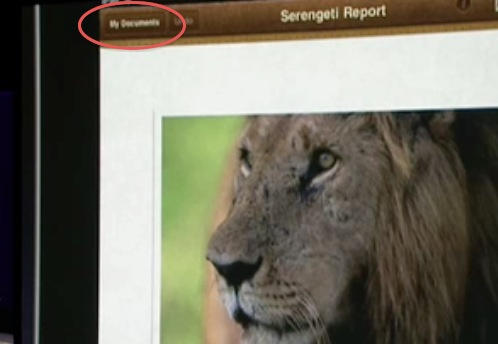
Microsoft’s My Documents Folder Makes Triumphant Return – On iPad

20100209-mydocuments.jpg

Earlier today, I was reading Infoworld’s article, The iPad questions Apple won’t answer. The first question they listed was “Can you save and transfer documents to the iPad?”, and their assumed answer was “No”; they suggested that the only way to do this would be to open a document from an email message.

I read that and I knew it wasn’t the case. I knew I’d seen something that suggested to me that the iPad has on-board storage for documents. It was something I’d seen somewhere before, and for a moment I couldn’t think where. Then I remembered.

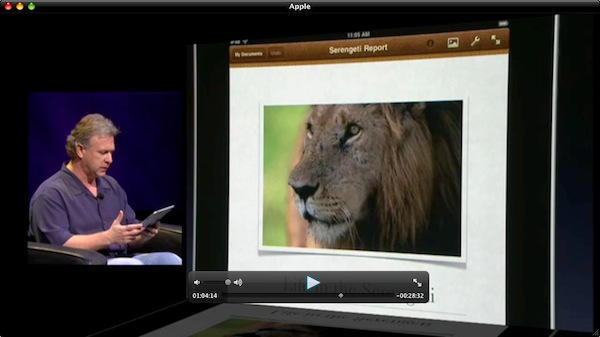
It was here:
20100209-schiller.jpg

This is at 1:04 in Apple’s official iPad announcement event.

Phil Schiller is demonstrating the new iWork for iPad. He’s just shown us Keynote, and visible in the corner of the screen was a button called “My Presentations”:

20100209-mypresentations.jpg

Then he moves on to Pages, and we see it clearly: “My Documents”. It’s like Windows 95 all over again.

It’s pretty clear that this is on-board storage for documents on the iPad. Some questions remain, though: is this just a Pages feature, or might it be a system-wide folder that other apps can use for document storage? (The fact that the same button in Keynote is called “My Presentations” suggests it will be for Pages only, but hey, a man can dream.)

DON'T MISS
How To Enable Automatic iCloud Document Syncing Between Macs [OS X Tips]

Another thought: how will we be able to reach into this My Documents library from outside the iPad itself? Will it sync to something in iTunes? Will it magically sync, Dropbox-style, to a Finder location? (We can hope, right?)

As to the name “My Documents” – well, perhaps it’s just a working title. Maybe it’ll be called something different when iWork for iPad actually ships. Maybe.

About the author

gilest

Giles Turnbull is a freelance writer in England. He writes for the Press Association and The Morning News. He has a website you can ignore and a Twitter account you needn't follow.

(sorry, you need Javascript to see this e-mail address)| Read more posts by .

Posted in iPad, News, Software, Top stories |

  • http://twitter.com/daveSE1 Dave

    The iPad is going to support a shared storage area that’s accessible to apps and will also be accessible from your computer – it will show up as a removable drive, just like the older iPods did in disk mode.

    There’s support for writing to and reading from this area in the new SDK. This will make it as easy to copy files to the iPad as it would copying to a regular USB drive.

  • Jfmartin

    This “My Documents” thing will be mounted as a drive / server on the Mac/Pc in order to get / put content on the iPad. Maybe an auto sync feature on MobileMe iDisk will be available too.

  • Brian

    Thank you Dave for giving us some facts for a change. At least someone on this blog is talking sense. You quite often find people here giving forth their opinions/facts without a shred of evidence.

  • Joy

    How stupid do you have to be to want your documents called My Documents. If you don’t know whose they are you shouldn’t be using it. I do hope they ditch this, it’s a definite Microsoft-style dumbing-down. it would be appropriate in a kindergarten.

  • pmoes

    I’m reasonably confident that you won’t be able to see Pages docs when you are in Keynote and vice versa.
    So it would be reasonable to assume that it won’t be entirely like a USB drive but initially limited to synching docs for iWork only.

  • Shane

    iDocuments anyone? :D

  • http://www.spanskawilma.se/david David

    @Joy: I have thought about that too, for quite some time… Well, probably since the days of Win95…

    Giles:
    Great post, and a nice catch of you!

  • Gazoobee

    Great article, but the one linked to from Infoworld is biased, poorly written, click-bait. The author doesn’t seem to know what he’s talking about most of the time.

    Keep up the good work Giles, all of your articles are worth the read so far and that’s saying something on tech blogs like this.

  • http://gilest.org Giles Turnbull

    @David, @Gazoobee: thank you :)

  • http://twitter tHoj101

    Here’s a kick to the nuts. What if they just have a storage syetm for typed documents on the iPad. A storage system for files made directly on the device. Or maybe they just named a folder “My Documents.” You can potentially create an itunes playlist called “My Documents” …but that doesn’t mean you can throw any actual documents in it. Stick that in ur iPad and touch it.

  • http://www.axon.co.nz John

    But they aren’t My Documents, the IP belongs to the company I work for, all the copyright and ownership is theirs, not mine. 8)
    The biggest flaw I see in iPad is the inability to have different users. I dont want to give my iPad to my son and have him stuff the documents folder with my work on it, or my game progress, or my mail etc.

  • Emerson

    the answer is clear, iWork.com

  • http://www.theusesofliteracy.com duncan

    drop box is amazing…

  • DGF

    If I’m not mistaken, there has been a “Documents” folder in the Mac OS, starting with maybe 7.5, so the Windows reference is kind of a stretch (unless those two letters are a lot more significant than I think).

    And, Joy? Would it make the user any less stupid if they labeled that button “/home/joy?”

    Just curious.

    DGF

  • http://www.spanskawilma.se/david/blogg David

    Oh, by the way – what’s up with that extra button on the lock screen? I think it looks like there’s a small square-shaped button to the right of the slide-to-unlock-thingie. It can be seen in the video just when Jobs is sitting down for the first time and demos the iPad…Is it just me, or have they added something to the very locked-down locking screen?
    ::David

  • Michael

    @David: “what’s up with that extra button on the lock screen?”

    It’s to activate the slide show in the Photos app, which turns the iPad into a digital picture frame.

  • http://www.spanskawilma.se/david/blogg David

    @Michael – Oh, nice, thanks for the info!

  • James Bogard

    OK, obviously this will direct the user to their iDisk on their mobile me account.

    It’s all about the CLOUD.

  • alex dub

    As James Bogard says “It’s all about the cloud.” Think cloud services and anything they can do to link up Mobile Me & Itunes with all of the network devices…

    IMHO…Look for Idisk to house the following folders to be synced to your perifials. Documents subfolders by Iwork types, Movies, Music, Pictures

