Apple Working On a Mysterious, Ultra-Thin 15-inch MacBook [Rumor]

Apple Working On a Mysterious, Ultra-Thin 15-inch MacBook [Rumor]

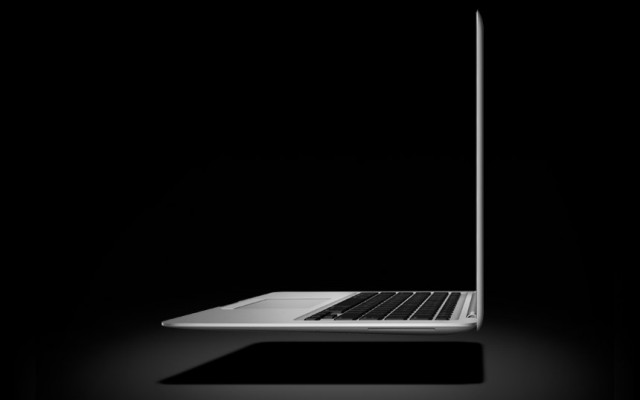
Hot on the heels of the new MacBook Air, Apple looks to already be working on a mysterious, “ultra-thin” 15-inch Macbook to add to the mix.

Not much is known about what this upcoming notebook from Apple will be like, but the MacBook Pro line hasn’t seen a refresh since February. Could it be an Air-style MBP?

MacRumors received word of a new notebook reaching the final testing stages at Apple:

“Apple is working on a 15’ ultra-thin Mac notebook, MacRumors has learned. We aren’t certain if it will be called a MacBook Air or MacBook Pro, but we do know that it is already in late testing stages at Apple. “

Apple’s new 11-inch and 13-inch MacBook Air models have become the company’s entry-level notebooks, starting at $999. The white Macbook was phased out with the updated Air’s introduction, so Apple has consolidated its notebook line to just the Air and Pro.

As it is wont to do, Apple will eventually start unifying the Air and Pro notebooks. The most obvious feature lacking in the MacBook Pro at this point is the lack of a pre-installed SSD. Apple could also ditch the Pro’s optical drive as it did with the new Mac Mini, making room for a secondary SSD drive or even more battery.

MacRumors doesn’t have an expected release date on this upcoming MacBook, but it could hit the shelves before the holidays. Apple has been known to traditionally hold a Mac-centric event around October, so there’s a chance this ultra-thin notebook could be unveiled then.

Thoughts?

DON'T MISS
Apple’s 15-Inch MacBook Air Set To Begin Shipping In March [Rumor]

Apps you might like

  • http://www.facebook.com/buzzy.ed Eddie Yu

    Look forward to see the end of optical drive…So all the Macbook can be ULTRATHIN

  • http://www.facebook.com/buzzy.ed Eddie Yu

    Look forward to see the end of optical drive…So all the Macbook can be ULTRATHIN

  • http://www.facebook.com/buzzy.ed Eddie Yu

    Look forward to see the end of optical drive…So all the Macbook can be ULTRATHIN

  • Anonymous

    I resisted the idea of removing optical drives from Apple products at first, but after nearly a year with my Macbook Air I can say that I don’t miss it. And with four Macs in the house, two desktop and two mobile, I get that I only need one optical drive (preferably connected via Thunderbolt and/or USB). Then when I need to use the drive I just plug into whichever computer needs it. Actually a pretty smart idea since I don’t have to pay for redundant devices when one will do.

  • Anonymous

    I resisted the idea of removing optical drives from Apple products at first, but after nearly a year with my Macbook Air I can say that I don’t miss it. And with four Macs in the house, two desktop and two mobile, I get that I only need one optical drive (preferably connected via Thunderbolt and/or USB). Then when I need to use the drive I just plug into whichever computer needs it. Actually a pretty smart idea since I don’t have to pay for redundant devices when one will do.

  • Anonymous

    I resisted the idea of removing optical drives from Apple products at first, but after nearly a year with my Macbook Air I can say that I don’t miss it. And with four Macs in the house, two desktop and two mobile, I get that I only need one optical drive (preferably connected via Thunderbolt and/or USB). Then when I need to use the drive I just plug into whichever computer needs it. Actually a pretty smart idea since I don’t have to pay for redundant devices when one will do.

  • Anonymous

    I resisted the idea of removing optical drives from Apple products at first, but after nearly a year with my Macbook Air I can say that I don’t miss it. And with four Macs in the house, two desktop and two mobile, I get that I only need one optical drive (preferably connected via Thunderbolt and/or USB). Then when I need to use the drive I just plug into whichever computer needs it. Actually a pretty smart idea since I don’t have to pay for redundant devices when one will do.

  • Anonymous

    I resisted the idea of removing optical drives from Apple products at first, but after nearly a year with my Macbook Air I can say that I don’t miss it. And with four Macs in the house, two desktop and two mobile, I get that I only need one optical drive (preferably connected via Thunderbolt and/or USB). Then when I need to use the drive I just plug into whichever computer needs it. Actually a pretty smart idea since I don’t have to pay for redundant devices when one will do.

  • Anonymous

    I resisted the idea of removing optical drives from Apple products at first, but after nearly a year with my Macbook Air I can say that I don’t miss it. And with four Macs in the house, two desktop and two mobile, I get that I only need one optical drive (preferably connected via Thunderbolt and/or USB). Then when I need to use the drive I just plug into whichever computer needs it. Actually a pretty smart idea since I don’t have to pay for redundant devices when one will do.

  • Anonymous

    I resisted the idea of removing optical drives from Apple products at first, but after nearly a year with my Macbook Air I can say that I don’t miss it. And with four Macs in the house, two desktop and two mobile, I get that I only need one optical drive (preferably connected via Thunderbolt and/or USB). Then when I need to use the drive I just plug into whichever computer needs it. Actually a pretty smart idea since I don’t have to pay for redundant devices when one will do.

  • Anonymous

    I resisted the idea of removing optical drives from Apple products at first, but after nearly a year with my Macbook Air I can say that I don’t miss it. And with four Macs in the house, two desktop and two mobile, I get that I only need one optical drive (preferably connected via Thunderbolt and/or USB). Then when I need to use the drive I just plug into whichever computer needs it. Actually a pretty smart idea since I don’t have to pay for redundant devices when one will do.

  • Anonymous

    I resisted the idea of removing optical drives from Apple products at first, but after nearly a year with my Macbook Air I can say that I don’t miss it. And with four Macs in the house, two desktop and two mobile, I get that I only need one optical drive (preferably connected via Thunderbolt and/or USB). Then when I need to use the drive I just plug into whichever computer needs it. Actually a pretty smart idea since I don’t have to pay for redundant devices when one will do.

  • Anonymous

    I resisted the idea of removing optical drives from Apple products at first, but after nearly a year with my Macbook Air I can say that I don’t miss it. And with four Macs in the house, two desktop and two mobile, I get that I only need one optical drive (preferably connected via Thunderbolt and/or USB). Then when I need to use the drive I just plug into whichever computer needs it. Actually a pretty smart idea since I don’t have to pay for redundant devices when one will do.

  • Anonymous

    I resisted the idea of removing optical drives from Apple products at first, but after nearly a year with my Macbook Air I can say that I don’t miss it. And with four Macs in the house, two desktop and two mobile, I get that I only need one optical drive (preferably connected via Thunderbolt and/or USB). Then when I need to use the drive I just plug into whichever computer needs it. Actually a pretty smart idea since I don’t have to pay for redundant devices when one will do.

  • Anonymous

    I resisted the idea of removing optical drives from Apple products at first, but after nearly a year with my Macbook Air I can say that I don’t miss it. And with four Macs in the house, two desktop and two mobile, I get that I only need one optical drive (preferably connected via Thunderbolt and/or USB). Then when I need to use the drive I just plug into whichever computer needs it. Actually a pretty smart idea since I don’t have to pay for redundant devices when one will do.

  • Anonymous

    I resisted the idea of removing optical drives from Apple products at first, but after nearly a year with my Macbook Air I can say that I don’t miss it. And with four Macs in the house, two desktop and two mobile, I get that I only need one optical drive (preferably connected via Thunderbolt and/or USB). Then when I need to use the drive I just plug into whichever computer needs it. Actually a pretty smart idea since I don’t have to pay for redundant devices when one will do.

  • Anonymous

    I resisted the idea of removing optical drives from Apple products at first, but after nearly a year with my Macbook Air I can say that I don’t miss it. And with four Macs in the house, two desktop and two mobile, I get that I only need one optical drive (preferably connected via Thunderbolt and/or USB). Then when I need to use the drive I just plug into whichever computer needs it. Actually a pretty smart idea since I don’t have to pay for redundant devices when one will do.

  • Anonymous

    I resisted the idea of removing optical drives from Apple products at first, but after nearly a year with my Macbook Air I can say that I don’t miss it. And with four Macs in the house, two desktop and two mobile, I get that I only need one optical drive (preferably connected via Thunderbolt and/or USB). Then when I need to use the drive I just plug into whichever computer needs it. Actually a pretty smart idea since I don’t have to pay for redundant devices when one will do.

  • Anonymous

    I resisted the idea of removing optical drives from Apple products at first, but after nearly a year with my Macbook Air I can say that I don’t miss it. And with four Macs in the house, two desktop and two mobile, I get that I only need one optical drive (preferably connected via Thunderbolt and/or USB). Then when I need to use the drive I just plug into whichever computer needs it. Actually a pretty smart idea since I don’t have to pay for redundant devices when one will do.

  • Anonymous

    I resisted the idea of removing optical drives from Apple products at first, but after nearly a year with my Macbook Air I can say that I don’t miss it. And with four Macs in the house, two desktop and two mobile, I get that I only need one optical drive (preferably connected via Thunderbolt and/or USB). Then when I need to use the drive I just plug into whichever computer needs it. Actually a pretty smart idea since I don’t have to pay for redundant devices when one will do.

  • Anonymous

    This seems far fetched.

  • Anonymous

    This seems far fetched.

  • Anonymous

    This seems far fetched.

  • Anonymous

    This seems far fetched.

  • Anonymous

    The page is turning, folks.

    Optical Drive’s days are numbered, my guess is that it’s going off the MacBook Pro next, then the iMac — probably on the next update cycle.  Eventually, it’ll drop off the Mac Pro, first it won’t be installed in standard models, but a BTO option. Then they’ll gone altogether and so will the bays. Even though audio and video pros still have need and use for DVDs and CDs, they are fading from general use.  But Optical drives will be cheap external add-on’s like floppy drives are now.

    But don’t get too worried about the Mac Pro–or too impatient, either. Apple’s update cycles for the MP are typically getting on a YEAR AND A HALF. The next one certainly won’t come before Intel releases the Sandy Bridge-E Xeon CPUs, not likely before 1Q2012, according to Intel-watchers. But Apple has surprised us in the past. If the Optical-free laptops and mini’s are successful, they’ll be that much more emboldened to EOL optical drives altogether.

    They certainly seem to be getting out of the “puttting discs in boxes” biz.

About the author

Alex HeathAlex Heath is a news contributor at Cult of Mac. He also covers jailbreak news and reviews. He previously served as an editor for iDownloadBlog. You can find out more about him on his personal site and also follow him on Twitter.

(sorry, you need Javascript to see this e-mail address)| Read more posts by .

Posted in News, Top stories | Tagged: , , , |

