Cult Favorite: BumpTop Re-Imagines Your Mac Desktop in 3D

bumptop.png

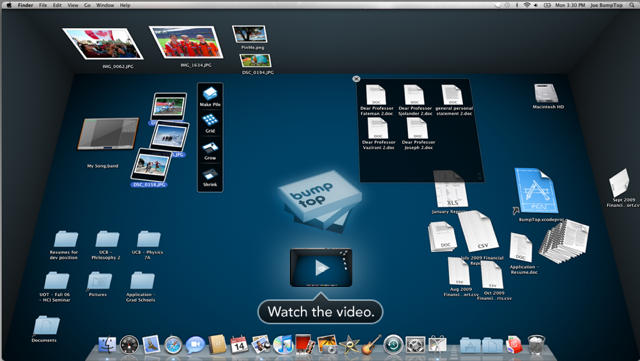
What it is: BumpTop for Mac is OS X software that gives you a whole new way of looking at and using your desktop, one that brings your computer screen into the realm of 3D imaging and instantly grows your monitor’s real estate – no matter how large or small – into a more productive palette than anything you’ve seen before.

Why it’s cool: BumpTop represents a total re-thinking of the 20 year-old design artifact that is the standard desktop UI.

Now you can view your computer screen as a real desk, or more accurately perhaps, as the floor of a four walled room – and use all the space to put your stuff in piles, tack important things on the walls and slap sticky notes on everything – just like in real life.

Desktop minimalists are hereby free to skip the rest of this post.

The driving force behind BumpTop’s innovation is the concept of Piles, with which Mac users will be familiar vis a vis Stacks – though BumpTop’s Piles are so much more.

Piles in BumpTop are agile. They work just like the piles of stuff on your desk or floor – you can throw stuff into them and use BumpTop’s Grid view or your mouse’s scroll wheel to leaf through them with ease.

BumpTop for Mac is also fully integrated with the gesture features of modern MacBook trackpads – you can pinch/zoom to shrink & grow your Piles, use three finger swipes to create and break Piles and swipe to leaf through Piles in a way that’s totally intuitive and familiar to anyone who’s ever seen a cover flow display.

BumpTop for Windows has been around for a while, but the product launching today is no blind port from the DarkSide.

Development of BumpTop for Mac was driven by interest from Mac users and implemented by a team of developers culled from award-winning shops that produced iPhone apps such as Pano for iPhone and Little Metal Ball. The underlying architecture is fast and robust and the Mac version has Mac-only features including total integration with Exposé, Spaces and Spotlight.

A prominent investor in BumpTop is Andy Hertzfeld, one of the many core Mac people for whom BumpTop resonates as a great innovation. “I was very impressed,” said Hertzfeld. “BumpTop leverages intuition and experience with the real world to [create an] experience that is simple, fun and practical.”

DON'T MISS
Video: Amazing, Futuristic MultiTouch Interface… On Windows

Where to get it: BumpTop for Mac is available beginning today in Free and Pro versions from the BumpTop website.

The Free version supports limited sticky notes, doesn’t support the Flip, Find as You Type, or MultiTouch features of the Pro version and has lower support priority, but otherwise features all of the 3D GUI, Piles and Clean Up functionality of the Pro version.

BumpTop Pro for Mac is $29 – but if you follow Cult of Mac on Twitter and/or become a Fan of Cult of Mac on Facebook, next Monday we will be giving away access codes for the Pro version to up to 100 lucky readers.

Download your free copy of BumpTop for Mac today and check Twitter and Facebook Monday 1/25 for your chance to go Pro on us.

About the author

Lonnie Lazar

Lonnie Lazar is a writer-musician-web designer-attorney. He writes about Apple for Cult of Mac and Mac|Life, and about VoIP and telecommunications for Voxilla. Follow Lonnie on Twitter @LonnieLazar, join the Cult of Mac on Facebook, and find Lonnie's photos on Flickr.

(sorry, you need Javascript to see this e-mail address)| Read more posts by .

Posted in Desktop Pictures, First impressions, Macintosh, News, Software |

  • CaryMG

    This link — http://bumptop.com/mac/ — doesn’t work.

  • ekdor

    Hi. I would like to know what is “Available” when you get a password dialogue when you click on http://bumptop.com/mac/

    Contradiction in full: “Where to get it: BumpTop for Mac is available beginning today in Free and Pro versions from the BumpTop website.”

    Cheers,.

  • Roger

    Unfortunately,the link to the Mac version requires a password. Maybe they removed the free mac version?

  • http://www.flickr.com/tiagohammett Tiago

    I just found out in the AppleBlog (http://theappleblog.com/2009/10/05/bumptop-for-mac-is-now-in-alpha/) that is a private alpha!

    Now I need one copy :P

  • Seong-Hoon Lee

    Ummm, can anyone plz send me a copy?
    I will be really appreciated.
    or any megaupload files are ok.

  • Seong-Hoon Lee

    I became a fan and i really hope I can get one!!!!!
    PLZ! I AM DYING FOR THIS!
    I have been waiting 2 years, since the release of the Demo.

  • http://mactips.blogbus.com Googlor

    I’d like to have a try. Looks great. but still not available.

  • Seong-Hoon Lee

    Ok, Mr.Lazar,
    I have been confirmed to be the beta tester for this.
    I am waiting for the Pro code!

  • moses malone

    i am also waiting for a code . will start testing right away!

  • Rory Parker

    I’m a fan.
    Hit me up. :)

  • Sayam Aggarwal

    It will be released at 8 am EST from what I know. Till then, all will get the password pop-up. BTW, it’s no more alpha, it’s a full 1.0 version I think.

  • ungenio

    I’ve tested this, and it’s somewhat buggy (couldn’t create a linked documents folder). Besides, multitouch support seems to be available only to the more recent macbooks pro :(

  • Phil

    I stopped at the word Piles :)

  • moses malone

    site is open

  • http://yagankiely.com/blog/ Yagan Kiely

    I wonder where they got that idea from?

    http://news.cnet.com/8301-13579_3-10121240-37.html

  • http://cultofmac.com Lonnie Lazar

    Sorry all for the miscalculated post-time. All links should be live now. Don’t forget to check Twitter and Facebook next Monday for a chance to get BumpTop Pro for Mac free!

  • Gazoobee

    This “article” reads like an advertisement and is so chock full of hyperbole that it just isn’t believable.

    3D desktops, however useful they may or may not be have been done many times before, to phrase it as “… a total re-thinking of the 20 year-old design artifact that is the standard desktop UI” is just horse poop.

    Try actually *reviewing* the product and you might get some agreement and some interest from me. All this lathering at the mouth while providing no analysis is just a waste of time.

  • chano

    Thanks Mr Lazar. I downloaded it and, while it is not perfect, it is a good re-imagining of the way future UIs might be.
    The Finder is showing its age a little and 3D would add layers of functionality and ease of use which has always been Apple’s mantra on computing et al.

  • ged

    for those of us who think the dock makes most mac-sense on the right, this thing does not work at all?

  • schpenk1

    cool idea, someone already did something similar an presented it on TED…
    but…this one looks u g l y :(

  • Scott

    The thing I don’t get is the physics simulation. How does scattering your icons around in any way help you be more productive? The beauty of the physicality metaphors of modern GUIs is that you can use the pieces of reality that will help the users intuit how things work, but you also get to IGNORE the parts of reality that don’t help. Can you imagine if your paintbrush app had to re-dip in paint after each brushstroke, or if you could break the lead on your virtual pencil and have to re-sharpen it?

  • lemon

    downloaded, and trying

  • lhmickey

    i want to Pro Sn?thankyou!

  • Levin

    It’s very amazing!

  • bACK

    This “article” reads like an advertisement and is so chock full of hyperbole that it just isn’t believable.

    3D desktops, however useful they may or may not be have been done many times before, to phrase it as “… a total re-thinking of the 20 year-old design artifact that is the standard desktop UI” is just horse poop.

    Try actually *reviewing* the product and you might get some agreement and some interest from me. All this lathering at the mouth while providing no analysis is just a waste of time.

  • Halo

    The integration of trackpad gesture features is pretty impressive. Worth trying!

  • Halo

    Can we get the Pro version here? thx

