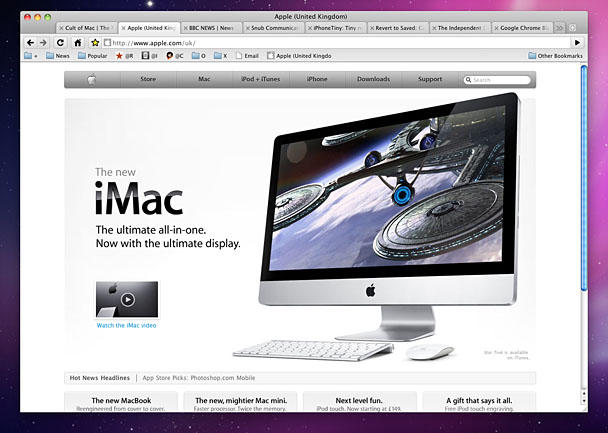
How Google Could Make Chrome for Mac OS X More Mac-Like

Chrome could be more Mac-like when it comes to the browser's tabs and toolbar.

Chrome could be more Mac-like when it comes to the browser's tabs and toolbar.

Google Chrome for Mac arrived yesterday in beta form. The browser is lacking important features, including bookmarks and cookie management, and the useful app mode available in the Windows version. Also, benchmarks show it’s marginally slower than Safari. But in use I’ve found it good enough to set as my default, and Chrome’s superior to Apple’s browser in important ways: it launches more quickly, and is far less taxing on my Mac regarding RAM and processor usage, even with many tabs open.

However, one thing I’m finding irritating is Chrome’s tabs. Google’s efforts elsewhere in making Chrome a Mac-like experience should be applauded—the browser supports Keychain and the Mac OS X dictionary, and there are subtle animations peppered about—but the main toolbar and tabs area is problematic. I spent a short while making a mock-up (see the full-size version on my Flickr page), which offers ideas for a more Mac-like Chrome interface.
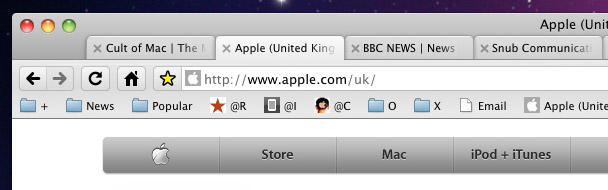
A larger toolbar hit area and close buttons moved to the left.

A larger toolbar hit area and close buttons moved to the left.

Although Chrome is designed to be efficient regarding space on your screen, this comes at the expense of usability. Mac users are used to grabbing a title bar to move apps around, but Chrome’s tabs are situated high up, cutting the toolbar in half. It’s too easy to start a drag on a tab by mistake (Chrome, like Safari, frees the tab from its parent window rather than moving the entire window), and so you need to be more precise and slow down your actions. By reinstating the standard Mac app toolbar, this problem goes away, and you also have somewhere for the name of the site in the current tab, rather than you only seeing the first 20 or so characters. Again, this is a usability benefit. The only ‘disadvantage’ is losing about 11 pixels in height for the main viewing area, which is no hardship.

The other change made here is moving the tab close button to the left. This is the standard Mac way, and something Firefox and Opera also ignore. If Chrome wants to be truly Mac-like, though, it should follow Apple’s lead here. The only disadvantage is you lose the favicons from the tabs, although the current site’s favicon could be placed within the address bar. Chrome’s angled tabs make the close button’s position a little problematic, so my mock-up also straightens tab edges, which also happens to be a more Mac-like design.
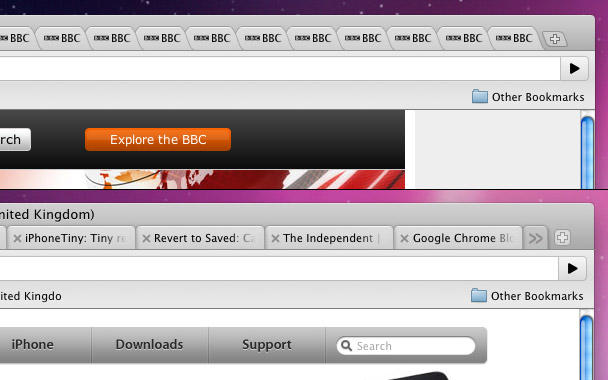
Top: with many tabs open, Chrome becomes less usable; bottom: on borrowing a trick from Safari and Firefox, 'extra' tabs would be available via a widget.

Top: with many tabs open, Chrome becomes less usable; bottom: on borrowing a trick from Safari and Firefox, 'extra' tabs would be available via a widget.

Another problem I have with Chrome is that if many tabs are open, the browser is less usable, because tab widths become tiny. This makes tabs harder to click and activate, but it also means you cannot easily figure out what web page is within any given tab, because the title is truncated after only a few characters. Opera behaves in a similar manner, but I’d like—at least as an option—Chrome to behave more like Safari and Firefox, reducing tab widths to a set minimum and then making further tabs accessible via a widget.

DON'T MISS
Opera 11 Beta Brings Native Click To Flash, Incredible New Tab Stacking Features

These design changes might seem fussy, but the best Mac apps are consistent and have great attention to detail. In its beta form, Google’s first crack at a Mac browser is already most of the way there, but those aspects of the design noted in this post betray Chrome’s cross-platform and non-Mac routes—and not in a good way.

About the author

Craig Grannell

Craig Grannell is Cult of Mac's designer and an occasional contributor. He also runs iPhoneTiny.com, a Twitter-driven reviews site for iPhone apps and games. Follow Craig on Twitter @CraigGrannell and visit his website, Snub Communications.

(sorry, you need Javascript to see this e-mail address)| Read more posts by .

Posted in Music, News, Software, Top stories |

  • http://toomuchgreen.eu RichBos

    Personally I’m bemused at the level of giddiness surrounding Chrome, the OS will be interesting for sure but this is just a browser.

    Firefox is more than adequate.

  • Ryan

    This is like when a client takes visuals you’ve done and scribbles all over it with their crayons before sending it back as an improvement ;P

  • Ryan

    @RichBos

    The OS is pretty much just a browser.

  • Tiago

    What about RSS reader? Major failure, cannot even give it a proper try without an rss reader!

  • http://www.snubcommunications.com Craig Grannell

    @RichBos: For me, Firefox has some major drawbacks. On every Mac I’ve run it on, the thing slows down massively over time, regardless of cache dumps, and it’s also clearly a port. If it integrated more with Mac OS X, it’d be a better browser.

    @Tiago: I’m not too fussed about the lack of an RSS reader, given that I use Mail for that task anyway. Plus this is still a beta, and Google’s been quite upfront about the fact it’s missing a bunch of stuff. For general browsing, I’m finding it really good, though—well, apart from the tabs and toolbar!

  • David

    Never-mind the fact that I disagree with some of your points (I love the fact that chrome tries to maximize screen real estate, And I like being able to have more tabs open, who wants an extra click??).
    I think you missed a major point here Craig. There is a very large amount of value in having a unified look and feel for Chrome across browsers. For those of us who are using multiple OS’es regularly, I don’t want the look and feel of Chrome to be changing all the time. You mentioned at the end of your post, the look and feel come from Googles cross platform roots, which, in my opinion, is great.

  • Django
  • Joseph

    Tried Chrome for a few minutes. It seems all right. But I’m just too hooked on the minimalism of Safari. Drives me nuts to have to see a folder icon beside each folder name in the bookmarks bar. I made the names myself, so the names alone tell me all I need to know. Why does every browser other than Safari insist on cluttering up the bar with a bunch of folder icons, one beside each name, that provide zero information to the user? I don’t get it.

  • Scott

    I found CAMINO about a month ago and liked that browser so much I removed Firefox and Safari from my Mac dock. The main reason for giving up on Firefox and Safari was that Camino felt mush faster than both.

    When Chrome for Mac BETA was released this week, I DLed and installed it. I like Chrome just a little bit better than Camino, both are sitting on my dock now, though Chrome is set as my default browser.

    I agree that the lack of a bookmark manager is a problem, but I’ve found a work around for that already – I edited my bookmark bar in Safari, deleted all bookmarks from Chrome, then used Chrome>Import Bookmarks and Settings, and reimported the bookmarks from Safari. Very clunky, but at least my bookmark bar now looks like I want it to in Chrome.

    The tabs don’t really bother me, and I kind of like the favicon on the tab versus in the address toolbar.

    Not every application on a Mac needs to look like Apple designed it.

  • Darcy McGee

    So basically you’re saying the way to make it more Mac like it to make it look exactly like Safari. While they’re at it they should use the same rendering engine as Safari uses (Webkit.)

    Ah…wait….THEY ALREADY DO.

    I don’t get the Chrome love. On Windows I get the Chrome love because it’s a better alternative than the default browser over there. Chrome is basically Safari by Google, but with a less robust bookmark interface and no RSS feeds.

    So why al the Chrome love? Google is evil anyway.

  • MJ

    The RSS reader is provided by the “Next” shortcut button that you get from Google Reader, and then you just click to see your next article.

  • http://www.snubcommunications.com Craig Grannell

    @Darcy: I’m hardly saying “make it look like Safari”, merely that it would be better if the browser fully respected Mac conventions.

    As for why the Chrome love, I noted my reasoning in the article, in that it’s mostly down to resources. Chrome is far less hungry than Safari, and so far on Snow Leopard crashes a whole lot less, too.

  • http://blog.iloveflycasual.com FlyCasual

    Joseph and Darcy, my thoughts exactly.

    Chrome is overhyped to say the least. Firefox is a UI nightmare (I’m a designer, so I obsess over graphical details). Safari is my choice, hands down.

  • MySchizoBuddy

    chrome uses a different JS engine than safari. it really isn’t safari from Google.
    Safari uses nitro and Chrome uses V8 for javascript.
    chrome has some extensions and is continuing to make more extensions on parity with firefox extensions. Safari doesn’t have support for extensions.

  • MySchizoBuddy

    chrome has the design and speed of safari and extensibility of Firefox.

  • DG

    I actually don’t mind the Chrome interface as it is. Seems like it has to have some sort of uniqueness to stand out. I’m particularly fond of the loading animation on the tabs and the status bar that only shows when there is information to display.

    Hey, I’d be curious to see your bookmarks. Your organization is unique, at least. Feel like sharing what sites you visit most often? In particular, what are the two bookmarks to the left of the Cult of Mac bookmark?

  • http://www.snubcommunications.com Craig Grannell

    @DG: I did a ‘year zero’ with browser bookmarks when I switched Macs, so I don’t have that many now. I mostly just bookmark something I’m interested in revisiting straight into the main bookmarks list. Of the stuff in the toolbar, the leftmost + folder is for forums I visit. The @ links are admin for blogs I’m involved with – Revert to Saved, iPhoneTiny and Cult of Mac. O is for live websites I’ve designed, and X is for local ones.

  • http://www.snubcommunications.com Craig Grannell

    @David: “There is a very large amount of value in having a unified look and feel for Chrome across browsers.”

    I disagree. Functionality should be generally matched across versions, but I don’t believe there’s any fundamental benefit in keeping things the same x-platform rather than fine-tuning for the host. Adobe CS is a prime example of this – in an attempt to be relatively platform-agnostic, CS4 is a UI disaster. It would be far more beneficial for the Win and Mac versions to have feature-parity, but interfaces fit for each host (and leveraging core technologies, which is something Chrome at least does do).

  • http://www.toxicspark.com Andrew Macdonald

    @Joseph

    I completely agree with you sir. I love Safari for its minimalism, its perfect for what i need, so i wont be changing any time soon.

  • Paolo

    Apart from the performance point of view, i can think only at Firefox as the best mac-like interface, even better integrated than Safari and, to me, the big “back” button is a nice improvement over the standards.

  • David

    @CG: My point is that you have opinions on what the look and feel should be, and clearly you like safari’s look and feel. However, the things you mentioned are just matters of preference, and if you like chromes interface, you are going to want it to be the same on all OS’es, it can definitely be confusing to have it switch. And in any case, what is the benefit to having a different look and feel for each OS? Now I agree that the different versions should take advantage of core technologies, but as you stated, chrome does this. The rest is preference, in which case, it makes sense to keep it standard.

  • http://www.snubcommunications.com Craig Grannell

    @David: I see what you’re saying, but in an argument about consistency across platforms and consistency within the platform, I still believe the latter should win out. Some of my mock-up (notably the vertical tabs) was clearly down to aesthetic preferences, and I admit that. However, the toolbar returning to standard and moving the close buttons were not—these are fundamentals of well-behaved Mac apps.

  • http://unofficialmac.com Alpay

    While I agree with your points on the UI, I really didn’t like your draft :) I am using Chrome since the release as my only browser and had “zero” problems. The biggest gripe about the browsers I use on Snow Leopard is the Gears-HTML5 Dilemma which I have written some on my blog. I would expect Google would solve it with the Chrome Beta. We will wait and see though.

  • John Brownlee

    Craig, sure, that’s more Mac-like: but Google wants the Chrome browser to at least help people want to make the jump to the Chrome Operating System coming in 2010. In that sense, it doesn’t make a lot of sense for them to re-arrange integral aspects of the interface that are meant to be standard between both the browser and the operating system.

    Much prefer your method of having Chrome handle tabs… but I find even Safari’s method inferior to Firefox with Tab Mix Plus installed, which allows you to have multiple rows of tabs. If you’re a blogger and have thirty tabs or so open at a time, having more than half hidden in a drop-down is irritating to the extreme.

  • http://www.snubcommunications.com Craig Grannell

    @John: I agree entirely regarding what Google’s aims regarding Chrome are. It’s clear the browser is only a tiny part of the equation, and that it’s designed to get people interested in Chrome OS. Like I said, though, I find it a shame that the browser almost falls at that last hurdle, and the toolbar thing in particular dramatically reduces usability for no real benefit on the Mac (11px of screen height, unless I’m mistaken).

    I’ll have to take a look at Tab Mix Plus, although I’m increasingly anti-Firefox these days, because it’s lack of Mac integration does my head in.

  • http://www.metrokids.ca Conrad

    @Craig: I like all of your suggestions. But I would like to suggest the the FavIcon for the site you are on would still appear, and when you mouseover it, it would become the close tab button. I have an extension for Safari (YES! Safari has extensions!) that lets me do that. I like Chrome, but in the same way I like Linux. It’s a fine OS and I would sure use it before IE/Windows, but on Mac my favourite browser is Safari. Between core system integration, handling of live bookmarks, UI, and multi-clutch gestures (in 32-bit mode) nothing else compares.

    Chrome stands tall as my preferred browser on Windows, though, with Firefox on Linux.

  • Eric M.

    I think you’re right on point regarding the tabs. And now that I’ve become to the integration of Services into many of my most used apps, I find their abscence in Chrome really annoying. When I highlight a word and right-click, I expect to see “Look Up in Dictionary”, “Speech > Start Speaking”, etc.

  • John Brownlee

    Craig, Tab Mix Plus isn’t going to change your mind about Firefox, because no matter what the extenstion, Firefox is the very antithesis of the Mac design experience. Personally, that doesn’t bother me — although Firefox’s terrible performance after it’s been open for a while.

    @Conrad — Hey! What’s that Safari extension you’ve got? Safari’s inability to handle favicons (and thus give me a quick visual queue as to which tab I want) is a deal killer.

  • Darcy McGee

    I’ve yet to see Safari crash in Snow Leopard.

    I don’t, mind you, download pornography.

  • FeralFreq

    I keep trying to read about FF and now Chrome and why I’d want to switch from Safari. These other browsers feel like knowing everyone at a party except for the person cleaning up on the crudites near the wall. Umm, who are you here with? And who have you let into my house?
    Meh.

  • http://www.metrokids.ca Conrad

    @John: This main plugin I use is called Glims – http://www.machangout.com – which has an absolute barrage of customization options. (I also use Multi-Clutch, Xmarks, and AdBlock). Check that out. But if your a die hard FF fan, it won’t convert you.

  • David

    @Craig: You might find this interesting, a pretty good analysis of why tab behaviour is better in chrome (not just aethetically).

  • David

    @Craig: You might find this interesting, a pretty good analysis of why tab behaviour is better in chrome (not just aethetically).
    Oops, forgot the link before!:
    http://www.theinvisibl.com/news/2009/12/08/a-piece-with-a-lot-of-screenshots-about-the-close-tab-behaviour-in-google-chrome/

  • http://www.snubcommunications.com Craig Grannell

    @David: I read that, but I don’t entirely agree with the theory. One might easily argue that it’s “better” to be able to resize windows from all edges, but that’s thrown a bunch of people I know when it works in, say, CS4, and not in other Mac apps. Since a lot of what he says hinges on quickfire UI interaction, my point about the skinny toolbar grab area rather destroys that thinking. At best, you might argue it’s (sometimes) quicker to close Chrome tabs, but it takes longer to move a window.

    Furthermore, his argument about the interface is that “an application should exhibit the least-funky behaviour”. Frankly, when tabs become only a few pixels wide, not enabling users to see their titles – and when said application has no other means of accessing said titles – I’d call that “funky behaviour”.

    The real reason Chrome has its tab close buttons on the right is nothing to do with usability – it’s because it’s the Windows way. It’s what the majority of users cross-platform expect. With Chrome being an OS as well as a browser, it’s doing what Apple did with Safari for Windows – putting out what it thinks is right and hang the consequences. What will be interesting is to see whether Google decides to follow Apple’s example with Safari and – at least optionally – provide some kind of interface that’s more in keeping with the host, rather than attempting to use a browser to encourage someone to make an OS switch.

  • Bill

    @Craig: Okay – cross platform? Apple’s take a lot of hits for not integrating into the windows environment.

    Here’s one for Google. Tabs on the bottom, please. Like all the others. Apple even tried that “top tab” thing. Didn’t work out in the long term.

    And can we not have an afterthought as a browser? Plugin support that works? You’ve had 5 months to get the other features in. Maybe not just take the “dev only” badge off your old compile and call it new?

  • http://www.snubcommunications.com Craig Grannell

    @Bill: To be fair to Google, its ‘top tabs’ aren’t nearly as bad as Apple’s were. The original version of Safari replaced the title bar with tabs; Chrome merely puts them above the address bar—something Opera also does.

  • tdskate

    You look like Seth MacFarlane.

  • http://www.snubcommunications.com Craig Grannell

    If only I had his wallet also.

  • http://gearx.com/blog/staff/user/zeke/ Zeke

    Craig, I agree with you that chrome becomes unusable when many tabs are open. They are way too small. However, I don’t really like a dropdown on the right like safari and FF have either. What I really liked was tabs on top in Safari 4 beta. If memory serves, the active tab was always full size, and the inactive tabs shrunk as need be. I feel like you could always see the favicon for identification though. I think if you got too many tabs open then they would eventually go into a dropdown, but you could open many more before that happened. I think it would be even better if the tabs got smaller as they got closer to the edge of the window. Then when they get to minimum size some tabs get pushed out of view, but scroll buttons appear on the side of the tab row. In other words I’d like the tab row to behave somewhat like cover-flow.

    I also really liked safari 4 beta because the active tab was the title bar. They made sure it was always the biggest target so you could easily click and drag to move the whole window. Accidentally breaking a tab off into a new window was not a problem because you had to command-click to do that. If they had stayed with the beta interface I might use safari a lot more today.

  • Anonymous

    How does it suppor the mac dictionary feature? Control + Command + D does not work.

