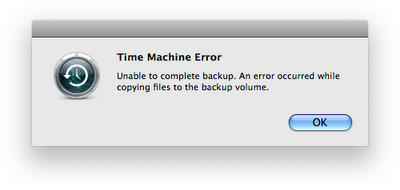
A bug in the OS X 10.5.3 update creates trust issues with the reliability of some Time Machine backups, writes Baltimore Sun reporter David Zeiler. Hourly system backups to some Mac Pro machines are inconsistently met with the vague error message
which leaves the option of staring at the screen or clicking the OK button and pretending the failed backup doesn’t matter.
MacRumors has had a discussion thread going on this topic since the end of May, and the support forums on the Apple website show a question on this topic that remains unanswered after 69 replies.
A simple fix may help in some cases, according to blogger David Alison. Run the Console application in your Utilities folder, and select All Messages on the left. Then start searching using the box in the upper right. All Time Machine activity is logged under the process name of “backupd”, so searching for that will pull up all the relevant logs. If you’ve got an open backup that’s listed as “In Progress,” even though Time Machine is not running, try deleting that to see if it allows your backups to continue.

Lonnie Lazar is a writer-musician-web designer-attorney. He writes about Apple for Cult of Mac and Mac|Life, and about VoIP and telecommunications for Voxilla. Follow Lonnie on Twitter @LonnieLazar, join the Cult of Mac on Facebook, and find Lonnie’s photos on Flickr.

