Opinion: Arranging Your iPhone Apps Is A Waste Of Time

20091016-iphone.jpg

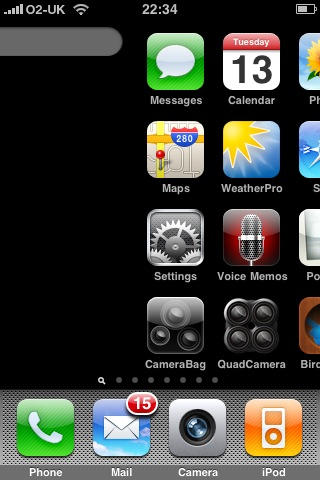
When iTunes 9 came out, a lot of people (myself included) were delighted to see a new feature that allowed you to re-arrange the apps on your iPhone’s screens using your desktop computer.

Hooray, we cheered. No more tedious dragging of little wriggling icons from one screen to another. Now we can put our apps where we want them to be, and never have to worry about them again.

Wrong.

It turns out that using this feature in iTunes 9 is a complete waste of time, thanks to the way the iPhone OS works. Here’s why.

No matter how much re-arranging of apps you do, you’re still going to have to deal with a single rule that governs the way new apps are installed: when you install a new app, it will be placed in the first available empty slot on the first screen with any empty slots.

So if screens 1 and 2 are full, and there’s a slot on screen 3, the next new app will go there.

OK, fine: you move each new app to the screen where you want it to live. An example: you download a new game. If you’ve got all your games on screen 2, you put it there – except, oh wait, that screen’s full. So you’re going to have to put it somewhere else. Perhaps it could stay on screen 3, where you’ve got your photography apps. Or you could shift it to screen 5, where there’s a space at the end of your geo/location apps. Or you could create a new screen of games – but that requires a trip back to your Mac, plug into iTunes, do the re-arranging dance. Maybe it’s worth doing; maybe not.

I spent time carefully arranging my apps into genre-specific screens like this, and found within days that installing new apps ruined the effect. What I realized was, once you’ve started arranging your apps, you’re tied into constantly maintaining that arrangement.

DON'T MISS
A Quick Look At The iPhone App Manager In iTunes 9

I felt like I was farming my apps almost as much as I was using them; and frankly, life’s too short.

So, arrangement be damned. I’m embracing the Apple Way and simply letting apps go where they will. What I can’t find by flicking my fingers I shall find using the built-in Spotlight search.

That said, I’m lucky. I’m not in the position where I have more apps than my phone has space to display, unlike m’colleague Craig Grannell. The number and variety of iPhone expose mock-ups and suggestions that are doing the rounds these days suggests that this part of iPhone OS still needs work; I have a feeling that Apple is well aware of this, and is working on it.

About the author

gilest

Giles Turnbull is a freelance writer in England. He writes for the Press Association and The Morning News. He has a website you can ignore and a Twitter account you needn't follow.

(sorry, you need Javascript to see this e-mail address)| Read more posts by .

Posted in iPhone, Opinions |

  • http://post.marcof.net Marco

    You’re making things too complicated here.
    so what if a new app is put in a different screen than where you want it? Is it too hard to keep it there until you get home and rearrange it with iTunes? Or are you loading dozens of apps each day?

    Personally i don’t see the problem here.

    FWIW I found it was easier to divide the screens into usage instead of tasks

  • Nobita

    You get caught up man. It’s not a problem for me to rearrange icons.

  • Brad

    Complain, complain, complain.

  • Bobby

    Personally, to fix the issue of always needing to rearrange screens and apps…I keep my apps split into 2 categories: those that require an internet connection and those that don’t. Within these categories, I have my apps arranged alphabetically. Therefore, when I download a new app and it automatically goes to the wrong location, I just drag it to the correct alphabetic position based on its category. If it needs to go on a page that is full, it won’t matter because the last app will just get pushed to the next page of that category and still be in alphabetic order. Just my two cents worth.

  • TG

    Come on! I rearranged my apps before 9 and now with 9 it is even easier… and I do download new apps regularly but that doesn’t mean i can’t arrange them as i want in a matter of seconds…
    Sigh… When there is nothing to complain about, you guys just make stuff up?

    I’ve put mine in usage order, and one for games, never even crossed my mind that this was too hard… sigh again…

  • Jim

    While organizing is a pain, there is an ap called AppButler that helps. It allows you to put a marker or title in front of a group of apps – Biz, Photo, Games, etc. – so that at least you can easily see how to group them. Also, it lets you put in page numbers. To get it, you need to go the their WWW site, not to the iTunes store, from your iPhone : http://www.fonicon.com/

  • Christine

    I respectfully disagree. Organization is not always easy, that is why many people are not organized. I agree that sometimes organizing is time consuming. If you add up all the time spent searching for an app, does it out weigh the time it takes to organize your apps when you aquire a new one? What about the frustration of having to search for an app? Does this not count in your life is short mantra?

  • got2trythis

    I am not sure what you are expecting? Your screen is full. Are you expecting the new app to be squeezed in? You know that you can drag multiple apps by holding the option button when you select (mac). You can also drag screens to arrange screen order and insert empty screens between full screens. No, the iphone is not going to read your mind and make all these arrangements for you automatically. I really do not know that point of this article other than complaining for something that seems is the lack of your knowledge!!

  • My2cents

    My pet peeve is the re-installation of apps that are deleted on both the iPhone and in iTunes. But sometimes when you download a new app, all these old ones reappear…

  • Kate

    Rearranging it on the computer is awesome. I hate leaving pages with empty spots, so new apps always go to the end. It’s the perfect solution to have it all spread out for me on iTunes.

  • omni

    Are you being serious right now? I love how iTunes manages my apps. The only problem I see here, would be the stories you decide to report on Mr. Giles.

  • lgp

    I simply leave a couple of open spots on each screen except the first. Whenever I grab a new app, it goes to the first open slot, and I can then put it whereever I want with minimum disruption.

    The added open slots simply make it easier to re-arrange things on the fly.

  • Frank

    I love it. The expose feature would be nice as well. But I’m sure people would complain about that too.

  • fred

    The “finder” in the iPhone sux.

    Why not do what Palm had done for years:

    Allow you to see both LARGE and small icon views, sort by LIST, and show (if desired) only CATEGORIES in list mode such as games, utilities, mediaplayers etc.

    THAT was a smart phone!

  • Michael H.

    I’m not sure Giles is correct. I have 4 pages on my phone, with a couple of spots free on the main page since nothing else was important enough to go there. I installed two new apps, and they wound up being placed on the second screen.

    Now, I have _zero_ idea how it decided to put them there, but it’s not the behavior you describe.

    I suspect, as a Mac blogger, you are also not the target audience. Do most people really buy apps that frequently?

  • Joey

    OPINION: This write up was a big waste of time =)

  • http://www.snubcommunications.com Craig Grannell

    Regarding behaviour, new installs go in the first free space the device finds. If there are no free spaces, the app goes into the void. There’s also a huge bug where if you have 11 full pages and bump an Apple app into the void, it’ll reappear after a restart on a new page 2, and you’ll have 12 pages until the next sync.

    @Michael—I think app purchase frequency depends on user type, but the people who buy a lot of apps are gamers. Several people I know now have 11 home screens full of games, and they’re getting increasingly pissed off that they cannot list them like they can in Windows or Mac OS, or even on an R4 on the DS, and it irks that if you delete an app (or have a back-up go wrong) you lose all your progress. If Schiller really believes iPod gaming is the future, Apple really needs to address these things pretty damn quickly, before PSP Go and other platforms fight back.

  • Sayam Aggarwal

    Actually, I completely agree with this write-up, not just because it’s by a colleague but this is how I do things!

    Seriously, I mean arranging becomes a big pain if you have like more than 3 screens full of apps. Arranging on iPhone itself is definitely frustrating!

    iTunes 9′s arrangement option did seem nice to me in the beginning but now I would say that it works as if in alpha stage! Moving an app to a page that’s full causes the last app to create a damn new page instead of taking it to the first spot on next page! This means if you need to arrange apps alphabetically (including the new apps you download), you will need freakin time! Sucks, isn’t it? HINT: I used to arrange alphabetically as well but know, it’s a pain..

    Nowadays, what I simply do is everytime I restore, apps are synced alphabetically and after that, any app I download goes to the empty spot, I no more arrange these. I mean it’s literally a waste of time, even for an organization psycho like me!

    Hope you guys understand what I meant to say.. I am not opposing anyone who likes to arrange but it’s just that the whole idea is flawed for the particular device.

  • Loren

    i sudgest having a “new apps” page. then when you dowload a new app you drop it there (probably the last page) and when you get around to having it plugged into your mac, then you can organize to your hearts content, as opposed to doing it with every single new app.

  • robinson

    Agreed 100%! The entire app arrangement biz on the i-devices needs redoing! It’s a pain sliding things around– and if you’re not careful, you end bumping things to others pages, etc. An irritating mess! :-)

    They should borrow the Zlauncher (and others) approach from the old Palm devices– a tabbed interface. Users can name the tabs what they’d like and have multiple categories readily accessible from the home page. Plus, there’s be a “New apps” category where downloaded apps go (the old “Untitled” tab on the Palm). You tap that tab and could drag the apps to any other category tab you’d like.

  • Michael

    I don’t have any problems keeping my applications arranged. And when I add a new application, I just drag it to the appropriate screen.

    Screen 1: contains all the applications I use frequently.
    Screen 2: Reference applications
    Screen 3: Games
    Screen 4: Shopping oriented applications
    Screen 5: Misc Utilities and other apps

  • http://elitemobilegames.com EliteMobileGames

    There is Expose for the iPhone now.
    You can try it out for free with the online demo they posted:
    http://bit.ly/exposeiphonedemo

  • http://www.redrobe.com/mike Mike Redrobe

    #1 reason to jailbreak…. FOLDERS

  • Anon

    Opinion: ALL of Giles write-ups are a waste of time. It’s sad that I automatically knew the crappy writer when I read the headline.

  • Grawlix

    Dear Cult of Mac,

    Please advise how I can subscribe to your feeds, but exclude Giles Turnbull’s pieces, which are ignorant, uninformative and boring.

    Thanks,
    gr@wl!x

  • Grawlix

    Actually, it turns out this piece was useful after all. It prompted me to review all recent Cult of Mac articles in my feed, which led me to realise ALL CoM posts are ignorant, uninformative and boring.

    File, Unsubscribe.

    Bye,
    gr@wl!x

  • http://www.you.com me

    another garbage article.

    is leander the only person that writes half ass decent articles?

    the rest are full ass shit articles.

  • iGenius

    “So, arrangement be damned. I’m embracing the Apple Way”

    I’m a new Apple Customer. The iPhone 3GS was the first Apple device I’ve bought since my very first computer: a //c in the early 1980′s.

    I was under the impression (until my iPhone purchase) that Apple was the undisputed master of the UI. How wrong I was!

    Springboard is missing VERY basic stuff, and to add insult to injury, Apple will not allow third parties to make better app launchers available! WTF?! Can’t change the icon? Can’t relable the apps? Can’t arrange them on the page the way you want? Can’t put them into folders? WTF?!

    I’ve used several third party app launchers on my PalmOS devices over the years, each of which makes Sprinboard look, well, extremely deficient. Heck, the shovelware app launcher that came standard on PalmOS devices was MUCH better than springboard, and that was 15 years ago.

    The poorly designed Springboard app is disappointing. The inability to load a competent app launcher is infuriating.

    And doing things “the Apple way” is to accept mediocrity for no good reason.

  • iGenius

    “hey should borrow the Zlauncher (and others) approach from the old Palm devices– a tabbed interface. Users can name the tabs what they’d like and have multiple categories readily accessible from the home page. Plus, there’s be a “New apps” category where downloaded apps go (the old “Untitled” tab on the Palm). You tap that tab and could drag the apps to any other category tab you’d like.”

    I’ve used Zlauncher. And many others. They each worked well, with some more handy for certain tasks than others..

    So why can’t I get a better app launcher at the AppStore? Because Apple is afraid that its typical iPone customer would get “confused”? Or what?

    I object to the locked-down, dumbed-down world of Apple software. They make great hardware, but their policies cripple it to the point of my currently searching for alternatives.

  • Veovis

    Actually, they skip the first page, then choose the first page with any blank spots.

    In Cydia, there is an app called Infiniboard. It allows for vertical springboard scrolling. You can either scroll like in Safari, or page up and down just like you do for left and right. I choose the latter.

    What this allows you to do is have one page per category. So my first page is full of productivity apps, my second page is home to App Store, Cydia, and then all the apps I’m still trying out. If I like an app, I move it to the right place. My third page is for entertainment, my fourth is thinking games, and my fifth is action games. In fact, I do the same with my iPad.

    So I can keep things arranged alphabetically in each category, and not have to worry about where things are. The only thing I wish I could change is to move the second page to the last page, but I haven’t found a way yet. Mostly because I don’t care enough. :P

    Yeah, this post is old, and my solution involves a JB, but hey, why wouldn’t you?

