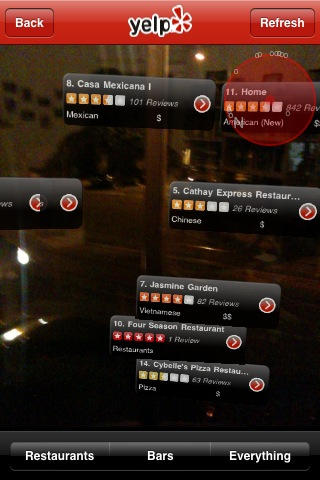
Renowned blogger, FriendFeeder, and all-around social web socialite Robert Scoble has pointed out something really interesting about the latest updated to the new revision of the Yelp iPhone app (iTunes link): it has a secret augmented reality mode dubbed “Monocle.” It is, of course, for iPhone 3GS only.
To activate, simply shake your iPhone a bunch (I’ve heard three times, but it took me like 10) until a blue box lets you know Monocle has been activated. Then just tap the Monocle button, which sticks around for good, and the app uses your camera, GPS location, and compass to put up signs and reviews for nearby restaurants and bars.
I just tried it out in my living room (that’s the view from my window circa 9 p.m.), and it’s seriously amazing. That list is pretty much exactly the full complement of cheap eats south from my window.
I don’t know how useful Monocle is (using the standard map mode is probably faster and definitely less battery draining), but it is a great way to feel like you live in the future.
Nicely done, Yelp.

Pete Mortensen is a design strategist for consulting firm Jump Associates and the co-author of Wired to Care: How Companies Prosper When They Create Widespread Empathy, a book and blog that are significantly more interesting than you might initially think. Pete’s particular Apple avocations are both around design–interface and industrial. Follow him on Twitter!

