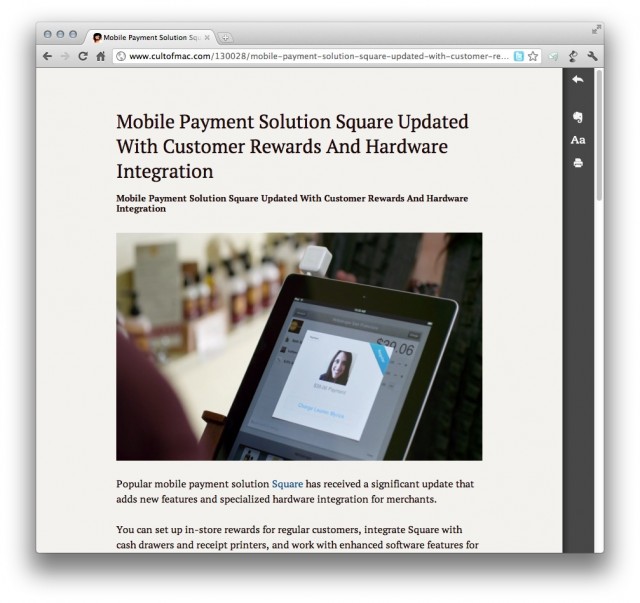
Evernote has announced “Clearly,” a new browser extension that mimics other enhanced reading services, like Instapaper and Readability. Clearly is available for Google Chrome now, with support coming for other browser in the near future.
While Evernote already lets you save webpages, take notes, archive memories and more, Clearly has one simple, clear (pardon the pun) focus: distraction-free reading.
From the Evernote blog:
I like getting comfortable when I read. I grab a cup of tea, sink into my favorite chair, put my feet up, and then crack open the book. Getting cozy and tuning out distractions helps me focus. Unfortunately, online reading doesn’t let you do that. Before you even finish the first paragraph, you’re clicking on links. Five minutes later, you’re buying a new tent and wondering how you ever got there.
There’s a better way. Introducing our new browser extension, Evernote Clearly. Available now for Google Chrome (other browsers are coming soon).
Clicking on the Clearly extension while surfing the web will take any open article and bring it into a minimal layout with customizable fonts and colors.
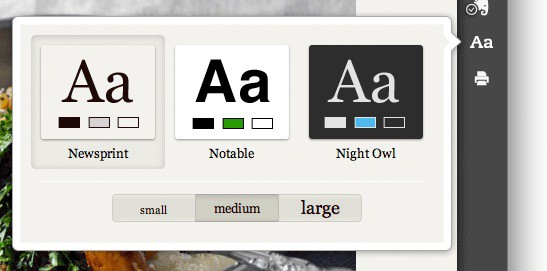
Clearly will even take multi-page articles and present them in one, long, beautiful page for your reading pleasure. Articles can be sent to your Evernote account or sent to your Mac’s printer.
httpvhd://www.youtube.com/watch?v=hgVPobaTyr0
The idea of Clearly isn’t new if you currently use a service like Instapaper, Readability, or Read It Later. But for Evernote addicts, Clearly is the perfect addition to your Mac’s browser.
Evernote Clearly can be downloaded for free in the Google Chrome Web Store.

Alex Heath is a journalist who works for Tech Insider. He’s the former co-host of The CultCast. He has been quoted by the likes of the BBC, KRON 4 News, and books like “ICONIC: A Photographic Tribute to Apple Innovation.” He lives in Lexington, Kentucky. If you want to pitch a story, share a tip, or just get in touch, additional contact information is available on his personal site. Follow him on Twitter.

