
Split Your iPad Keyboard In iOS 5 And Give Your Thumbs A Workout [iOS Tips]

Split Your iPad Keyboard In iOS 5 And Give Your Thumbs A Workout [iOS Tips]Split Your iPad Keyboard In iOS 5 And Give Your Thumbs A Workout [iOS Tips]

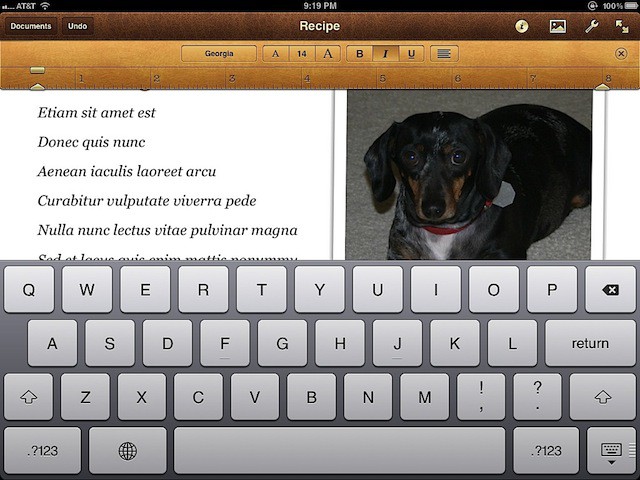
When Apple introduced the iPhone in 2007, people either loved or hated the virtual keyboard. I still have mixed feelings about it, but I definitely prefer the one on the iPad over the one on the iPhone. It accommodates my big hands and fingers by being a lot more responsive, and with buttons so big I’m less likely to make mistakes.

Although the iPad keyboard is good enough for most people, users with smaller hands or people who like to use their thumbs for data entry will be happy to know the iPad virtual keyboard in iOS 5 can be split into two pieces that can easily be accessed using your thumbs.

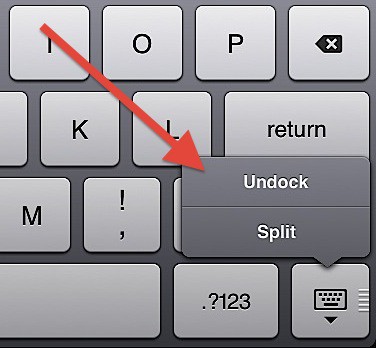
If you press and hold the keyboard icon on the iPad’s virtual keyboard, you’ll be presented with a menu like this:
Split Your iPad Keyboard In iOS 5 And Give Your Thumbs A Workout [iOS Tips]

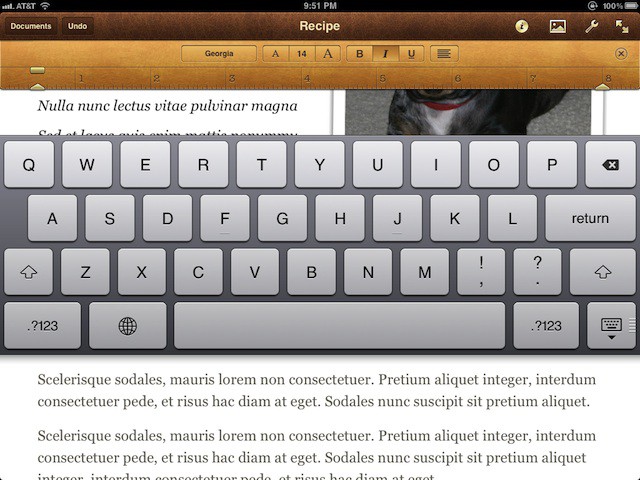
If you select Undock, the keyboard is moved to a place in the middle of the iPad screen. That looks like this:
Split Your iPad Keyboard In iOS 5 And Give Your Thumbs A Workout [iOS Tips]

If you select Split, it will look like a keyboard you can use with your thumbs while holding the iPad.

Split Your iPad Keyboard In iOS 5 And Give Your Thumbs A Workout [iOS Tips]

There you go! Now you have a couple of keyboard options to use with your iPad.

Apps you might like

About the author

David W. MartinDavid W. Martin has more than 20 years of experience in the industry as a programmer, systems and business analyst, author, and consultant. David has written for CNET's iPhoneatlas.com, MacLife.com, CultofMac.com, BYTE.com and recently for aNewDoman.net. He comes to Cult of Mac's website with deep knowledge and passion for the all things Apple. Follow David on Twitter @david_w_martin or see what he's up to now at davidwmartin.com.

(sorry, you need Javascript to see this e-mail address)| Read more posts by .

Posted in iOS, Tips & Tricks | Tagged: , , , , , |


scribol
